> For the complete documentation index, see [llms.txt](https://docs.talsec.app/appsec-articles/llms.txt). Markdown versions of documentation pages are available by appending `.md` to page URLs; this page is available as [Markdown](https://docs.talsec.app/appsec-articles/articles/android-malware-detection-sdk-for-your-app-detect-risky-and-suspicious-apps-and-known-malware.md).
# Android Malware Detection SDK for Your App: Detect Risky & Suspicious Apps and Known Malware
Talsec Malware Detection SDK scans Android devices for RATs, keyloggers & SMS forwarders without QUERY\_ALL\_PACKAGES. Play Store compliant, offline-capable.
If you're building a banking, fintech, or e-gov Android app, you likely need to scan the user's device for malware - and you're probably required to do so under regulations like [DORA](https://www.talsec.app/resources/dora-compliance), [OWASP MASVS or CSA Safe App Standard](https://www.talsec.app/compliance-with-regulations-in-the-mobile-app-security-domain-for-fi-and-fintechs), or [NIS 2 / GDPR for HealthTech](https://www.talsec.app/industries/talsec-healthtech).
Historically scanning device apps meant using the `QUERY_ALL_PACKAGES` permission, which Google heavily restricts since Android 11 - apps using it for general security scanning are routinely rejected from the Play Store. Talsec's Malware Detection SDK solves this. It uses a targeted approach that stays fully compliant with Google Play policies.
## How the Detection Works
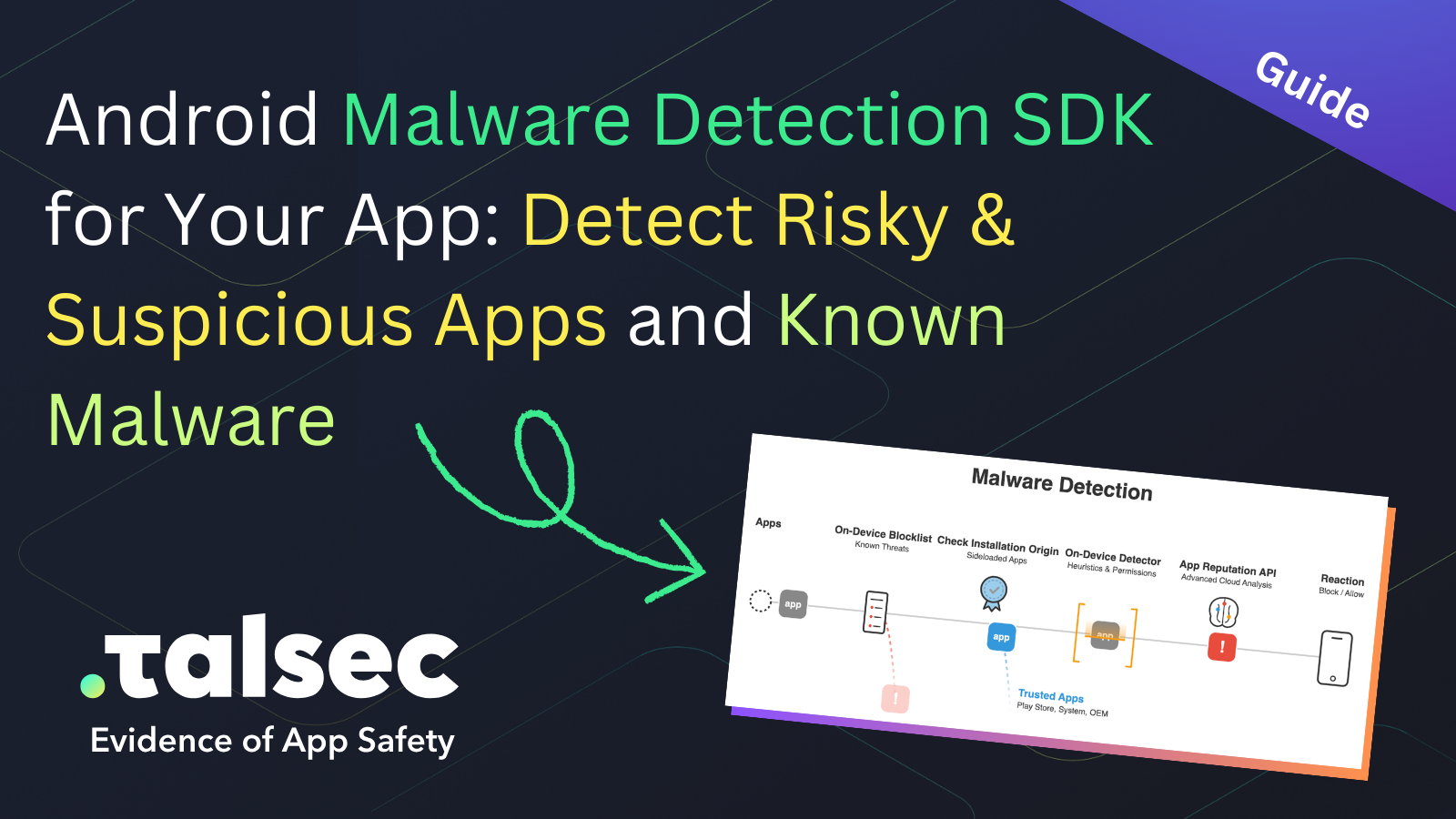
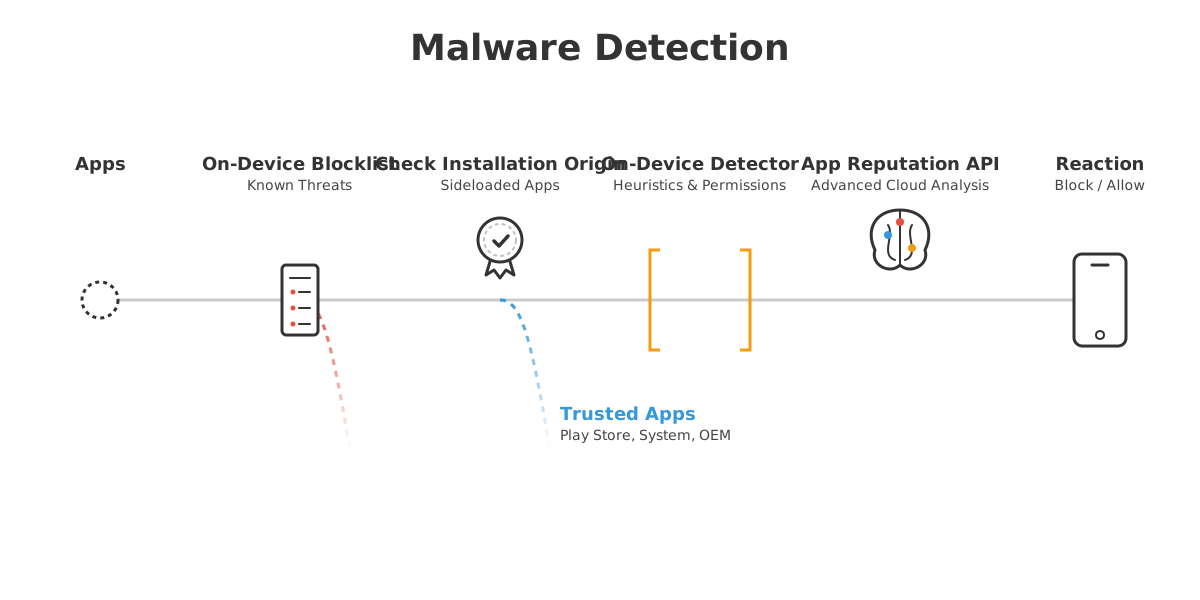
The malware detection diagram below shows the multi-layered detection pipeline of the Talsec Malware Detection SDK that every app on the device goes through. The App Reputation API is the only online step; all other stages run entirely on-device. This means the detection can operate in a fully offline mode when that better suits the use-case or compliance requirements. Because there is no one-size-fits-all solution, Talsec Malware Detection is designed to be configurable so every team gets the best fit for their needs.
{% stepper %}
{% step %}
### On-Device Blocklist
The system first checks a customizable local list of known-bad hashes and package names. Any match is flagged immediately without further processing.
{% endstep %}
{% step %}
### Installation Origin Check
Next, the system checks where the app was installed from. Apps from trusted sources (Google Play Store, Samsung Galaxy Store, Huawei AppGallery, etc.) receive a trusted badge and skip the deep inspection stages. Apps sideloaded from a browser or unknown source continue down the pipeline.
{% endstep %}
{% step %}
### On-Device Detector
Sideloaded apps are scanned locally on the device. The detector analyzes the app's requested permission combinations, looking for high-risk patterns (e.g., an app requesting `READ_SMS` + `BIND_ACCESSIBILITY_SERVICE` + `BIND_DEVICE_ADMIN`).
{% endstep %}
{% step %}
### App Reputation API
For a final verdict, the local findings can optionally be sent to a cloud-based App Reputation API. The API cross-references the app against a global threat intelligence database by **Gen**, the parent company of **Norton** and **Avast**. If the app turns out to be benign (false alarm), it is cleared. If confirmed as a threat (RAT, SMS stealer, overlay trojan), the system triggers a block.
{% hint style="info" %}
#### Online Malware Database by Gen (Norton, Avira)
By teaming up with [Gen](https://www.gendigital.com/), the parent company of Norton and Avast, we bring you an unparalleled malware database. It continuously evolves, drawing top-tier threat intelligence from a massive network of 500 million global users.
{% endhint %}
{% endstep %}
{% endstepper %}
*Note: The defaults called "High Security Configuration" work for most scenarios. Need something tailored? Our experts can suggest the configuration to fit your requirements.*
{% hint style="info" %}
**Did you know?** Established stores like Google Play, Samsung Galaxy Store, and Huawei AppGallery all scan apps for known malware before making them available for download - so apps from these sources arrive pre-vetted.
{% endhint %}
Attackers rarely try to exploit the Android OS directly anymore. Instead, they build specialized malicious apps designed to interfere with *your* app. These threats are often custom-built and rapidly modified, so universal malware databases struggle to keep up. Talsec's Malware Detection focuses on catching apps specifically engineered for fraud and abuse. The detection signals are built around a set of high-risk permissions that legitimate apps almost never request in combination:
* **`READ_SMS`, `RECEIVE_SMS`, `RECEIVE_WAP_PUSH`:** The core fingerprint of SMS Forwarders and OTP Stealers - trojans that intercept incoming messages to bypass two-factor authentication.
* **`BIND_ACCESSIBILITY_SERVICE`:** Abused by Overlay Trojans to draw fake login screens over banking apps, and by Keyloggers & Surveillance Spyware to capture keystrokes silently.
* **`BIND_DEVICE_ADMIN`:** Requested by malware that needs persistent device control - used to prevent uninstallation or enforce remote lockout.
* **`REQUEST_INSTALL_PACKAGES`:** The hallmark of dropper apps that download and silently install additional malicious payloads after the initial infection.
* **`QUERY_ALL_PACKAGES`:** Used by spyware to enumerate all installed apps and map the device before targeting specific banking or authentication apps.
Other threat types such as Call-Intercepting Trojans, Clipper Malware, and app Copycats are also detectable by the detection engine.
*Want to see these attacks in action? Check out our* [*Malware Detection conference presentation on YouTube*](https://youtu.be/ibexWkRIfLg)*:*
{% embed url="" %}
## Detection by Requested or Granted Permissions
Talsec evaluates permissions at two levels - **requested** (declared in the app's manifest) and **granted** (actively approved by the user) - with the detection scope configurable to match your threat model. Flagging toxic combinations like `BIND_ACCESSIBILITY_SERVICE` + `READ_SMS` + `BIND_DEVICE_ADMIN` at the manifest level means Talsec can catch brand-new, zero-day malware that signature-based antivirus databases have never seen.
## Active System Settings as an Attack Vector
Scanning app manifests is only half the picture. The other half is checking what is actually *active* at the OS level. An app that has been granted elevated system privileges by the user - even a legitimate-looking one - is immediately more dangerous than one that merely declares permissions in its manifest. Talsec monitors both.
Android deliberately gives users more control than iOS. The problem is that malware actively social-engineers users into enabling high-risk settings they don't fully understand. The following Settings areas are the primary targets:
* **Accessibility Services** (`Settings > Accessibility > Installed Services`): Any non-system app with an active accessibility service can read all on-screen UI content, simulate taps, and capture keystrokes - without any further permission dialog at runtime. Users are routinely tricked into enabling these for fake "performance optimizers" or "battery savers."
* **Keyboard (IME) apps with Accessibility enabled**: A third-party keyboard that also holds an active accessibility service is a textbook keylogger setup. The keyboard sees every character typed; the accessibility service gives it the ability to observe and interact with the surrounding UI.
* **Default SMS handler**: The app registered as the default SMS application has OS-level read and send access to all messages without per-message permission prompts. A malicious app that becomes the default SMS handler can silently forward OTPs as they arrive.
* **Default phone/dialer app**: The app registered to handle outgoing calls can intercept, record, and manipulate call flows without triggering visible permission requests at call time.
* **Device Administrator apps** (`Settings > Security > Device Admin Apps`): Apps holding device admin rights can lock the screen, enforce password policies, and resist uninstallation. This is the persistence mechanism behind screen-locking ransomware - the user cannot simply uninstall the app without first revoking its admin rights.
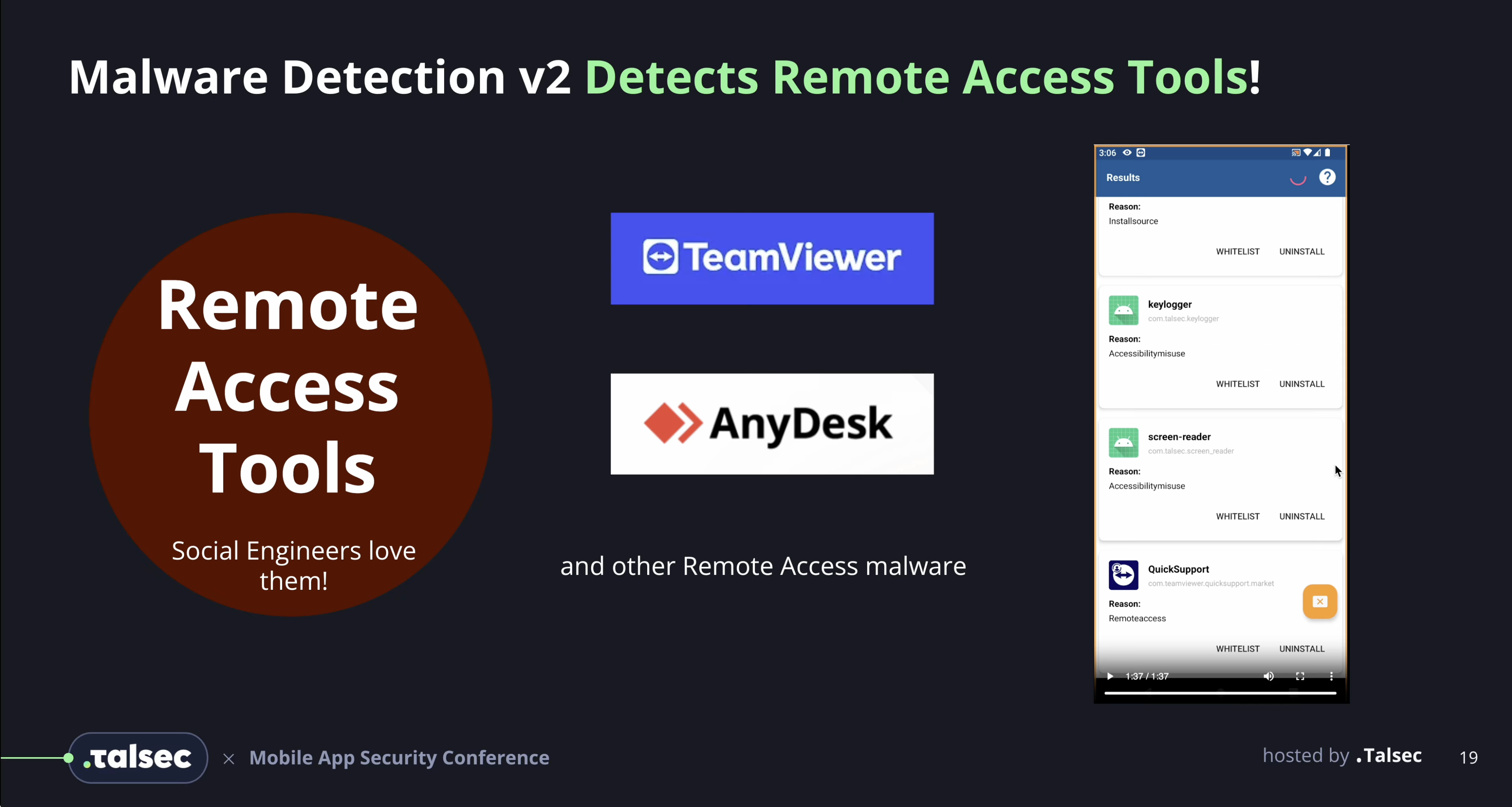
* **Remote access / screen sharing apps**: Apps capable of capturing and streaming the device screen (Remote Access Tools, or RATs) can be present on a device without obvious malicious permissions declared in their manifest. Detecting them requires behavioral analysis that goes beyond manifest inspection.
## **Check out Demos**
* **Keyloggers Detection Demo:**
* **Remote Access Tools Detection Demo:**
* **SMS Forwarders Detection Demo:**
* **Screen Readers Detection Demo:**
## Filtering by Installation Source
Scanning every app on a device generates noise - and the most significant source of that noise isn't random apps, it's system and OEM pre-installed apps. Consider what comes pre-installed on a typical Android device: screen recorders, diagnostic tools, manufacturer accessibility services, OEM camera or gallery apps. These apps legitimately hold many of the exact high-risk permissions we're scanning for (`RECORD_AUDIO`, `BIND_ACCESSIBILITY_SERVICE`, `READ_SMS` on carrier builds, etc.). Scanning them would produce a flood of hits that are technically correct detections but are expected and safe on that device - not actionable false positives, but noise that slows down the scanner and overwhelms any response logic.
The solution is to skip apps that were installed by the OS or a trusted OEM store. Talsec allows you to configure a whitelist of trusted installation sources. You can set the SDK to ignore apps installed from verified stores (like `com.android.vending` for Google Play, `com.sec.android.app.samsungapps` for Samsung, Huawei AppGallery, etc.) and to exclude system-flagged apps entirely.
With those filtered out, the scanner focuses exclusively on user-installed and sideloaded apps - the realistic attack surface - where dangerous permission combinations are genuinely suspicious.
## Performance and Privacy
Security tools are only useful if they don't degrade the user experience. Talsec was built with developer ergonomics and runtime performance as priorities:
* **100% Offline Processing (Optional):** In its default configuration, all hash checks, package name blocklists, and permission evaluation happen *directly on the device*. No app inventory data leaves the phone.
* **Asynchronous Scanning:** Scans run in the background asynchronously and never block the main thread or freeze the UI.
* **Cross-Platform Support:** Talsec supports native Android, Flutter, React Native, Kotlin Multiplatform, Cordova, and Capacitor.
## Configuration Modes
Different applications have different risk profiles. Talsec lets you combine on-device offline scanning with an optional, online **App Reputation API** to balance security and user friction.
{% stepper %}
{% step %}
### Offline Scanning
A purely on-device, privacy-preserving layer that uses customizable hash/package blocklists and permission-based risk scoring to catch zero-days locally.
{% endstep %}
{% step %}
### High-Confidence Mode
Relies solely on Talsec's live App Reputation API. It only flags recognized malware. Near 0% false positives - allows teams to automatically block critical actions when malware is detected without risking false blocks on legitimate users.
{% endstep %}
{% step %}
### High-Security Mode
Combines the live database with zero-day permission checks. If an app is unknown to the database *but* was sideloaded and requests high-risk permissions, it triggers a flag.
{% endstep %}
{% endstepper %}
## Handling Detections
When Talsec detects a risky app, how should your application respond? Two primary strategies:
Strategy A: Silent Business Logic (No User Friction) Process the list of suspicious apps silently in the background. Use this data on your backend for:
* **Dynamic Feature Blocking:** Allow the user to view their account balance, but temporarily restrict sensitive actions (like outward wire transfers) until the device is clean.
* **Device Risk Scoring:** Feed the data into your existing anti-fraud models.
* **Threat Intelligence:** Monitor emerging fraud patterns targeting your specific user base.
Strategy B: User Involvement (Warning UI) Display a malware warning screen to alert the user *why* their app access is restricted.
* Suggest the user to directly **Uninstall** the malicious app from within your UI.
* Allow the user to **Trust/Whitelist** the app locally if they know it is legitimate.
As mentioned in the High-Security mode, when the SDK flags an unknown sideloaded app, we recommend handling it through a localized "User Trust" flow:
{% stepper %}
{% step %}
### Detection
The SDK flags the sideloaded app because it is unknown to the Reputation API and requests sensitive permissions.
{% endstep %}
{% step %}
### Interaction
Your app displays a bottom sheet or dialog to the user: "We detected an app from an unofficial source with potentially dangerous permissions. If you trust this app (e.g., Kaspersky from the official site), you can mark it as safe."
{% endstep %}
{% step %}
### Local Whitelisting
If the user confirms, call the SDK method:
{% code title="Kotlin" %}
```kotlin
Talsec.addToWhitelist(context: Context, packageName: String)
```
{% endcode %}
This whitelists the app on *that specific device* without compromising the security of your entire user base.
{% endstep %}
{% endstepper %}
## Example of Difficult Edge Case: Legitimate Sideloaded Apps
Consider a concrete example: a user legitimately downloads Kaspersky antivirus directly from the vendor's website via their browser. To the OS, this app is *sideloaded* and it requests *high-level permissions*. Under a High-Security configuration, Talsec will correctly flag it as suspicious - this is exactly the scenario the User Trust flow described above is designed for.
**Why not just whitelist the package name (`com.kms.free`) globally?** Because attackers frequently spoof package names of legitimate security apps to bypass detection. A global whitelist is a security hole. The per-device User Trust approach avoids this.
**Why not send every app to the online API instead of scanning locally?** The App Reputation API is effective against known threats, but it cannot catch truly novel (zero-day) malware that hasn't been cataloged yet. On-device heuristic checks (permission combos, installation source analysis) catch unknown malware the cloud database has never seen. Additionally, sending every app to the API adds network latency and unnecessary data transfer. The hybrid local-first, cloud-optional approach gives the best coverage.
**How should I communicate detection results to my backend?** The SDK provides structured callbacks your app can hook into. In the silent strategy, send threat metadata (detection type, risk level, number of flagged apps) to your backend as part of a device risk score. Use it to gate sensitive operations - transfers, password changes, session elevation - without user-facing alerts. In the user-facing strategy, let the user act on the warning directly in-app, and log their decision (uninstall / trust) back to your backend for audit purposes.
**Can I log detected package names to my backend?** Be careful here. Google Play treats the list of installed apps as **personal and sensitive user data**. Under the [QUERY\_ALL\_PACKAGES policy](https://support.google.com/googleplay/android-developer/answer/10158779) and the [Spyware policy](https://support.google.com/googleplay/android-developer/answer/14745000), transmitting app inventory data (including package names) to a remote server without prominent user disclosure and explicit consent is a policy violation. This can lead to app removal or developer account termination. Google also holds host app developers responsible for data collected by any embedded SDKs.
The recommended approach: log only anonymized or hashed threat indicators and detection verdicts (e.g., "sideloaded app with high-risk permission combo detected, risk level: high") rather than raw package names. If your security team needs raw package names for incident investigation, implement explicit user consent and a prominent privacy disclosure in your app before collecting that data.
## Conclusion
By combining installation source filtering, zero-day permission analysis, and optional live reputation databases, Talsec provides targeted and effective malware detection that works within Google Play's policy constraints.
* [Learn more on our Malware Detection page](https://docs.talsec.app/premium-products/product/malware-detection)
{% hint style="success" %}
Handle App Security with a Single Solution! Check Out Talsec's Premium Offer & Plan Comparison!
#### Apps Security Threats Report 2025
#### Plans Comparison
#### Premium Products:
* [RASP+](https://docs.talsec.app/premium-products/product/rasp) - An advanced security SDK that actively shields your app from reverse engineering, tampering, rooting/jailbreaking, and runtime attacks like hooking or debugging.
* [AppiCrypt](https://docs.talsec.app/premium-products/product/appicrypt) (Android & iOS) & [AppiCrypt for Web](https://docs.talsec.app/premium-products/product/appicryptweb) - A backend defense system that verifies the integrity of the calling app and device to block bots, scripts, and unauthorized clients from accessing your API.
* [Malware Detection](https://docs.talsec.app/premium-products/product/malware-detection) - Scans the user's device for known malicious packages, suspicious "clones," and risky permissions to prevent fraud and data theft.
* [Dynamic TLS Pinning](https://docs.talsec.app/premium-products/product/app-hardening#about-dynamic-tls-pinning) - Prevents Man-in-the-Middle (MitM) attacks by validating server certificates that can be updated remotely without needing to publish a new app version.
* [Secret Vault](https://docs.talsec.app/premium-products/product/app-hardening#about-secret-vault) - A secure storage solution that encrypts and obfuscates sensitive data (like API keys or tokens) to prevent them from being extracted during reverse engineering.
{% endhint %}
---
# Agent Instructions
This documentation is published with GitBook. GitBook is the documentation platform designed so that both humans and AI agents can read, navigate, and reason over technical content effectively. Learn more at gitbook.com.
## Querying This Documentation
If you need additional information that is not directly available in this page, you can query the documentation by asking a question.
Perform an HTTP GET request on the following URL with the `ask` and `goal` query parameters:
```
GET https://docs.talsec.app/appsec-articles/articles/android-malware-detection-sdk-for-your-app-detect-risky-and-suspicious-apps-and-known-malware.md?ask=&goal=
```
`ask` is the immediate question: it should be specific, self-contained, and written in natural language.
`goal` is what the user is ultimately trying to achieve, the reason they need the answer. Sharing it helps GitBook give you a better, more relevant answer. A goal is most helpful when it describes the outcome the user wants rather than restating the question. For example, with `ask=how do I create an API token`, a goal like `automate deployments from our CI pipeline` lets GitBook tailor the answer to that use case.
The response will contain a direct answer to the question and relevant excerpts and sources from the documentation.
Use this mechanism when the answer is not explicitly present in the current page, you need clarification or additional context, or you want to retrieve related documentation sections.
 {% endhint %}
{% endstep %}
{% endstepper %}
{% endhint %}
{% endstep %}
{% endstepper %}
 {% endhint %}
Attackers rarely try to exploit the Android OS directly anymore. Instead, they build specialized malicious apps designed to interfere with *your* app. These threats are often custom-built and rapidly modified, so universal malware databases struggle to keep up. Talsec's Malware Detection focuses on catching apps specifically engineered for fraud and abuse. The detection signals are built around a set of high-risk permissions that legitimate apps almost never request in combination:
* **`READ_SMS`, `RECEIVE_SMS`, `RECEIVE_WAP_PUSH`:** The core fingerprint of SMS Forwarders and OTP Stealers - trojans that intercept incoming messages to bypass two-factor authentication.
* **`BIND_ACCESSIBILITY_SERVICE`:** Abused by Overlay Trojans to draw fake login screens over banking apps, and by Keyloggers & Surveillance Spyware to capture keystrokes silently.
* **`BIND_DEVICE_ADMIN`:** Requested by malware that needs persistent device control - used to prevent uninstallation or enforce remote lockout.
* **`REQUEST_INSTALL_PACKAGES`:** The hallmark of dropper apps that download and silently install additional malicious payloads after the initial infection.
* **`QUERY_ALL_PACKAGES`:** Used by spyware to enumerate all installed apps and map the device before targeting specific banking or authentication apps.
Other threat types such as Call-Intercepting Trojans, Clipper Malware, and app Copycats are also detectable by the detection engine.
*Want to see these attacks in action? Check out our* [*Malware Detection conference presentation on YouTube*](https://youtu.be/ibexWkRIfLg)*:*
{% embed url="
{% endhint %}
Attackers rarely try to exploit the Android OS directly anymore. Instead, they build specialized malicious apps designed to interfere with *your* app. These threats are often custom-built and rapidly modified, so universal malware databases struggle to keep up. Talsec's Malware Detection focuses on catching apps specifically engineered for fraud and abuse. The detection signals are built around a set of high-risk permissions that legitimate apps almost never request in combination:
* **`READ_SMS`, `RECEIVE_SMS`, `RECEIVE_WAP_PUSH`:** The core fingerprint of SMS Forwarders and OTP Stealers - trojans that intercept incoming messages to bypass two-factor authentication.
* **`BIND_ACCESSIBILITY_SERVICE`:** Abused by Overlay Trojans to draw fake login screens over banking apps, and by Keyloggers & Surveillance Spyware to capture keystrokes silently.
* **`BIND_DEVICE_ADMIN`:** Requested by malware that needs persistent device control - used to prevent uninstallation or enforce remote lockout.
* **`REQUEST_INSTALL_PACKAGES`:** The hallmark of dropper apps that download and silently install additional malicious payloads after the initial infection.
* **`QUERY_ALL_PACKAGES`:** Used by spyware to enumerate all installed apps and map the device before targeting specific banking or authentication apps.
Other threat types such as Call-Intercepting Trojans, Clipper Malware, and app Copycats are also detectable by the detection engine.
*Want to see these attacks in action? Check out our* [*Malware Detection conference presentation on YouTube*](https://youtu.be/ibexWkRIfLg)*:*
{% embed url="