> For the complete documentation index, see [llms.txt](https://docs.talsec.app/appsec-articles/llms.txt). Markdown versions of documentation pages are available by appending `.md` to page URLs; this page is available as [Markdown](https://docs.talsec.app/appsec-articles/articles/owasp-top-10-for-flutter-m7-insufficient-binary-protection-in-flutter-and-dart.md).
# OWASP Top 10 For Flutter – M7: Insufficient Binary Protection in Flutter & Dart
Welcome back to our deep dive into the [OWASP Mobile Top 10 for Flutter developers](https://docs.talsec.app/appsec-articles).
In earlier parts, we tackled:
* [M1: Mastering Credential Security in Flutter](/appsec-articles/articles/owasp-top-10-for-flutter-m1-mastering-credential-security-in-flutter.md)
* [M2: Inadequate Supply Chain Security in Flutter](/appsec-articles/articles/owasp-top-10-for-flutter-m2-inadequate-supply-chain-security-in-flutter.md)
* [M3: Insecure Authentication and Authorization in Flutter](/appsec-articles/articles/owasp-top-10-for-flutter-m3-insecure-authentication-and-authorization-in-flutter.md)
* [M4: Insufficient Input/Output Validation in Flutter](/appsec-articles/articles/owasp-top-10-for-flutter-m4-insufficient-input-output-validation-in-flutter.md)
* [M5: Insecure Communication for Flutter and Dart](/appsec-articles/articles/owasp-top-10-for-flutter-m5-insecure-communication-for-flutter-and-dart.md)
* [M6: Inadequate Privacy Controls in Flutter & Dart](/appsec-articles/articles/owasp-top-10-for-flutter-m6-inadequate-privacy-controls-in-flutter-and-dart.md)
Each is a critical piece of the mobile security puzzle.
In this seventh article, we focus on **M7: Insufficient Binary Protection**, a risk that doesn't hide in your code logic, network calls, or database queries. Instead, it targets something more fundamental: the compiled Flutter app itself. When you ship your app to users, you're essentially handing over a complete package of your business logic, algorithms, and sometimes your secrets too. Without proper protection, attackers can reverse engineer, tamper with, or redistribute your application as they see fit.
I've seen this vulnerability underestimated more times than I can count. Developers often assume that because Dart code gets compiled to native machine code, it's somehow "safe." The reality? It's just a different challenge for attackers, not an impossible one. Tools like Ghidra, Frida, and even Flutter-specific utilities like reFlutter make binary analysis more accessible than ever.
**Let's get started.**
{% hint style="success" %}
**Source code:** All code examples from this article are available as a runnable Flutter project on GitHub:
[flutterengineering\_examples — M7 Binary Protection](https://github.com/mhadaily/flutterengineering_examples/tree/main/OWASP_Top_10_Flutter/m7_binary_protection)
{% endhint %}
### Understanding Binary Protection in Mobile Apps
#### What is Binary Protection?
Binary protection is about safeguarding your compiled app from being analyzed, modified, or misused. To really get why it matters, just think about what actually happens when you build a Flutter app.
Your Dart code doesn't stay as readable source code — it gets compiled into machine code for iOS or a combination of native libraries and Dart AOT (Ahead-of-Time) snapshots for Android. This compiled binary is what users download from app stores, and here's the uncomfortable truth: it contains *everything*:
* **Your business logic** and proprietary algorithms
* **Hardcoded secrets** (API keys, encryption keys—yes, even if you think you've hidden them)
* **Security mechanisms** (license checks, authentication flows, anti-cheat logic)
* **Proprietary assets** (AI/ML models, unique computational methods)
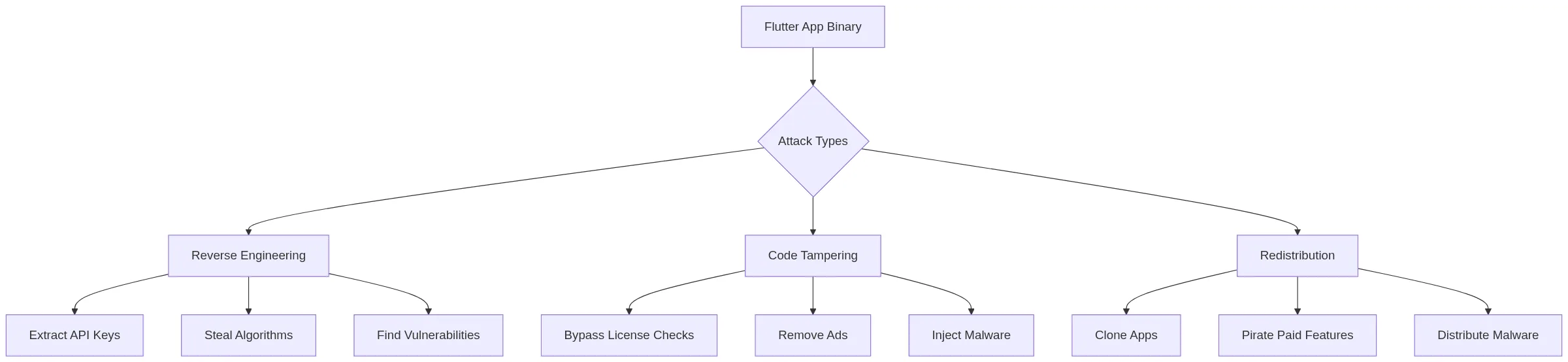
I know what you're thinking, "But it's compiled, surely that's secure enough?" I've heard that reasoning a lot. Without adequate protection, attackers can do more than you'd expect:
#### Why Flutter Apps Are Targets
I've been asked many times whether Flutter apps are inherently safer than React Native or web apps.
The honest answer is as I always say: it depends.
Flutter has real strengths, but also some quirks that make it a unique target.
Take Dart's Ahead-of-Time (AOT) compilation, for example. Your Dart code gets turned into native machine code before execution, unlike Just-in-Time (JIT) compilation, which happens at runtime. That's more secure than shipping plaintext JavaScript, no doubt. But it's not immune to reverse engineering. Skilled attackers with the right tools can still extract meaningful information from that compiled code.
What catches many developers off guard is where that compiled code actually lives—I'll walk you through the exact package structure in a moment, but once you see it, the need for protection becomes obvious.
The cross-platform nature of Flutter is a double-edged sword here too. Once an attacker cracks your Android app, the same techniques usually work directly on iOS—because it's the same Dart codebase underneath.
And as Flutter keeps growing in enterprise, fintech, and high-value consumer products, it's drawing more attention from attackers. That's just how it goes: the higher the stakes, the more motivated the attackers.
#### The Business Impact
Before we get into the technical details, I want to spend a moment on the business side of this. In my experience, binary protection is often deprioritized because it feels abstract—until something goes wrong.
According to the [OWASP Mobile Top 10 (2024) — M7: Insufficient Binary Protections](https://owasp.org/www-project-mobile-top-10/2023-risks/m7-insufficient-binary-protection), insufficient binary protection can lead to significant damage across multiple dimensions:
| Impact Type | Description | Example |
| --------------------- | -------------------------------------------- | ----------------------------------- |
| **Financial Loss** | Misuse of commercial APIs, bypassed payments | Stolen API keys cost $50K/month |
| **IP Theft** | Algorithms, AI models extracted | Competitor copies your ML model |
| **Reputation Damage** | Malicious clones distributed | Fake banking app steals credentials |
| **Revenue Loss** | Pirated premium features | Pro features unlocked for free |
I've personally seen startups lose months of competitive advantage because a competitor extracted their core algorithm from an unprotected APK. I've also witnessed companies face unexpected cloud bills when attackers extracted API keys and used them for their own purposes. These aren't hypothetical scenarios, they happen regularly, and they often happen to apps whose developers assumed "nobody would bother."
### Flutter's Binary Architecture: Know Your Attack Surface
Before we talk about defense, we need to look at the app the same way an attacker does. I find this exercise genuinely useful, once you see what's exposed, the motivation to protect it becomes a lot more concrete.
#### Android APK Structure
When you run `flutter build apk`, Flutter produces an APK file that follows a specific structure. Understanding this structure helps you appreciate where your code ends up and why certain files are targeted:
```
app-release.apk
├── AndroidManifest.xml
├── classes.dex # Minimal Java/Kotlin code
├── res/ # Resources
├── assets/
│ └── flutter_assets/ # Dart assets
├── lib/
│ ├── arm64-v8a/
│ │ ├── libflutter.so # Flutter engine
│ │ └── libapp.so # YOUR DART CODE (AOT compiled)
│ ├── armeabi-v7a/
│ │ ├── libflutter.so
│ │ └── libapp.so
│ └── x86_64/
│ ├── libflutter.so
│ └── libapp.so
└── META-INF/
```
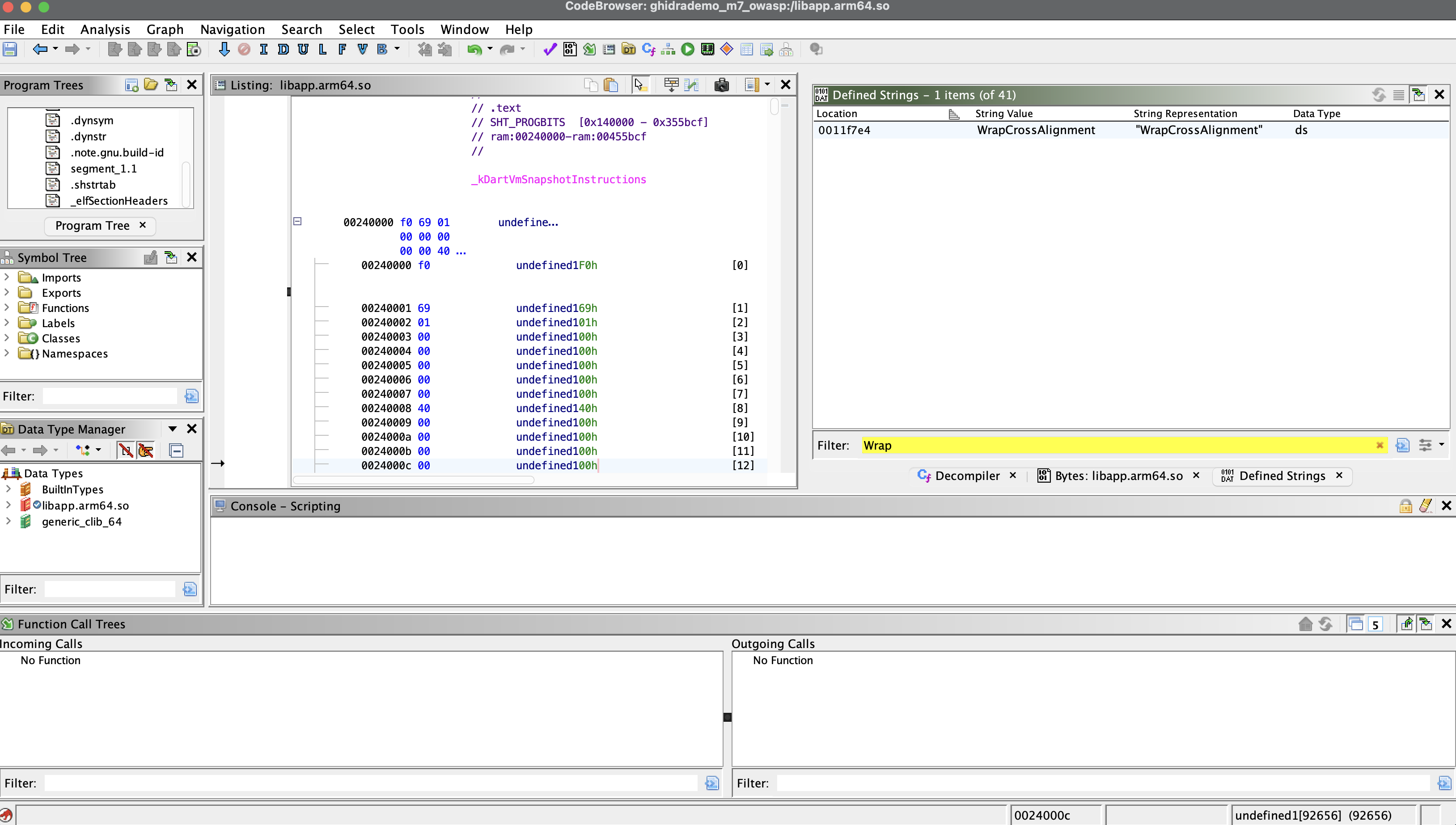
See that `libapp.so` file? That's the crown jewel for attackers. It contains your entire Dart application compiled to native code. Every widget, every service class, every business logic function, it's all in there. While it's compiled to machine code (not human-readable Dart), skilled reverse engineers can still extract a surprising amount of information from it.
#### iOS IPA Structure
The iOS story is similar. When you archive your Flutter app for iOS distribution, the IPA contains:
```
Runner.app/
├── Info.plist
├── Runner # Main executable
├── Frameworks/
│ ├── Flutter.framework/ # Flutter engine
│ └── App.framework/ # YOUR DART CODE (AOT compiled)
│ └── App # The actual binary
├── flutter_assets/
└── _CodeSignature/
```
Just like Android's `libapp.so`, the `App.framework/App` binary contains your compiled Dart code. iOS apps benefit from Apple's code signing requirements and stricter app review process, but once someone has your IPA file, they can analyze it using the same reverse engineering techniques.
#### What Attackers Can Extract
Let me show you something that might make you uncomfortable. Consider this seemingly innocent code that many developers write without thinking twice:
```dart
// Example: Hardcoded API key that attackers can find
class ApiConfig {
// BAD: This string is easily extractable from the binary
static const String apiKey = 'sk-prod-a1b2c3d4e5f6g7h8i9j0';
static const String secretToken = 'super_secret_token_123';
// BAD: Even "hidden" in variables, strings are visible
static String getApiKey() {
return 'sk-prod-' + 'a1b2c3d4' + 'e5f6g7h8i9j0';
}
}
```
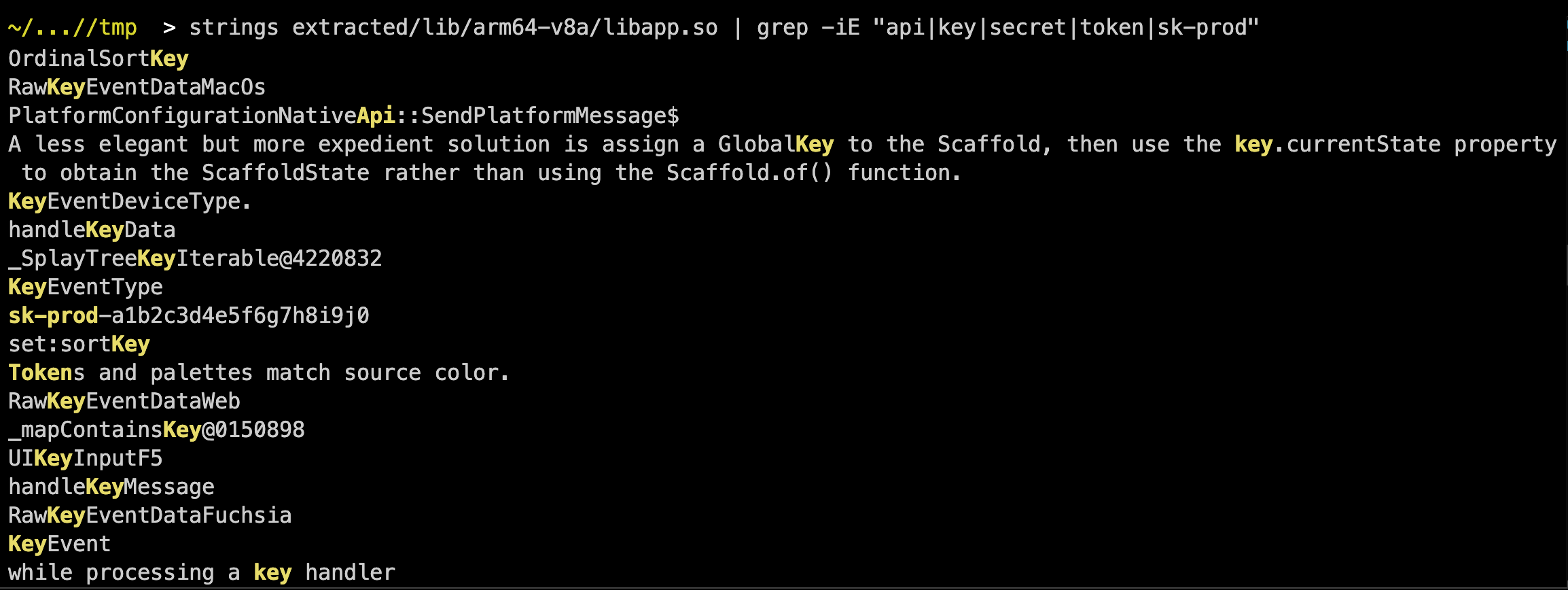
You might think that breaking up the string or using a method makes it harder to find. It doesn't. An attacker running the `strings` command on your binary—or using more advanced tools like Ghidra, can easily locate these:
```bash
# Extracting strings from a Flutter Android binary
unzip app-release.apk -d extracted/
```
The folder tree looks like this:
```
~/.../extracted > tree -L 1
.
├── AndroidManifest.xml
├── DebugProbesKt.bin
├── META-INF
├── assets
├── classes.dex
├── kotlin
├── kotlin-tooling-metadata.json
├── lib
├── res
└── resources.arsc
```
Then run (Linux/macOS):
```bash
# Finds super_secret_token_123 ✓
strings extracted/lib/arm64-v8a/libapp.so | grep -i "api\|key\|secret\|token"
# Finds sk-prod-a1b2c3d4e5f6g7h8i9j0 ✓
strings extracted/lib/arm64-v8a/libapp.so | grep "sk-prod"
# Both at once
strings extracted/lib/arm64-v8a/libapp.so | grep -iE "api|key|secret|token|sk-prod"
```
**Output: you may see many matches. These are the ones to look for:**
```
sk-prod-a1b2c3d4e5f6g7h8i9j0
super_secret_token_123
```
It really is that simple. If you've hardcoded secrets in your Dart code, consider them already compromised the moment you publish your app.
### Attack Vectors: How Attackers Target Flutter Apps
Now that we understand what's inside a Flutter app, let's examine the specific techniques attackers use. Understanding these attack vectors isn't about learning to attack, it's about knowing what you're defending against.
#### 1. Static Analysis (Reverse Engineering)
Static analysis involves examining your app without running it. Attackers use disassemblers and decompilers to dig into your binary and understand its structure. It's like reading a book—they don't need the app to be running to learn from it.
**Common Tools Used Against Flutter Apps:**
Here's a look at the tools attackers commonly use. Most of these are freely available and well-documented:
| Tool | Platform | Purpose |
| ---------------------------------------------------------- | --------- | ------------------------------------ |
| [Ghidra](https://github.com/NationalSecurityAgency/ghidra) | Both | NSA's free disassembler |
| [IDA Pro](https://hex-rays.com/ida-pro/) | Both | Industry-standard disassembler |
| [Hopper](https://www.hopperapp.com/) | iOS/macOS | macOS disassembler |
| [apktool](https://github.com/iBotPeaches/Apktool) | Android | APK unpacking/repacking |
| [jadx](https://github.com/skylot/jadx) | Android | DEX to Java decompiler |
| [Frida](https://frida.re/) | Both | Dynamic instrumentation |
| [reFlutter](https://github.com/Impact-I/reFlutter) | Both | Flutter-specific reverse engineering |
That last one—[**reFlutter**](https://github.com/Impact-I/reFlutter)—deserves special attention. It's specifically designed to reverse engineer Flutter apps, and it's particularly dangerous because it understands Flutter's architecture:
```
# reFlutter can dump your Dart code's structure
$ reflutter app-release.apk
# Output reveals function names, class structures, and more
[+] Dumping functions from libapp.so
[+] Found 2,847 Dart functions
[+] UserAuthService.login
[+] PaymentProcessor.processPayment
[+] LicenseChecker.verifyPremium
...
```
Notice how it reveals function names like `LicenseChecker.verifyPremium`? An attacker now knows exactly where to look if they want to bypass your premium features.
#### 2. Dynamic Analysis (Runtime Attacks)
While static analysis is like reading a book, dynamic analysis is like watching a movie—attackers observe (and manipulate) your app while it's running. Tools like Frida allow attackers to "hook" into your app at runtime and modify its behavior on the fly.
Here's a real example of a Frida script that could bypass a license check in a Flutter app:
```javascript
// Frida script to bypass a license check in a Flutter app
Java.perform(function () {
// Hook into the Flutter engine
var libapp = Module.findBaseAddress('libapp.so');
// Find and hook the license verification function
Interceptor.attach(libapp.add(0x1a2b3c), {
onEnter: function (args) {
console.log('License check called');
},
onLeave: function (retval) {
// Force return true (licensed)
retval.replace(1);
console.log('License check bypassed!');
},
});
});
```
The attacker doesn't need to understand your entire codebase. They just need to find the function that checks for premium access and make it always return `true`. With the function names exposed by static analysis, this becomes a focused attack rather than a blind search.
#### 3. Binary Patching (Code Tampering)
Sometimes attackers don't bother with real-time manipulation, they simply modify your app's binary directly and redistribute it. This is particularly common for apps with premium features, in-app purchases, or ad-supported business models.
The steps are surprisingly simple:
Once the modified APK is created, it can be uploaded to third-party app stores, shared on forums, or distributed through other channels. Users who install these cracked versions get your premium features for free, and you lose revenue. Worse, if the attacker injected malicious code alongside the cracks, those users' devices (and your app's reputation) are compromised.
#### 4. Real-World Attack Scenario
Let me walk you through a realistic attack scenario to make this more concrete. Imagine you've built a Flutter fintech app with premium trading features:
```dart
// Original code in a premium trading app
class TradingFeatures {
bool isPremiumUser = false;
Future checkLicense() async {
final response = await api.verifyLicense(userId);
isPremiumUser = response.isValid;
}
void executeAdvancedTrade(TradeOrder order) {
// BAD: Client-side only check
if (!isPremiumUser) {
showUpgradeDialog();
return;
}
// Execute premium trading algorithm
_runProprietaryAlgorithm(order);
}
}
```
Here's how an attacker would compromise this:
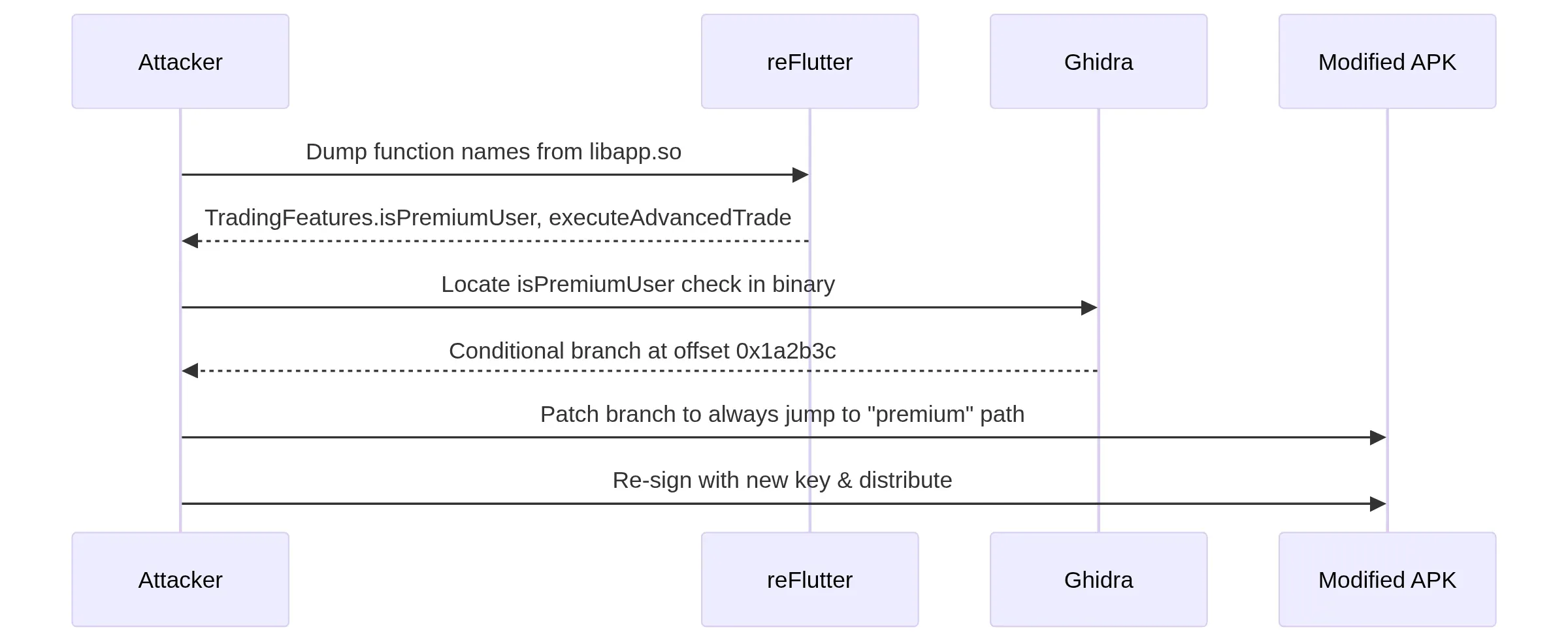
1. **Step 1**: Use reFlutter to dump function names, discovering `TradingFeatures.isPremiumUser` and `TradingFeatures.executeAdvancedTrade`
2. **Step 2**: Use Ghidra or IDA Pro to locate the check for `isPremiumUser` in the compiled binary
3. **Step 3**: Patch the conditional jump instruction to always proceed as if `isPremiumUser` is `true`
4. **Step 4**: Repack the APK, sign it with a new key, and use it, or distribute the cracked version
The entire process might take an experienced attacker a few hours. Your premium features are now available to anyone who downloads the cracked APK.
### Protecting Your Flutter Apps: Defense Strategies
Let's shift to defense. You can't make your app completely unbreakable (nothing is), but you can make attacking it significantly more difficult, time-consuming, and unreliable. The goal is to make the cost of attacking your app higher than the potential reward.
#### 1. Code Obfuscation
Code obfuscation is your first line of defense. It doesn't prevent reverse engineering entirely, but it makes the attacker's job much harder by replacing meaningful names with gibberish and making the code structure more difficult to follow.
The good news? Flutter provides [built-in obfuscation](https://docs.flutter.dev/deployment/obfuscate) that you should **always enable for release builds**. It's a simple flag, but it's surprising how many developers forget to use it.
**Enabling Flutter Obfuscation**
Here's how to build your app with obfuscation enabled:
```bash
# Build with obfuscation enabled
flutter build apk --release --obfuscate --split-debug-info=./debug-info
# For iOS
flutter build ios --release --obfuscate --split-debug-info=./debug-info
# For App Bundle (recommended for Play Store)
flutter build appbundle --release --obfuscate --split-debug-info=./debug-info
```
**What does `--obfuscate` actually do?**
It renames your classes, methods, and fields to meaningless names. The result is that your stack traces become unreadable (without the symbol map), and reverse engineers have a much harder time understanding what each function does.
**Before obfuscation:**
```dart
UserAuthenticationService.validateCredentials();
PaymentProcessor.processTransaction();
PremiumFeatureManager.checkSubscription();
```
**After obfuscation:**
```dart
aB.c();
xY.zZ();
qR.sT();
```
Now, instead of immediately knowing that `LicenseChecker.verifyPremium` is the function to target, an attacker sees `qR.sT()` and has no idea what it does without significant additional analysis.
**Preserving Debug Information**
"But wait," you might be thinking, "if my stack traces are unreadable, how do I debug production crashes?"
Great question! The `--split-debug-info` flag is the answer. It saves the symbol mapping to a separate directory that you keep secure but don't ship with your app. When a crash occurs, you can use these symbols to translate the obfuscated stack trace back to meaningful code:
```dart
// In your app, you can still get readable crash reports
import 'package:firebase_crashlytics/firebase_crashlytics.dart';
void main() {
FlutterError.onError = (errorDetails) {
FirebaseCrashlytics.instance.recordFlutterFatalError(errorDetails);
};
runApp(MyApp());
}
```
The key is to upload the debug symbols to your crash reporting service. This way, you see readable crash reports in your dashboard, but attackers only see obfuscated gibberish:
```shellscript
# Upload symbols to Firebase Crashlytics
firebase crashlytics:symbols:upload --app=YOUR_APP_ID ./debug-info
```
**Advanced Obfuscation with ProGuard (Android)**
For Android, you can add an extra layer of protection using ProGuard (or R8, which is now the default). While Flutter's Dart code is obfuscated by the `--obfuscate` flag, any Kotlin/Java code (including plugin code) benefits from ProGuard.
Configure it in your `android/app/build.gradle`:
```
android {
buildTypes {
release {
minifyEnabled true
shrinkResources true
proguardFiles getDefaultProguardFile('proguard-android-optimize.txt'), 'proguard-rules.pro'
}
}
}
```
Then create `android/app/proguard-rules.pro` with rules to keep Flutter's necessary classes while obfuscating everything else:
```
# Flutter specific rules
-keep class io.flutter.app.** { *; }
-keep class io.flutter.plugin.** { *; }
-keep class io.flutter.util.** { *; }
-keep class io.flutter.view.** { *; }
-keep class io.flutter.** { *; }
-keep class io.flutter.plugins.** { *; }
# Keep your model classes if using reflection
-keep class com.yourapp.models.** { *; }
# Obfuscate everything else aggressively
-repackageclasses ''
-allowaccessmodification
```
{% hint style="info" %}
**Note:** The directive `-optimizationpasses` is ignored by R8 (Android's default shrinker since AGP 3.4). R8 determines the optimal number of passes internally. If you're on a recent Android Gradle Plugin version, you're already using R8; the ProGuard format is accepted for compatibility, but R8-specific flags may differ.\
\
See the [R8 compatibility FAQ](https://r8.googlesource.com/r8/+/refs/heads/main/compatibility-faq.md).
{% endhint %}
#### 2. Protecting Sensitive Strings and Keys
This is perhaps the most critical section of this entire article. I cannot stress this enough: **never hardcode secrets in your Dart code**. Not API keys, not encryption keys, not tokens, nothing. They *will* be extracted.
Let's look at some alternatives, from simple to more advanced:
**Using Environment Variables (Build-time)**
The simplest improvement is to use Dart's `String.fromEnvironment` to inject secrets at build time rather than embedding them in source code:
```dart
// Define in your build command or CI/CD
// flutter build apk --dart-define=API_KEY=your_key_here
class SecureConfig {
// Loaded at compile time, not visible as plain string in source
static const String apiKey = String.fromEnvironment('API_KEY');
// Validate it exists
static void validateConfig() {
if (apiKey.isEmpty) {
throw StateError('API_KEY not configured. Build with --dart-define=API_KEY=xxx');
}
}
}
```
**Important caveat:** While this keeps secrets out of your source code repository (a good practice for version control), the strings still end up in the compiled binary. An attacker examining your `libapp.so` can still find them. This approach is better for organization and CI/CD practices. But it's not a security silver bullet.
**Using Native Code for Extra Protection**
If you absolutely must include a secret in your app (though I'd encourage you to question whether that's really necessary), storing it in native code adds an extra layer of difficulty for attackers. Native code (C/C++) is generally harder to reverse engineer than Dart code.
Here's an example of how to set this up:
**Android (Kotlin) - Create a method channel:**
```kotlin
// android/app/src/main/kotlin/com/yourapp/SecretProvider.kt
package com.yourapp
import io.flutter.embedding.engine.plugins.FlutterPlugin
import io.flutter.plugin.common.MethodChannel
class SecretProvider : FlutterPlugin {
private lateinit var channel: MethodChannel
override fun onAttachedToEngine(binding: FlutterPlugin.FlutterPluginBinding) {
channel = MethodChannel(binding.binaryMessenger, "com.yourapp/secrets")
channel.setMethodCallHandler { call, result ->
when (call.method) {
"getApiKey" -> {
// Return from native code (still extractable but harder)
result.success(getSecretFromNative())
}
else -> result.notImplemented()
}
}
}
private external fun getSecretFromNative(): String
companion object {
init {
System.loadLibrary("secrets")
}
}
override fun onDetachedFromEngine(binding: FlutterPlugin.FlutterPluginBinding) {
channel.setMethodCallHandler(null)
}
}
```
**C++ Native Library (secrets.cpp) - Add simple obfuscation:**
```cpp
#include
#include
// XOR decryption for the API key (simple obfuscation)
extern "C" JNIEXPORT jstring JNICALL
Java_com_yourapp_SecretProvider_getSecretFromNative(JNIEnv *env, jobject /* this */) {
// Encoded key: each byte is the original char XOR'd with the mask 0x5A.
// Original plaintext "sk-prod" was encoded offline with the same mask.
unsigned char encoded[] = {0x29, 0x31, 0x77, 0x2A, 0x28, 0x35, 0x3E};
unsigned char mask = 0x5A;
std::string decoded;
for (unsigned char c : encoded) {
decoded += (char)(c ^ mask);
}
// decoded now equals "sk-prod"
return env->NewStringUTF(decoded.c_str());
}
```
**Dart side - Call the native method:**
```dart
import 'package:flutter/foundation.dart';
import 'package:flutter/services.dart';
class NativeSecrets {
static const _channel = MethodChannel('com.yourapp/secrets');
static Future getApiKey() async {
try {
final key = await _channel.invokeMethod('getApiKey');
return key ?? '';
} catch (e) {
debugPrint('Failed to get API key: $e');
return '';
}
}
}
// Usage
void main() async {
final apiKey = await NativeSecrets.getApiKey();
// Use the key...
}
```
**A word of caution:** Native code makes extraction harder, not impossible. A determined attacker with Ghidra and enough time can still figure it out. This is a speed bump, not a wall.
**Using Secure Remote Configuration**
Here's the truth that many developers don't want to hear: **the most secure approach is to never ship secrets with your app at all**. Instead, fetch sensitive configuration from a secure server at runtime.
Firebase Remote Config is one popular option for this pattern:
```dart
import 'package:firebase_remote_config/firebase_remote_config.dart';
import 'package:flutter_secure_storage/flutter_secure_storage.dart';
class SecureConfigService {
final _remoteConfig = FirebaseRemoteConfig.instance;
final _secureStorage = const FlutterSecureStorage();
Future initialize() async {
await _remoteConfig.setConfigSettings(RemoteConfigSettings(
fetchTimeout: const Duration(minutes: 1),
minimumFetchInterval: const Duration(hours: 1),
));
await _remoteConfig.fetchAndActivate();
}
Future getApiKey() async {
// First, try to get from secure storage (cached)
final cached = await _secureStorage.read(key: 'api_key');
if (cached != null) return cached;
// Fetch from remote config
final key = _remoteConfig.getString('api_key');
// Cache securely
await _secureStorage.write(key: 'api_key', value: key);
return key;
}
}
```
With this approach, even if an attacker completely reverse engineers your app, they won't find the API key because it was never there to begin with. They'd have to intercept network traffic or compromise your Firebase project, both of which are significantly more difficult than extracting a string from a binary.
#### 3. Integrity Verification and Anti-Tampering
Obfuscation and secret management are about making attack harder. But what about detecting when an attack has already happened? Integrity verification allows your app to check whether it has been modified, and respond appropriately.
The idea is simple: your app knows what it *should* look like. If something's different, sound the alarm.
**Signature Verification (Android)**
Android apps are digitally signed before distribution. When you upload your app to the Play Store, it's signed with your release key. If an attacker modifies your app and re-signs it (which they must do for the modified APK to install), the signature changes.
Here's how to implement signature verification:
```dart
import 'dart:io';
import 'package:flutter/services.dart';
class IntegrityChecker {
static const _channel = MethodChannel('com.yourapp/integrity');
/// Verify the app's signing certificate
static Future verifySignature() async {
if (!Platform.isAndroid) return true;
try {
final isValid = await _channel.invokeMethod('verifySignature');
return isValid ?? false;
} catch (e) {
// If we can't verify, assume compromised
return false;
}
}
/// Get the current signature hash for comparison
static Future getSignatureHash() async {
if (!Platform.isAndroid) return null;
try {
return await _channel.invokeMethod('getSignatureHash');
} catch (e) {
return null;
}
}
}
```
**The Android native implementation does the heavy lifting:**
```kotlin
// android/app/src/main/kotlin/com/yourapp/IntegrityPlugin.kt
package com.yourapp
import android.content.pm.PackageManager
import android.os.Build
import io.flutter.embedding.engine.plugins.FlutterPlugin
import io.flutter.plugin.common.MethodChannel
import java.security.MessageDigest
class IntegrityPlugin : FlutterPlugin {
private lateinit var channel: MethodChannel
private lateinit var context: android.content.Context
// Your release signing certificate SHA-256 hash
private val VALID_SIGNATURES = listOf(
"A1:B2:C3:D4:E5:F6:G7:H8:I9:J0:K1:L2:M3:N4:O5:P6:Q7:R8:S9:T0:U1:V2:W3:X4"
)
override fun onAttachedToEngine(binding: FlutterPlugin.FlutterPluginBinding) {
context = binding.applicationContext
channel = MethodChannel(binding.binaryMessenger, "com.yourapp/integrity")
channel.setMethodCallHandler { call, result ->
when (call.method) {
"verifySignature" -> result.success(verifyAppSignature())
"getSignatureHash" -> result.success(getAppSignatureHash())
else -> result.notImplemented()
}
}
}
private fun verifyAppSignature(): Boolean {
val currentHash = getAppSignatureHash() ?: return false
return VALID_SIGNATURES.contains(currentHash)
}
private fun getAppSignatureHash(): String? {
return try {
val packageInfo = if (Build.VERSION.SDK_INT >= Build.VERSION_CODES.P) {
context.packageManager.getPackageInfo(
context.packageName,
PackageManager.GET_SIGNING_CERTIFICATES
)
} else {
@Suppress("DEPRECATION")
context.packageManager.getPackageInfo(
context.packageName,
PackageManager.GET_SIGNATURES
)
}
val signatures = if (Build.VERSION.SDK_INT >= Build.VERSION_CODES.P) {
packageInfo.signingInfo.apkContentsSigners
} else {
@Suppress("DEPRECATION")
packageInfo.signatures
}
val signature = signatures.firstOrNull() ?: return null
val md = MessageDigest.getInstance("SHA-256")
val digest = md.digest(signature.toByteArray())
digest.joinToString(":") { "%02X".format(it) }
} catch (e: Exception) {
null
}
}
override fun onDetachedFromEngine(binding: FlutterPlugin.FlutterPluginBinding) {
channel.setMethodCallHandler(null)
}
}
```
**App Integrity Check with Hash Verification**
Beyond signature checking, you can also verify that your binary files haven't been modified by computing and comparing hash values:
```dart
import 'dart:io';
import 'dart:convert';
import 'package:crypto/crypto.dart';
import 'package:flutter/foundation.dart';
import 'package:flutter/services.dart';
class BinaryIntegrityChecker {
static const _channel = MethodChannel('com.yourapp/integrity');
// Expected hash of your release binary (generate during build)
static const String _expectedLibappHash = 'abc123...'; // SHA-256
/// Verifies that libapp.so has not been tampered with.
/// The native library path must be resolved from native code
/// because Dart's path_provider cannot locate it reliably.
static Future verifyBinaryIntegrity() async {
if (!Platform.isAndroid) return true;
try {
// Delegate to native code, which uses
// context.applicationInfo.nativeLibraryDir to locate libapp.so
final hash = await _channel.invokeMethod('getLibappHash');
if (hash == null) return false;
return hash == _expectedLibappHash;
} catch (e) {
debugPrint('Integrity check failed: $e');
return false;
}
}
}
```
This approach requires you to generate the expected hash during your build process and embed it in the app. There's an inherent chicken-and-egg problem here: the hash lives inside the binary, but computing the hash changes the binary. The standard workaround is to hash a file *other* than the one containing the expected value (e.g., hash `libflutter.so` or specific asset files), or perform the verification entirely on the server by uploading the hash at startup. A purely client-side self-check will always have this limitation.
**Building a Comprehensive Integrity Service**
In practice, you'll want to combine multiple integrity checks into a single service that can assess your app's overall security posture:
```dart
import 'package:flutter/foundation.dart';
enum IntegrityStatus {
valid,
signatureMismatch,
debuggerAttached,
emulatorDetected,
rootDetected,
tamperingDetected,
unknown,
}
class AppIntegrityService {
static final AppIntegrityService _instance = AppIntegrityService._internal();
factory AppIntegrityService() => _instance;
AppIntegrityService._internal();
final List _violations = [];
List get violations => List.unmodifiable(_violations);
bool get isCompromised => _violations.isNotEmpty;
Future performFullCheck() async {
_violations.clear();
// Check signature
if (!await IntegrityChecker.verifySignature()) {
_violations.add(IntegrityStatus.signatureMismatch);
}
// Check for debugger (in release mode)
if (kReleaseMode && await _isDebuggerAttached()) {
_violations.add(IntegrityStatus.debuggerAttached);
}
// Check for emulator
if (await _isRunningOnEmulator()) {
_violations.add(IntegrityStatus.emulatorDetected);
}
// Check for root/jailbreak
if (await _isDeviceRooted()) {
_violations.add(IntegrityStatus.rootDetected);
}
}
Future _isDebuggerAttached() async {
// Platform-specific implementation
return false; // Placeholder
}
Future _isRunningOnEmulator() async {
// Check various emulator indicators
return false; // Placeholder
}
Future _isDeviceRooted() async {
// Check for root indicators
return false; // Placeholder
}
void handleViolations() {
if (!isCompromised) return;
for (final violation in _violations) {
switch (violation) {
case IntegrityStatus.signatureMismatch:
// Critical: App has been re-signed
_handleCriticalViolation('Application signature mismatch detected');
break;
case IntegrityStatus.debuggerAttached:
// High: Someone is debugging in production
_handleHighViolation('Debugger detected');
break;
case IntegrityStatus.rootDetected:
// Medium: Running on rooted device
_handleMediumViolation('Rooted device detected');
break;
default:
break;
}
}
}
void _handleCriticalViolation(String message) {
// Log to security backend
// Clear sensitive data
// Show warning or exit app
debugPrint('CRITICAL SECURITY VIOLATION: $message');
}
void _handleHighViolation(String message) {
debugPrint('HIGH SECURITY VIOLATION: $message');
}
void _handleMediumViolation(String message) {
debugPrint('MEDIUM SECURITY VIOLATION: $message');
}
}
```
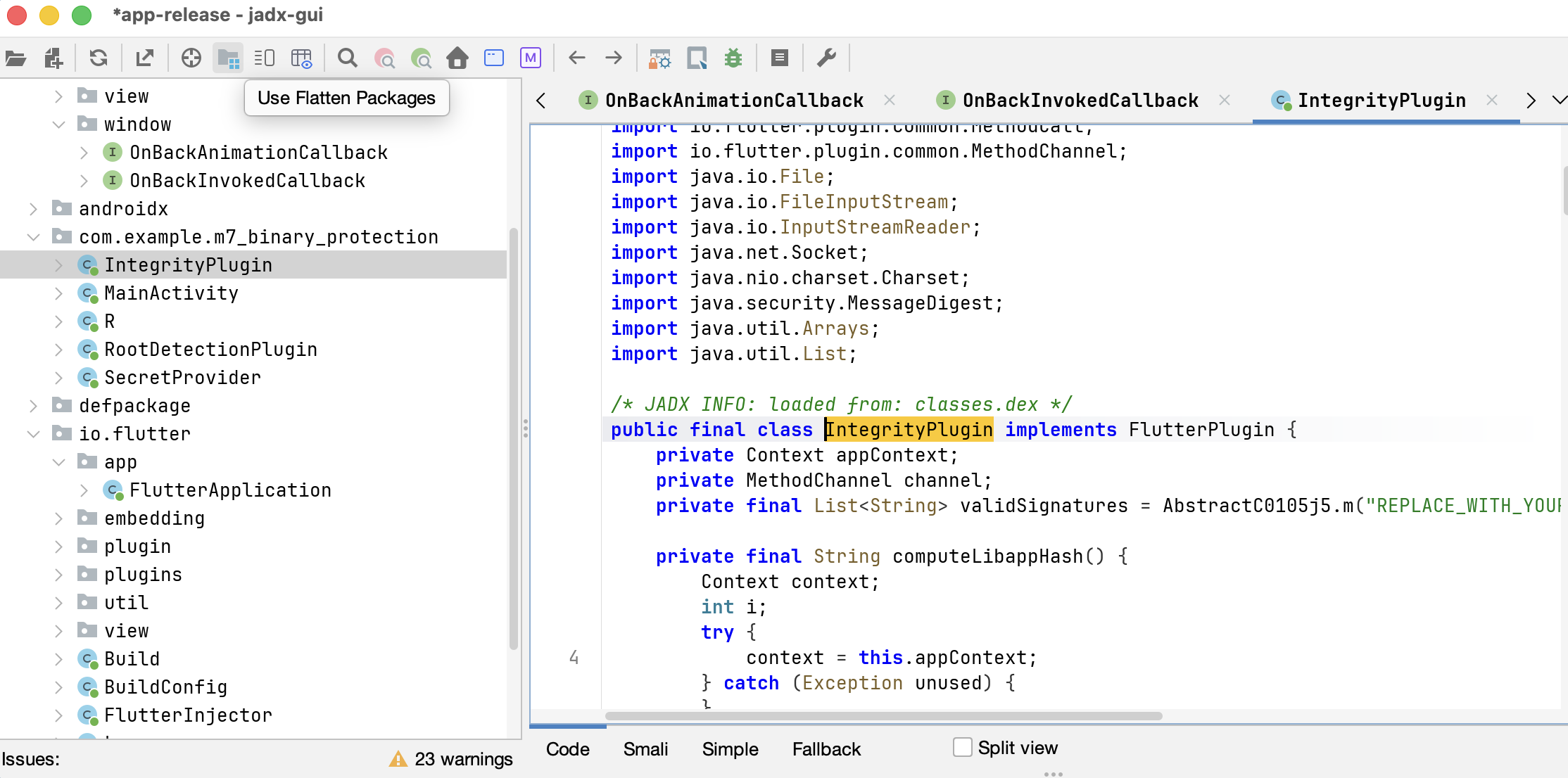
Here is a screenshot of the decompiled app in JADX:
#### 4. Root/Jailbreak Detection
A rooted Android device or jailbroken iOS device gives users (and attackers) elevated privileges that bypass the normal security sandbox. On such devices, other apps can read your app's private storage, attach debuggers, and intercept communications.
Detecting these compromised environments is an important defense layer. Here's a comprehensive approach:
```dart
import 'dart:async';
import 'dart:io';
import 'package:flutter/services.dart';
class RootDetector {
static const _channel = MethodChannel('com.yourapp/root_detection');
/// Comprehensive root/jailbreak detection
static Future isDeviceCompromised() async {
if (Platform.isAndroid) {
return await _checkAndroidRoot();
} else if (Platform.isIOS) {
return await _checkIOSJailbreak();
}
return false;
}
static Future _checkAndroidRoot() async {
try {
final result = await _channel.invokeMethod