> For the complete documentation index, see [llms.txt](https://docs.talsec.app/appsec-articles/llms.txt). Markdown versions of documentation pages are available by appending `.md` to page URLs; this page is available as [Markdown](https://docs.talsec.app/appsec-articles/articles/owasp-top-10-for-flutter-m8-security-misconfiguration-in-flutter-and-dart.md).
# OWASP Top 10 For Flutter – M8: Security Misconfiguration in Flutter & Dart
Welcome back to our deep dive into the [OWASP Mobile Top 10 for Flutter developers](https://docs.talsec.app/appsec-articles). OWASP (Open Worldwide Application Security Project) maintains this [industry-standard risk ranking](https://owasp.org/www-project-mobile-top-10/) to help developers prioritize mobile security efforts.
In earlier parts, we tackled:
* [M1: Mastering Credential Security in Flutter](/appsec-articles/articles/owasp-top-10-for-flutter-m1-mastering-credential-security-in-flutter.md)
* [M2: Inadequate Supply Chain Security in Flutter](/appsec-articles/articles/owasp-top-10-for-flutter-m2-inadequate-supply-chain-security-in-flutter.md)
* [M3: Insecure Authentication and Authorization in Flutter](/appsec-articles/articles/owasp-top-10-for-flutter-m3-insecure-authentication-and-authorization-in-flutter.md)
* [M4: Insufficient Input/Output Validation in Flutter](/appsec-articles/articles/owasp-top-10-for-flutter-m4-insufficient-input-output-validation-in-flutter.md)
* [M5: Insecure Communication for Flutter and Dart](/appsec-articles/articles/owasp-top-10-for-flutter-m5-insecure-communication-for-flutter-and-dart.md)
* [M6: Inadequate Privacy Controls in Flutter & Dart](/appsec-articles/articles/owasp-top-10-for-flutter-m6-inadequate-privacy-controls-in-flutter-and-dart.md)
* [M7: Insufficient Binary Protection in Flutter & Dart](/appsec-articles/articles/owasp-top-10-for-flutter-m7-insufficient-binary-protection-in-flutter-and-dart.md)
Each is a critical piece of the mobile security puzzle.
In this eighth article, we focus on [**M8: Security Misconfiguration**](https://owasp.org/www-project-mobile-top-10/2023-risks/m8-security-misconfiguration.html), a vulnerability that often hides in plain sight. Unlike the complex code vulnerabilities we discussed earlier, misconfigurations are usually simple oversights. A flag left enabled. A permission not restricted. A default setting unchanged. These mistakes are easy to make. They also go unnoticed.
This hits Flutter devs hard. We ship **multiple configuration layers** at once. Dart code, Android’s `AndroidManifest.xml`, iOS’s `Info.plist`, Gradle files, Xcode settings, and more. Each layer adds its own failure modes. A review that only covers Dart misses a big chunk of the attack surface.
I’ve reviewed many Flutter projects. Security misconfigurations are among the most common issues I see. The good news is simple. They’re also among the easiest to fix.
Let’s break down what security misconfiguration means for Flutter apps. Let’s harden your configs.
{% hint style="success" %}
**Source code:** All examples from this article are available as a runnable Flutter project on GitHub:
[flutterengineering\_examples — M8 Security Misconfiguration](https://github.com/mhadaily/flutterengineering_examples/tree/main/OWASP_Top_10_Flutter/m8_security_misconfiguration)
{% endhint %}
### Understanding Security Misconfiguration
#### What is Security Misconfiguration?
Security misconfiguration occurs when security settings are defined, implemented, or maintained incorrectly. Think of it like leaving your front door unlocked. It’s not a flaw in the lock itself. It’s how you’re using (or not using) the security mechanism.
In mobile apps, security misconfiguration takes many forms:
* **Insecure default settings** left unchanged
* **Debug features** enabled in production
* **Unnecessary permissions** requested
* **Exposed components** (activities, services, content providers)
* **Weak network security** configurations
* **Improper backup settings** that leak data
* **Missing security headers** or policies
{% hint style="info" %}
For the [official definition and attack scenarios](https://owasp.org/www-project-mobile-top-10/2023-risks/m8-security-misconfiguration.html), see the OWASP M8 page.
{% endhint %}
The following diagram illustrates the various categories of security misconfiguration:
#### Why Flutter Developers Must Pay Extra Attention
Here's a reality check for Flutter developers: you're responsible for configuring **two completely different platforms** correctly, plus managing Dart-level configurations. A single misconfiguration on either Android or iOS can compromise your entire app, regardless of how secure your Dart code is.
Let me break down what you’re actually managing:
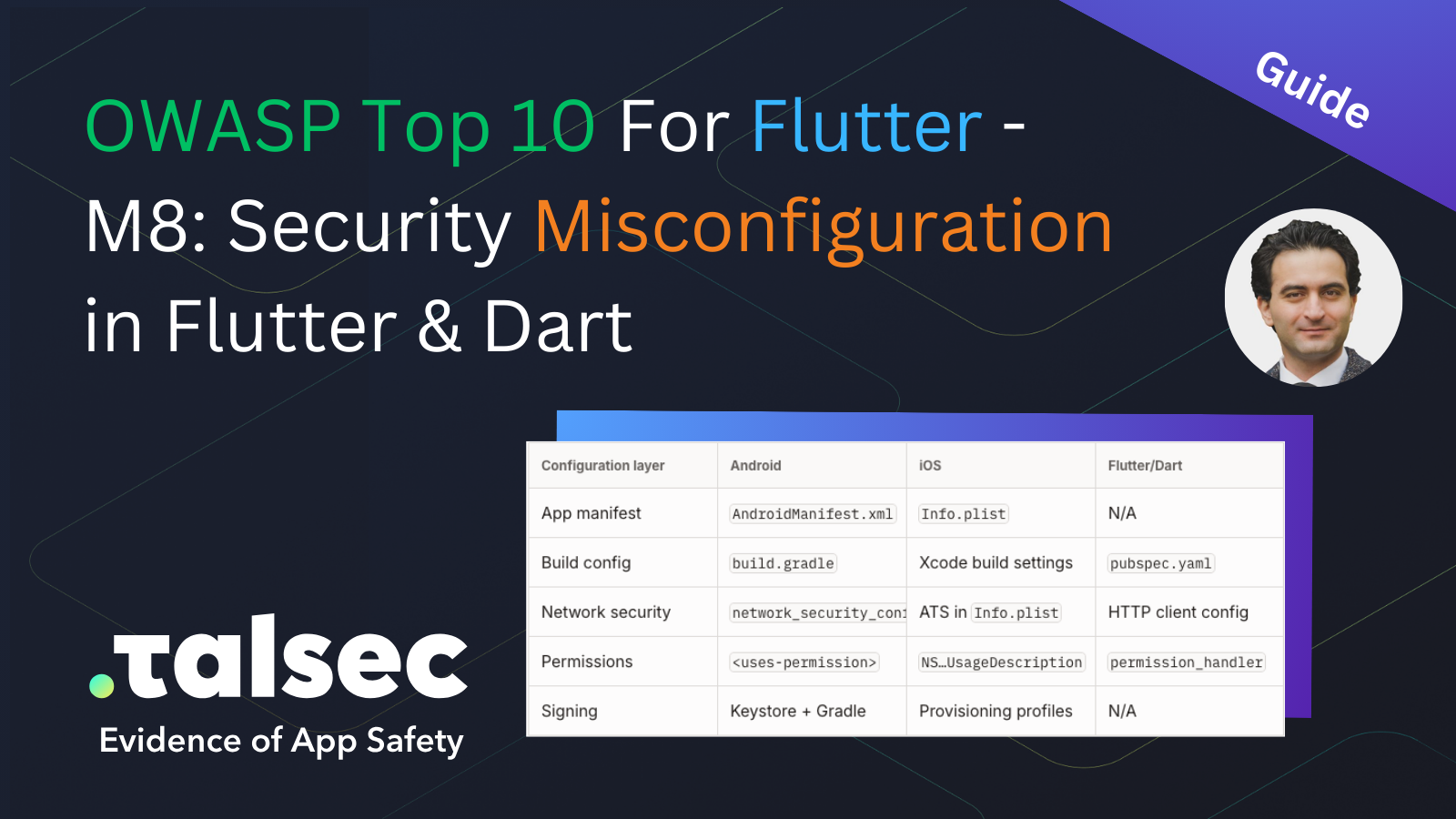
| Configuration layer | Android | iOS | Flutter/Dart |
| ------------------- | ----------------------------- | --------------------- | -------------------- |
| App manifest | `AndroidManifest.xml` | `Info.plist` | N/A |
| Build config | `build.gradle` | Xcode build settings | `pubspec.yaml` |
| Network security | `network_security_config.xml` | ATS in `Info.plist` | HTTP client config |
| Permissions | `` | `NS…UsageDescription` | `permission_handler` |
| Signing | Keystore + Gradle | Provisioning profiles | N/A |
That's a lot of surface area to secure. And here's the thing: most Flutter tutorials and documentation focus on the Dart layer. The platform-specific security configurations are often an afterthought, or worse, copy-pasted from StackOverflow without understanding what they do.
#### Business and Technical Impact
What can actually go wrong with security misconfigurations? According to OWASP, the consequences include:
* **Unauthorized data access:** Attackers exploit exposed components and read user data.
* **Account hijacking:** Weak session or auth configs let attackers take over accounts.
* **Data breaches:** Backups extracted from unprotected storage end up leaked or sold.
* **Compliance violations:** [GDPR](https://gdpr.eu/), [HIPAA](https://www.hhs.gov/hipaa/index.html), and [PCI-DSS](https://www.pcisecuritystandards.org/) penalties can be substantial.
* **Reputation damage:** Public disclosure erodes user trust.
So let's get into the specific misconfigurations to watch out for.
### Android Security Misconfigurations in Flutter
Android configuration is particularly prone to security issues because of its flexibility and the sheer number of settings available. Let's walk through the most critical misconfigurations I encounter when reviewing Flutter apps.
#### 1. Debug Mode in Production
This one is the classic "oops" moment. Releasing an app with `android:debuggable="true"` is like shipping a car with the hood permanently unlatched. Anyone can look inside.
**What it looks like:**
```xml
```
**Why this is catastrophic:**
When debug mode is enabled, attackers can:
* Attach debuggers to your running app and step through code
* Inspect and modify memory contents at runtime
* Set breakpoints to bypass security checks
* Extract sensitive data directly from memory
I've seen production apps with this flag enabled—it happens more often than you'd think, especially when developers manually override build configurations for testing and forget to revert.
**The good news:** Flutter's build system handles this correctly by default. The `debuggable` flag is set to `true` only in debug builds. However, you should still verify your release builds, especially if you've ever modified build configurations manually:
```shellscript
# Check if your release APK is debuggable
aapt dump badging app-release.apk | grep debuggable
# Or using apkanalyzer
apkanalyzer manifest print app-release.apk | grep debuggable
```
**Expected output for a correctly configured release build:**
```shellscript
# aapt output (no "debuggable" line means it's disabled — correct)
application-debuggable: name='android:debuggable' value='false'
# apkanalyzer output
android:debuggable="false"
```
If you see `value='true'` or `debuggable="true"`, stop and fix your build configuration before shipping.
**Explicitly ensure debug is disabled in release builds:**
For extra safety, explicitly set the flag in your [Gradle build configuration](https://developer.android.com/build/build-variants#build-types). Belt and suspenders approach:
```groovy
// android/app/build.gradle
android {
buildTypes {
release {
debuggable false // Explicitly set
minifyEnabled true
shrinkResources true
proguardFiles getDefaultProguardFile('proguard-android-optimize.txt'), 'proguard-rules.pro'
}
debug {
debuggable true
}
}
}
```
#### 2. Backup Configuration Leaks
Here's a subtle one that catches many developers off guard. By default, Android [backs up your app data to Google Drive](https://developer.android.com/identity/data/autobackup). Sounds helpful, right? The problem is that this backup might include sensitive information: authentication tokens, cached user data, and encryption keys stored in SharedPreferences.
**The problem in action:**
```xml
```
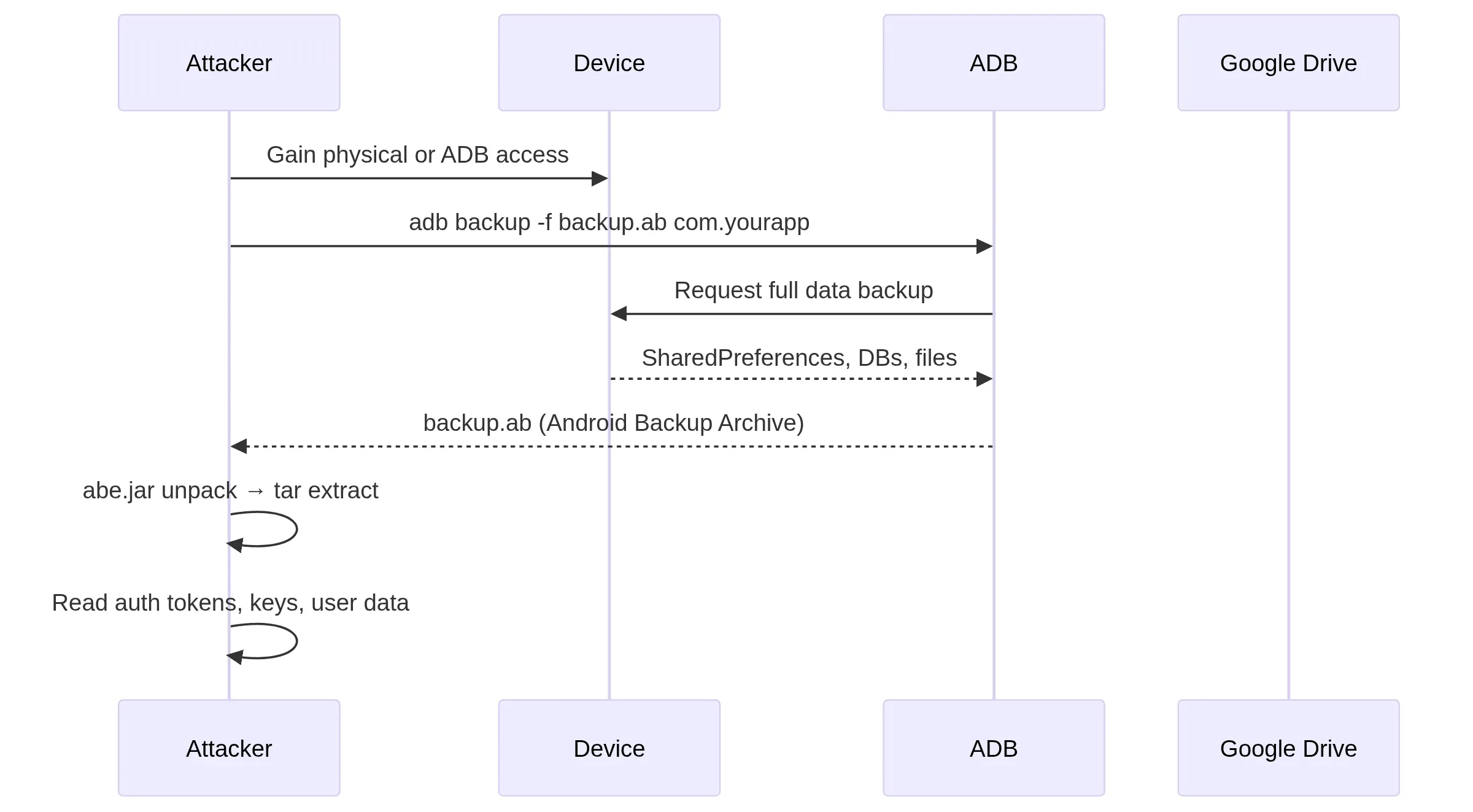
**How attackers exploit this:**
The following sequence shows how backup extraction works in practice:
An attacker with brief physical access to a device (think: borrowed phone, lost device, or malicious app with ADB access) can extract your entire app's data:
```shellscript
# Attacker with physical access can extract app data
adb backup -f backup.ab -noapk com.yourapp.app
# Convert and extract
java -jar abe.jar unpack backup.ab backup.tar
tar -xvf backup.tar
# Now attacker has access to SharedPreferences, databases, files
cat apps/com.yourapp.app/sp/FlutterSecureStorage.xml
```
**Output:**
```shellscript
$ adb backup -f backup.ab -noapk com.yourapp.app
Now unlock your device and confirm the backup operation...
$ java -jar abe.jar unpack backup.ab backup.tar
Strong password not specified. Using empty password.
$ tar -xvf backup.tar
apps/com.yourapp.app/sp/FlutterSecureStorage.xml
apps/com.yourapp.app/db/app_database.db
```
**Nuance on `flutter_secure_storage`:** If you configure it with `AndroidOptions(encryptedSharedPreferences: true)`, the encryption key lives in the [Android Keystore](https://developer.android.com/privacy-and-security/keystore) and is *not* included in backups. The extracted XML will contain ciphertext that is useless without the key.
However, when using the *default* configuration (or older package versions `< 5.0`), the key material may be stored alongside the data. That makes backup extraction a real threat.
{% hint style="warning" %}
Always enable `encryptedSharedPreferences: true` on Android.
{% endhint %}
**The fix:**
Explicitly disable backups. Or, if you need selective backup for user convenience, carefully exclude sensitive files. See the [`` element docs](https://developer.android.com/guide/topics/manifest/application-element#allowbackup) for the full attribute reference:
```xml
```
For Android 12+ (API 31+), create `android/app/src/main/res/xml/data_extraction_rules.xml`:
```xml
```
For older Android versions, create `android/app/src/main/res/xml/backup_rules.xml`:
```xml
```
And reference it:
```xml
```
#### 3. Cleartext Traffic (HTTP)
In 2026, there's really no excuse for allowing unencrypted HTTP traffic. Yet I still see Flutter apps with this misconfiguration regularly, usually because developers enabled it "temporarily" for local testing and forgot to disable it.
**The problematic setting:**
```xml
```
When this flag is enabled, your app can communicate over unencrypted HTTP. Any attacker on the same network (coffee shop WiFi, compromised router, or hostile network) can see everything your app sends and receives: authentication tokens, personal data, everything.
**The fix:**
Create a proper [network security configuration](https://developer.android.com/privacy-and-security/security-config). This approach gives you fine-grained control and makes your intent explicit. Create `android/app/src/main/res/xml/network_security_config.xml`:
```xml
10.0.2.2localhost
```
Reference it in your manifest:
```xml
```
#### 4. Certificate Pinning
If your app communicates with sensitive backend services (especially for financial or health data), consider adding certificate pinning. This prevents attackers from intercepting traffic even if they manage to install a rogue CA (Certificate Authority) certificate on the device.
Here's how to add certificate pinning in your network security config:
```xml
api.yourapp.comAAAAAAAAAAAAAAAAAAAAAAAAAAAAAAAAAAAAAAAAAAA=BBBBBBBBBBBBBBBBBBBBBBBBBBBBBBBBBBBBBBBBBBB=
```
**Generate pin hash from your server's certificate:**
```shellscript
# Get the certificate
openssl s_client -connect api.yourapp.com:443 < /dev/null 2>/dev/null | \
openssl x509 -outform DER | \
openssl dgst -sha256 -binary | \
openssl enc -base64
```
**Output:**
```
K87NG0IfQKa2X5VPz8cz66M5heCTKmMpXs+nDB85Nss=
```
Use this Base64 string as the `` value in your config.
**Important:** Always include at least two pins (a backup), and set an expiration date. If your certificate rotates and you only have one pin, your app will stop working.
#### 5. Exported Components
This is one of the most frequently overlooked security issues in Android development. Components marked as [`exported="true"`](https://developer.android.com/guide/topics/manifest/activity-element#exported) can be accessed by any other app on the device. This includes activities, services, broadcast receivers, and content providers.
Since Android 12 (API 31), the `android:exported` attribute is **required** for every component that declares an ``. Builds targeting
{% hint style="warning" %}
API 31+ will fail without it.
{% endhint %}
**The problem:**
```xml
android:grantUriPermissions="true"/>
```
**Why this matters for Flutter:**
Flutter's main activity is often exported for deep linking. While this is necessary for handling deep links, you need to be extremely careful about validating any data that comes through:
```xml
```
**The Fix:**
1. Set `exported="false"` for internal components
2. Add permission requirements for exported components
3. Validate all inputs from intent data
```xml
```
**Validate deep link data in Flutter:**
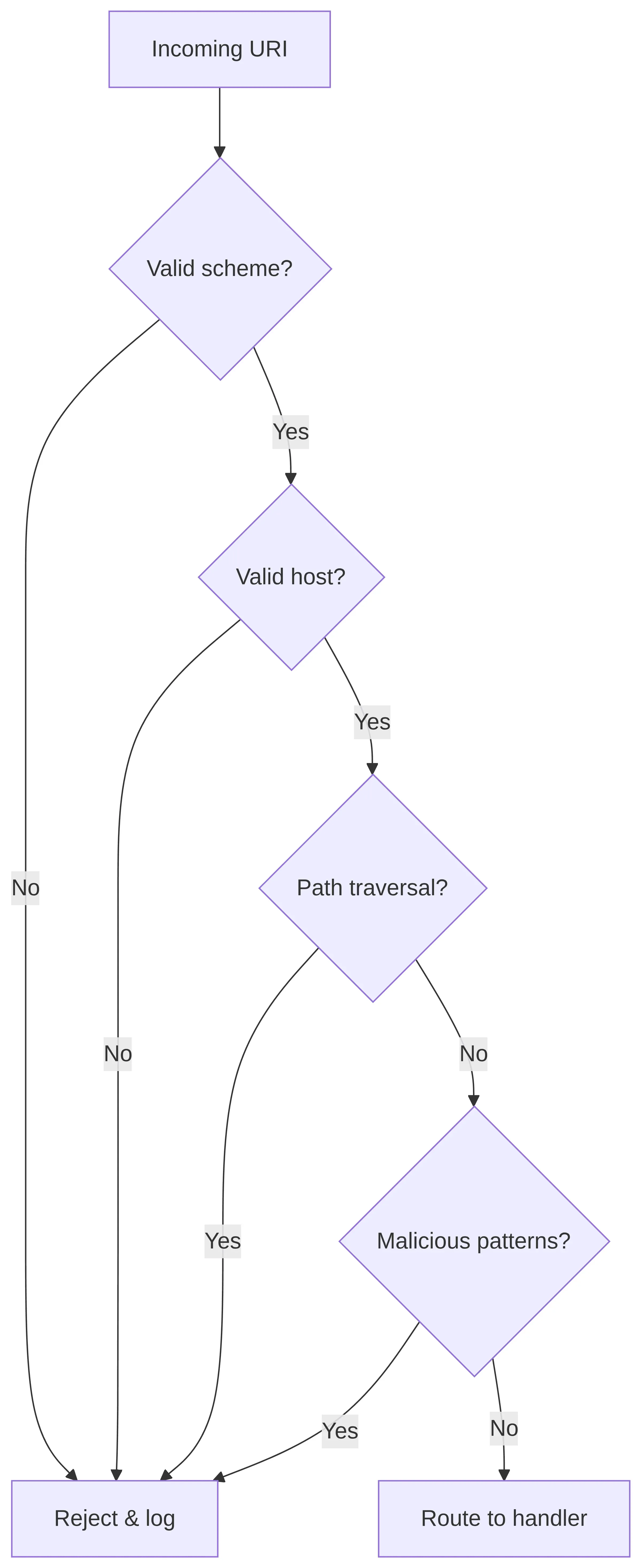
The following flow shows how every incoming deep link should be validated before the app acts on it:
```dart
import 'package:app_links/app_links.dart';
import 'package:flutter/widgets.dart';
class DeepLinkHandler {
final AppLinks _appLinks = AppLinks();
Future initDeepLinks() async {
// Handle initial link
final initialLink = await _appLinks.getInitialAppLink();
if (initialLink != null) {
_handleDeepLink(initialLink);
}
// Handle subsequent links
_appLinks.uriLinkStream.listen(_handleDeepLink);
}
void _handleDeepLink(Uri uri) {
// CRITICAL: Validate the deep link before processing
if (!_isValidDeepLink(uri)) {
debugPrint('Invalid deep link rejected: $uri');
return;
}
// Process validated link
_processValidatedLink(uri);
}
bool _isValidDeepLink(Uri uri) {
// Validate scheme
if (!['https', 'myapp'].contains(uri.scheme)) {
return false;
}
// Validate host
final allowedHosts = ['yourapp.com', 'www.yourapp.com'];
if (uri.scheme == 'https' && !allowedHosts.contains(uri.host)) {
return false;
}
// Validate path doesn't contain traversal attempts
// NOTE: Uri.parse normalises ".." away (e.g. "/../etc" → "/etc"),
// so always check the *raw* string the OS handed you as well.
if (uri.path.contains('..') || uri.path.contains('%2e%2e')) {
return false;
}
// Validate query parameters
for (final value in uri.queryParameters.values) {
if (_containsMaliciousPatterns(value)) {
return false;
}
}
return true;
}
bool _containsMaliciousPatterns(String value) {
final maliciousPatterns = [
RegExp(r' pattern.hasMatch(value));
}
void _processValidatedLink(Uri uri) {
// Safe to process the link
switch (uri.path) {
case '/product':
final productId = uri.queryParameters['id'];
if (productId != null && _isValidProductId(productId)) {
_navigateToProduct(productId);
}
break;
case '/profile':
_navigateToProfile();
break;
default:
_navigateToHome();
}
}
bool _isValidProductId(String id) {
// Only allow alphanumeric IDs
return RegExp(r'^[a-zA-Z0-9-]+$').hasMatch(id) && id.length <= 50;
}
// Navigation stubs — replace with your app's routing logic
void _navigateToProduct(String id) { /* GoRouter / Navigator */ }
void _navigateToProfile() { /* GoRouter / Navigator */ }
void _navigateToHome() { /* GoRouter / Navigator */ }
}
```
**Example output when processing deep links:**
```
[DeepLink] ✅ Accepted: https://yourapp.com/product?id=abc-123
[DeepLink] → navigating to product abc-123
[DeepLink] ❌ Rejected: https://yourapp.com/../etc/passwd
[DeepLink] ❌ Rejected: https://evil.com/product?id=1
[DeepLink] ❌ Rejected: https://yourapp.com/search?q=
```
#### 6. Excessive Permissions
This is one of those areas where I see a lot of "it works, ship it" mentality. Requesting unnecessary permissions increases your app's attack surface and violates the principle of least privilege. Every permission you request is a potential vector for abuse—by malicious code in your dependencies, by attackers who compromise your app, or by you accidentally leaking data you shouldn't have access to.
I've reviewed apps that request camera, contacts, location, SMS, microphone, and storage access... for a simple note-taking app. Each of those permissions opens a door. The more doors you open, the more you have to defend.
**The problematic approach:**
```xml
```
**The better approach:**
Only request what you actually need, and request it at runtime with proper explanation. Users have become increasingly permission-aware, they'll uninstall your app if you ask for things that don't make sense.
```xml
```
**Request permissions properly in Flutter:**
```dart
import 'package:permission_handler/permission_handler.dart';
import 'package:flutter/material.dart';
class PermissionService {
/// Request permission with explanation
Future requestCameraPermission(BuildContext context) async {
// Check current status
final status = await Permission.camera.status;
if (status.isGranted) {
return true;
}
if (status.isDenied) {
// Show explanation before requesting
final shouldRequest = await _showPermissionExplanation(
context,
title: 'Camera Permission Required',
explanation: 'We need camera access to scan QR codes for secure login. '
'Your camera feed is processed locally and never stored or transmitted.',
icon: Icons.camera_alt,
);
if (!shouldRequest) return false;
final result = await Permission.camera.request();
return result.isGranted;
}
if (status.isPermanentlyDenied) {
// Guide user to settings
await _showSettingsDialog(context, 'camera');
return false;
}
return false;
}
Future _showPermissionExplanation(
BuildContext context, {
required String title,
required String explanation,
required IconData icon,
}) async {
return await showDialog(
context: context,
builder: (context) => AlertDialog(
title: Row(
children: [
Icon(icon, color: Theme.of(context).primaryColor),
const SizedBox(width: 8),
Text(title),
],
),
content: Text(explanation),
actions: [
TextButton(
onPressed: () => Navigator.pop(context, false),
child: const Text('Not Now'),
),
ElevatedButton(
onPressed: () => Navigator.pop(context, true),
child: const Text('Continue'),
),
],
),
) ?? false;
}
Future _showSettingsDialog(BuildContext context, String permission) async {
await showDialog(
context: context,
builder: (context) => AlertDialog(
title: const Text('Permission Required'),
content: Text(
'The $permission permission was denied. Please enable it in Settings to use this feature.',
),
actions: [
TextButton(
onPressed: () => Navigator.pop(context),
child: const Text('Cancel'),
),
ElevatedButton(
onPressed: () {
Navigator.pop(context);
openAppSettings();
},
child: const Text('Open Settings'),
),
],
),
);
}
}
```
**Console output (example flow):**
```
[Permission] Camera status: PermissionStatus.denied
[Permission] Showing explanation dialog…
[Permission] User accepted explanation — requesting camera…
[Permission] Camera result: PermissionStatus.granted ✅
```
### iOS Security Misconfigurations in Flutter
Now let's shift our attention to iOS. While iOS has a reputation for being more secure than Android (and in some ways it is), it's not immune to misconfiguration issues. In fact, some iOS-specific security features are so easy to disable that developers do it without realizing the implications.
#### 1. App Transport Security (ATS)
[App Transport Security](https://developer.apple.com/documentation/bundleresources/information_property_list/nsapptransportsecurity) is Apple's way of enforcing secure network connections. It requires HTTPS by default, with modern TLS versions and cipher suites. It's a fantastic security feature that protects your users from man-in-the-middle attacks.
And yet, one of the most common Stack Overflow answers to "my app can't connect to my server" is "just disable ATS." This is terrible advice that has made its way into countless production apps.
**The problematic configuration:**
```xml
NSAppTransportSecurityNSAllowsArbitraryLoads
```
When you add this to your Info.plist, you're telling iOS "I don't care about network security, let me talk to any server over any protocol." Your app can then be tricked into communicating with malicious servers, or have its traffic intercepted on insecure networks.
**The secure approach:**
If you absolutely must connect to a server that doesn't support HTTPS (and please, pressure them to fix this), use targeted exceptions rather than disabling ATS entirely:
```xml
NSAppTransportSecurityNSExceptionDomainslegacy-api.example.comNSExceptionAllowsInsecureHTTPLoadsNSExceptionMinimumTLSVersionTLSv1.2NSIncludesSubdomains
```
**Best practice: Don't disable ATS at all.** If you're hitting HTTP endpoints, the right fix is to update those servers to use HTTPS, not to weaken your app's security. [Let's Encrypt](https://letsencrypt.org/) makes free certificates available to everyone—there's no excuse for HTTP anymore.
#### 2. Missing Privacy Usage Descriptions
iOS requires you to explain why your app needs access to sensitive features—camera, location, contacts, etc. This isn't just a formality; it's a privacy protection that helps users make informed decisions about what they're allowing.
Here's the fun part: if you request a permission without providing the corresponding usage description, your app doesn't show a generic dialog. It crashes. Immediately. And this will definitely get caught in App Store review if you somehow missed it in testing.
**What happens without descriptions:**
```dart
// This will crash if NSCameraUsageDescription is missing from Info.plist
await Permission.camera.request();
```
No graceful error handling, no fallback—just a crash. So make sure you add all necessary descriptions to `ios/Runner/Info.plist`:
```xml
NSCameraUsageDescriptionWe need camera access to scan QR codes for secure login.NSPhotoLibraryUsageDescriptionWe need photo library access to let you upload profile pictures.NSLocationWhenInUseUsageDescriptionWe need your location to show nearby stores.NSLocationAlwaysAndWhenInUseUsageDescriptionWe need background location to send you arrival notifications.NSMicrophoneUsageDescriptionWe need microphone access for voice messages.NSContactsUsageDescriptionWe need contacts access to help you find friends.NSFaceIDUsageDescriptionWe use Face ID for quick and secure login.NSBluetoothAlwaysUsageDescriptionWe use Bluetooth to connect to your fitness tracker.NSBluetoothPeripheralUsageDescriptionWe use Bluetooth to connect to your fitness tracker.
```
#### 3. Insecure Keychain Configuration
The iOS [Keychain](https://developer.apple.com/documentation/security/keychain_services) is one of the most secure places to store sensitive data on the device, but only if you configure it correctly. The Keychain has different accessibility levels that determine when your data can be accessed, and choosing the wrong one can leave your users' data exposed.
**The problematic approach (in native code):**
```swift
// BAD: Data accessible when device is locked
let query: [String: Any] = [
kSecClass: kSecClassGenericPassword,
kSecAttrAccessible: kSecAttrAccessibleAlways, // INSECURE!
kSecAttrAccount: "auth_token",
kSecValueData: tokenData
]
```
Using `kSecAttrAccessibleAlways` means the data can be read even when the device is locked. If someone steals the phone, they can potentially extract this data without knowing the passcode.
**The secure approach in Flutter (using flutter\_secure\_storage):**
The good news is that `flutter_secure_storage` gives you control over Keychain accessibility. Here's how to configure it properly:
```dart
import 'package:flutter_secure_storage/flutter_secure_storage.dart';
class SecureStorageService {
// Configure with appropriate accessibility
final FlutterSecureStorage _storage = const FlutterSecureStorage(
iOptions: IOSOptions(
accessibility: KeychainAccessibility.first_unlock_this_device,
// Only accessible after first unlock, not synced to other devices
),
aOptions: AndroidOptions(
encryptedSharedPreferences: true,
),
);
Future saveAuthToken(String token) async {
await _storage.write(
key: 'auth_token',
value: token,
iOptions: const IOSOptions(
accessibility: KeychainAccessibility.first_unlock_this_device,
),
);
}
Future getAuthToken() async {
return await _storage.read(key: 'auth_token');
}
Future deleteAuthToken() async {
await _storage.delete(key: 'auth_token');
}
}
```
**Output:**
```
[SecureStorage] ✅ Auth token written (encrypted, first_unlock_this_device).
[SecureStorage] ✅ Auth token read (length: 36).
[SecureStorage] ✅ Auth token deleted.
```
**Understanding Keychain Accessibility Options:**
Choosing the right accessibility level requires balancing security with user experience. Here’s a quick breakdown:
| Option | When accessible | Synced to iCloud |
| -------------------------- | ------------------------------------ | ---------------- |
| `passcode` | Only when unlocked with passcode | No |
| `unlocked` | When device is unlocked | Yes |
| `unlocked_this_device` | When device is unlocked | No |
| `first_unlock` | After first unlock until restart | Yes |
| `first_unlock_this_device` | After first unlock until restart | No |
| `always` | Always (**deprecated** since iOS 12) | Yes |
| `always_this_device` | Always (**deprecated** since iOS 12) | No |
`kSecAttrAccessibleAlways` and `kSecAttrAccessibleAlwaysThisDeviceOnly` have been [deprecated since iOS 12](https://developer.apple.com/documentation/security/ksecattraccessiblealways). Any code still targeting these values will trigger App Store review warnings.
> Migrate to `first_unlock_this_device` or `unlocked_this_device`.
For most sensitive data like auth tokens, I recommend `first_unlock_this_device`. This provides strong protection while still allowing background operations (like push notification handling) to access the data after the user has unlocked their device at least once since reboot.
#### 4. URL Scheme Hijacking
Custom URL schemes are a convenient way to open your app from links, but they come with a significant security risk: any app can register the same URL scheme. If a malicious app registers your scheme first (or the user installs a malicious app that does), it can intercept links meant for your app.
**The problematic approach:**
```xml
CFBundleURLTypesCFBundleURLSchemesmyapp
```
There's nothing stopping a bad actor from creating an app that also registers the `myapp://` scheme. When a user taps a link, iOS might open their malicious app instead of yours, and they could capture OAuth callbacks, payment confirmations, or other sensitive deep link data.
**The secure solution:** [**Universal Links**](https://developer.apple.com/documentation/xcode/supporting-universal-links-in-your-app)
Instead of custom URL schemes, use Universal Links. These are tied to a domain you own and cryptographically verified by Apple. No other app can intercept them.
```xml
com.apple.developer.associated-domainsapplinks:yourapp.comapplinks:www.yourapp.com
```
You'll also need to host an `apple-app-site-association` file at your domain's root (served over HTTPS, no redirect):
```json
{
"applinks": {
"apps": [],
"details": [
{
"appID": "TEAM_ID.com.yourcompany.yourapp",
"paths": ["/app/*", "/open/*"]
}
]
}
}
```
This file must be served at `https://yourapp.com/.well-known/apple-app-site-association`. Apple will fetch and verify this file when your app is installed, ensuring only your app can handle links to your domain.
### Flutter/Dart Level Misconfigurations
Beyond Android and iOS platform configurations, there are security considerations in your Dart code as well. Let's look at some common issues.
#### 1. Debug Mode Detection Bypass
Your app should behave differently in debug versus release mode. Sensitive endpoints, verbose logging, and development shortcuts should never be available in production builds. Here's a pattern I use to manage this:
```dart
import 'package:flutter/foundation.dart';
class AppConfig {
static bool get isProduction => kReleaseMode;
static String get apiBaseUrl {
if (kDebugMode) {
return 'https://dev-api.yourapp.com';
}
return 'https://api.yourapp.com';
}
static bool get enableDetailedLogging => kDebugMode;
static void validateReleaseConfiguration() {
if (kReleaseMode) {
// Ensure no debug configurations leak into release
assert(() {
debugPrint('WARNING: Assert statements run - not in release mode!');
return true;
}());
}
}
}
```
**Output (debug build):**
```
[AppConfig] Build mode : debug
[AppConfig] API URL : https://dev-api.yourapp.com
[AppConfig] Detailed logs : true
```
**Output (release build):**
```
[AppConfig] Build mode : release
[AppConfig] API URL : https://api.yourapp.com
[AppConfig] Detailed logs : false
```
#### 2. Insecure HTTP Client Configuration
One of the most dangerous patterns I see in Flutter codebases is disabling certificate validation "to make development easier." The problem is, this often gets left in production code, or worse, it's deliberately added to bypass certificate errors without understanding why those errors exist.
```dart
import 'package:http/http.dart' as http;
import 'dart:io';
import 'package:crypto/crypto.dart'; // Add crypto: ^3.0.0 to pubspec.yaml
class SecureHttpClient {
// BAD: Accepting all certificates - this defeats TLS entirely!
static HttpClient createInsecureClient() {
final client = HttpClient();
client.badCertificateCallback = (cert, host, port) => true; // DANGER!
return client;
}
// GOOD: Proper certificate validation with optional pinning
static HttpClient createSecureClient() {
final client = HttpClient();
// Optional: Certificate pinning for high-security scenarios
client.badCertificateCallback = (X509Certificate cert, String host, int port) {
// Only allow specific hosts
if (host != 'api.yourapp.com') {
return false;
}
// Verify certificate fingerprint
final expectedFingerprint = 'AA:BB:CC:DD:EE:FF:00:11:22:33:44:55:66:77:88:99';
final actualFingerprint = _getCertificateFingerprint(cert);
return actualFingerprint == expectedFingerprint;
};
return client;
}
static String _getCertificateFingerprint(X509Certificate cert) {
// Calculate SHA-256 fingerprint
final bytes = cert.der;
final digest = sha256.convert(bytes);
return digest.bytes
.map((b) => b.toRadixString(16).padLeft(2, '0').toUpperCase())
.join(':');
}
}
```
**Output:**
```
[SecureHTTP] ✅ Secure HTTP client created.
[SecureHTTP] Pinned host : api.yourapp.com
[SecureHTTP] Expected FP : AA:BB:CC:DD:EE:FF:00:11:22:33:44:55:66:77:88:99
```
**Why `badCertificateCallback` and not a plugin?** Dart's `HttpClient` gives you direct access to the TLS handshake. For `package:http` or Dio users, you can pass a custom `SecurityContext` or `HttpClient` to get the same effect. The trade-off: native-level pinning (e.g., `network_security_config.xml`) fires before Dart code runs, so it blocks non-Dart traffic too.
If you're seeing certificate errors, the solution is to fix the server's certificate configuration, not to tell your app to ignore security errors.
#### 3. Insecure SharedPreferences Usage
SharedPreferences is incredibly convenient for storing small bits of data, but it's not encrypted. On a rooted or jailbroken device, anyone can read its contents. I've seen apps store auth tokens, API keys, and even passwords in SharedPreferences. Don't be one of those apps.
```dart
import 'package:shared_preferences/shared_preferences.dart';
import 'package:flutter_secure_storage/flutter_secure_storage.dart';
class StorageService {
final SharedPreferences _prefs;
final FlutterSecureStorage _secureStorage;
StorageService(this._prefs, this._secureStorage);
// BAD: Storing sensitive data in SharedPreferences
Future saveTokenInsecure(String token) async {
await _prefs.setString('auth_token', token); // NOT ENCRYPTED!
}
// GOOD: Use secure storage for sensitive data
Future saveTokenSecure(String token) async {
await _secureStorage.write(key: 'auth_token', value: token);
}
// SharedPreferences is fine for non-sensitive preferences
Future saveThemePreference(bool isDark) async {
await _prefs.setBool('dark_theme', isDark); // OK - not sensitive
}
Future saveLanguagePreference(String locale) async {
await _prefs.setString('locale', locale); // OK - not sensitive
}
}
```
**Output:**
```
[Storage] ✅ Token saved to FlutterSecureStorage (encrypted).
[Storage] Theme preference saved: dark=true
[Storage] Locale preference saved: en_US
```
The rule is simple: if you wouldn't want it on the front page of a newspaper, don't put it in SharedPreferences.
#### 4. Logging Sensitive Information
Logging is essential for debugging, but it's also a common source of security leaks. I've seen production apps that logged full user credentials, API keys, and payment information—all visible to anyone with access to device logs.
```dart
import 'package:flutter/foundation.dart';
import 'dart:developer' as developer;
class SecureLogger {
static void log(String message, {Object? error, StackTrace? stackTrace}) {
if (kDebugMode) {
developer.log(message, error: error, stackTrace: stackTrace);
}
// In release mode, send to crash reporting without PII
}
// BAD: Logging sensitive data - NEVER do this
static void logLoginBad(String email, String password) {
debugPrint('Login attempt: $email / $password'); // NEVER DO THIS!
}
// GOOD: Sanitized logging
static void logLoginGood(String email) {
if (kDebugMode) {
// Even in debug, mask part of the email
final maskedEmail = _maskEmail(email);
developer.log('Login attempt: $maskedEmail');
}
}
static String _maskEmail(String email) {
final parts = email.split('@');
if (parts.length != 2) return '***';
final local = parts[0];
final domain = parts[1];
if (local.length <= 2) {
return '***@$domain';
}
return '${local.substring(0, 2)}***@$domain';
}
// GOOD: Never log these - this method exists only as documentation
static void neverLog({
String? password,
String? token,
String? creditCard,
String? ssn,
String? apiKey,
}) {
// These parameters exist only to document what should NEVER be logged
throw UnsupportedError('This method should never be called');
}
}
```
**Debug-mode output:**
```
[log] Login attempt: ma***@example.com
```
Even in debug mode, be thoughtful about what you log. Screenshots and screen recordings can capture log output, and you never know where those might end up.
### Security Configuration Audit Checklist
Here's a checklist you can use to audit your Flutter app's security configuration. I recommend going through this checklist before every major release, it's saved me from shipping vulnerable code more than once.
#### Android Configuration
**AndroidManifest.xml**
* `android:debuggable` is NOT set to true (or is absent)
* `android:allowBackup="false"` or properly configured backup rules
* `android:usesCleartextTraffic="false"`
* `android:networkSecurityConfig` points to secure config
* No unnecessary `exported="true"` on components
* Exported components have permission requirements
* Only necessary permissions are declared
* [`android:hasFragileUserData="false"`](https://developer.android.com/guide/topics/manifest/application-element#fragileuserdata) for sensitive apps (prevents data retention on uninstall)
**build.gradle**
* `minifyEnabled true` for release builds
* `shrinkResources true` for release builds
* Release signing configured properly
* `debuggable false` explicitly set for release
**network\_security\_config.xml**
* `cleartextTrafficPermitted="false"` as default
* Certificate pinning for sensitive endpoints
* No overly broad exceptions
* `debug-overrides` only for debugging
#### iOS Configuration
**Info.plist**
* No `NSAllowsArbitraryLoads` set to true
* Specific domain exceptions only if necessary
* All privacy usage descriptions present and accurate
* URL schemes are documented and necessary
**Entitlements**
* Only necessary entitlements enabled
* Associated Domains configured for Universal Links
* Keychain sharing groups are appropriate
**Xcode Settings**
* Code signing configured properly
* Debug builds don't use release certificates
* Bitcode settings appropriate for your needs
#### Dart/Flutter Configuration
**Code configuration**
* No hardcoded secrets or API keys
* Proper environment configuration
* Secure storage used for sensitive data
* HTTP client validates certificates
* Deep links are validated before processing
* Logging doesn't include PII in release
* Debug features disabled in release mode
**Dependencies**
* All packages are from trusted sources
* No known vulnerabilities in dependencies
* Minimum necessary permissions for plugins
### Automated Security Scanning
Manual checklists are great, but humans make mistakes, especially when we're rushing to meet deadlines. That's why I strongly recommend implementing automated security checks in your CI/CD pipeline. Here's a GitHub Actions workflow that catches common misconfigurations before they reach production:
{% hint style="info" %}
**Note:** you may adjust the following config a bit to match your project setup!
{% endhint %}
```yaml
# .github/workflows/security-scan.yml
name: Security Configuration Scan
on: [push, pull_request]
jobs:
android-security:
runs-on: ubuntu-latest
steps:
- uses: actions/checkout@v4
- name: Check AndroidManifest.xml
run: |
# Check for debuggable
if grep -q 'android:debuggable="true"' android/app/src/main/AndroidManifest.xml; then
echo "ERROR: debuggable=true found in manifest"
exit 1
fi
# Check for allowBackup
if grep -q 'android:allowBackup="true"' android/app/src/main/AndroidManifest.xml; then
echo "WARNING: allowBackup=true - ensure this is intentional"
fi
# Check for cleartext traffic
if grep -q 'android:usesCleartextTraffic="true"' android/app/src/main/AndroidManifest.xml; then
echo "WARNING: Cleartext traffic allowed"
fi
- name: Check for hardcoded secrets
run: |
# Search for potential secrets in Dart files
if grep -rE "(api_key|apiKey|secret|password)\s*[:=]\s*['\"][^'\"]+['\"]" lib/; then
echo "WARNING: Potential hardcoded secrets found"
exit 1
fi
ios-security:
runs-on: macos-latest
steps:
- uses: actions/checkout@v4
- name: Check Info.plist
run: |
# Check for ATS disabled
if grep -A2 'NSAllowsArbitraryLoads' ios/Runner/Info.plist | grep -q 'true'; then
echo "ERROR: NSAllowsArbitraryLoads is true"
exit 1
fi
- name: Verify entitlements
run: |
# Check entitlements file exists and is properly configured
if [ -f ios/Runner/Runner.entitlements ]; then
echo "Entitlements file found"
cat ios/Runner/Runner.entitlements
fi
```
This workflow won't catch everything, but it will catch the most common and dangerous misconfigurations. I've seen this simple check prevent several "oops, I shipped with debug mode enabled" incidents.
### Runtime Configuration Validation
For an extra layer of protection, you can add runtime checks that validate your app's configuration at startup. This is particularly useful for catching issues that might slip through static analysis:
```dart
import 'dart:io';
import 'package:flutter/foundation.dart';
import 'package:package_info_plus/package_info_plus.dart';
class SecurityConfigValidator {
static Future> validateConfiguration() async {
final issues = [];
// Check if running in debug mode in what should be production
if (kDebugMode && await _isProductionEnvironment()) {
issues.add('CRITICAL: Debug mode detected in production environment');
}
// Check for common misconfigurations
if (Platform.isAndroid) {
issues.addAll(await _validateAndroidConfig());
} else if (Platform.isIOS) {
issues.addAll(await _validateIOSConfig());
}
return issues;
}
static Future _isProductionEnvironment() async {
final packageInfo = await PackageInfo.fromPlatform();
// Check if package name indicates production
return !packageInfo.packageName.contains('.dev') &&
!packageInfo.packageName.contains('.staging');
}
static Future> _validateAndroidConfig() async {
final issues = [];
// Add Android-specific runtime checks
// These are limited but can catch some issues
return issues;
}
static Future> _validateIOSConfig() async {
final issues = [];
// Add iOS-specific runtime checks
return issues;
}
static void assertSecureConfiguration() {
if (kReleaseMode) {
// In release mode, validate configuration on startup
validateConfiguration().then((issues) {
if (issues.isNotEmpty) {
// Log to crash reporting (without exposing details)
// Consider preventing app from running if critical issues found
for (final issue in issues) {
debugPrint('Security Issue: $issue');
}
}
});
}
}
}
```
**Output (debug, non-production package):**
```
[SecurityValidator] Running configuration checks…
[SecurityValidator] ⚠️ Debug mode detected (expected for dev builds).
[SecurityValidator] Package: com.example.m8_security_misconfiguration (non-production ✅)
[SecurityValidator] Platform: android
[SecurityValidator] Validation complete — 0 critical issues.
```
**Output (release, production package accidentally in debug):**
```
[SecurityValidator] Running configuration checks…
[SecurityValidator] 🚨 CRITICAL: Debug mode detected in production environment
[SecurityValidator] Package: com.yourapp.app (production)
[SecurityValidator] Platform: android
[SecurityValidator] Validation complete — 1 critical issues.
```
### Conclusion
Security misconfiguration is one of the most common vulnerabilities in mobile apps, and honestly, one of the most frustrating because it's so preventable. Unlike complex vulnerabilities that require deep security expertise to understand, misconfigurations are simply settings that someone forgot to change or didn't realize were insecure.
As Flutter developers, we have the added responsibility of managing configurations across multiple platforms simultaneously. Every time you configure Android's `AndroidManifest.xml`, you need to remember to check iOS's `Info.plist` too. Every permission you add to Gradle needs a corresponding entry in Xcode. It's a lot to keep track of.
Here's what I want you to take away from this article:
1. **Disable debug features** in production builds. Verify before release.
2. **Disable or restrict backups** so attackers can’t extract user data.
3. **Enforce HTTPS** everywhere. Add pinning for high-security cases.
4. **Minimize permissions** to what you need. Users notice. Attackers too.
5. **Protect exported components** with permissions. Validate deep link inputs.
6. **Automate security checks** in CI/CD. Don’t rely on manual review.
7. **Audit regularly.** Configurations drift as features ship.
The key insight is that a single misconfiguration can undermine all your other security efforts. You can implement perfect encryption, bulletproof authentication, and thorough input validation—but if you leave `android:debuggable="true"` in your release build, attackers can bypass it all.
Make configuration review a standard part of your development process. Add it to your pull request checklist. Run automated scans on every commit. It's boring work, but it's the kind of boring work that prevents headlines.
In the next article, we'll explore **M9: Insecure Data Storage**, where we'll dive deep into how to properly store sensitive data on mobile devices. Spoiler alert: it's more nuanced than just "use encrypted storage."
### Additional Resources
* [OWASP Mobile Top 10 - M8: Security Misconfiguration](https://owasp.org/www-project-mobile-top-10/2023-risks/m8-security-misconfiguration.html)
* [Android Network Security Configuration](https://developer.android.com/privacy-and-security/security-config)
* [Android ](https://developer.android.com/guide/topics/manifest/application-element)[``](https://developer.android.com/guide/topics/manifest/application-element)[ Element Reference](https://developer.android.com/guide/topics/manifest/application-element)
* [Android Auto Backup](https://developer.android.com/identity/data/autobackup)
* [iOS App Transport Security](https://developer.apple.com/documentation/bundleresources/information_property_list/nsapptransportsecurity)
* [iOS Keychain Services](https://developer.apple.com/documentation/security/keychain_services)
* [Apple Universal Links](https://developer.apple.com/documentation/xcode/supporting-universal-links-in-your-app)
* [flutter\_secure\_storage (pub.dev)](https://pub.dev/packages/flutter_secure_storage)
* [permission\_handler (pub.dev)](https://pub.dev/packages/permission_handler)
* [app\_links (pub.dev)](https://pub.dev/packages/app_links)
*Stay secure, Flutter engineers!*
---
# Agent Instructions
This documentation is published with GitBook. GitBook is the documentation platform designed so that both humans and AI agents can read, navigate, and reason over technical content effectively. Learn more at gitbook.com.
## Querying This Documentation
If you need additional information that is not directly available in this page, you can query the documentation by asking a question.
Perform an HTTP GET request on the following URL with the `ask` and `goal` query parameters:
```
GET https://docs.talsec.app/appsec-articles/articles/owasp-top-10-for-flutter-m8-security-misconfiguration-in-flutter-and-dart.md?ask=&goal=
```
`ask` is the immediate question: it should be specific, self-contained, and written in natural language.
`goal` is what the user is ultimately trying to achieve, the reason they need the answer. Sharing it helps GitBook give you a better, more relevant answer. A goal is most helpful when it describes the outcome the user wants rather than restating the question. For example, with `ask=how do I create an API token`, a goal like `automate deployments from our CI pipeline` lets GitBook tailor the answer to that use case.
The response will contain a direct answer to the question and relevant excerpts and sources from the documentation.
Use this mechanism when the answer is not explicitly present in the current page, you need clarification or additional context, or you want to retrieve related documentation sections.