> For the complete documentation index, see [llms.txt](https://docs.talsec.app/appsec-articles/llms.txt). Markdown versions of documentation pages are available by appending `.md` to page URLs; this page is available as [Markdown](https://docs.talsec.app/appsec-articles/articles/owasp-top-10-for-flutter-m9-insecure-data-storage-in-flutter-and-dart.md).
# OWASP Top 10 For Flutter – M9: Insecure Data Storage in Flutter & Dart
Welcome back to our deep dive into the [OWASP Mobile Top 10 for Flutter developers](https://docs.talsec.app/appsec-articles).
In earlier parts, we tackled:
* [M1: Mastering Credential Security in Flutter](/appsec-articles/articles/owasp-top-10-for-flutter-m1-mastering-credential-security-in-flutter.md)
* [M2: Inadequate Supply Chain Security in Flutter](/appsec-articles/articles/owasp-top-10-for-flutter-m2-inadequate-supply-chain-security-in-flutter.md)
* [M3: Insecure Authentication and Authorization in Flutter](/appsec-articles/articles/owasp-top-10-for-flutter-m3-insecure-authentication-and-authorization-in-flutter.md)
* [M4: Insufficient Input/Output Validation in Flutter](/appsec-articles/articles/owasp-top-10-for-flutter-m4-insufficient-input-output-validation-in-flutter.md)
* [M5: Insecure Communication for Flutter and Dart](/appsec-articles/articles/owasp-top-10-for-flutter-m5-insecure-communication-for-flutter-and-dart.md)
* [M6: Inadequate Privacy Controls in Flutter & Dart](/appsec-articles/articles/owasp-top-10-for-flutter-m6-inadequate-privacy-controls-in-flutter-and-dart.md)
* [M7: Insufficient Binary Protection in Flutter & Dart](/appsec-articles/articles/owasp-top-10-for-flutter-m7-insufficient-binary-protection-in-flutter-and-dart.md)
* [M8: Security Misconfiguration in Flutter & Dart](/appsec-articles/articles/owasp-top-10-for-flutter-m8-security-misconfiguration-in-flutter-and-dart.md)
Each is a critical piece of the mobile security puzzle.
In this ninth article, we focus on **M9: Insecure Data Storage**.
Let me start with a story that still makes me cringe.
A few years ago, I was doing a security review of a health-tracking app. I discovered that the developers stored complete medical records in a plain JSON file. No encryption. No access controls. Readable by anyone with a few minutes of physical access to the device.
The developers weren’t malicious. They simply didn’t realize that “saving to a file” on mobile isn’t like saving to a server behind a firewall. Mobile devices get lost, stolen, backed up to cloud services, and sometimes compromised by malware. Every piece of data you store becomes a potential liability.
[**OWASP M9: Insecure Data Storage**](https://owasp.org/www-project-mobile-top-10/2023-risks/m9-insecure-data-storage) addresses exactly this problem. It’s the improper protection of sensitive data at rest. It’s also one of the most common vulnerabilities in mobile apps.
Flutter’s cross-platform nature adds an extra layer of complexity. When you call `SharedPreferences.setString()`, do you know where that data ends up on Android versus iOS? Do you know who can access it?

Let’s get into it.
{% hint style="success" %}
**Source code:** All code examples from this article are available as a runnable Flutter project on GitHub:
[flutterengineering\_examples — M9 Insecure Data Storage](https://github.com/mhadaily/flutterengineering_examples/tree/main/OWASP_Top_10_Flutter/m9_insecure_data_storage)
{% endhint %}
### Understanding the Threat Landscape
Before we get to the solutions, I want to give you a clear picture of what you're actually defending against. The threat isn't abstract. There are real people (and automated tools) that go after insecure storage.
#### Who's After Your Data?
You might be surprised how many different types of attackers care about what your app stores:
| Who | Motivation | Attack Method |
| -------------------------- | ---------------------------------- | ----------------------------------------- |
| **Hackers** | Data extraction, credential theft | Reverse engineering, file system access |
| **Malicious Insiders** | Privilege abuse, data exfiltration | Direct database/file access |
| **State-Sponsored Groups** | Espionage, mass surveillance | Advanced persistent threats |
| **Cybercriminals** | Financial gain, ransomware | Malware, data selling on dark web |
| **Competitors** | Corporate espionage | Supply chain attacks, insider recruitment |
| **Data Brokers** | Selling personal information | Automated scraping of insecure apps |
You might think your app isn't a big enough target to worry about. But here's the thing: automated tools don't discriminate. A script that scans backup files for stored credentials doesn't care whether your app has 1,000 users or 1,000,000.
#### How Attackers Get Your Data
The exploitability of insecure data storage is rated [**EASY**](https://owasp.org/www-project-mobile-top-10/2023-risks/m9-insecure-data-storage) by OWASP. That's the highest exploitability rating, and it's accurate.
1. **Physical device access:** even a few minutes with an unlocked device can be enough. Think lost phones, repair shops, or handing your phone over “just to see the photo”.
2. **Rooted/jailbroken devices:** sandboxes don’t help. Malware with privileged access can read your app’s private storage.
3. **Backup extraction:** a common blind spot. Backups to iCloud or Google may include app data in plain text.
4. **Malware:** a malicious app can read other apps' insecure storage on rooted devices. It can also abuse backup mechanisms.
5. **Social engineering:** tricking users into installing apps that request broad permissions and harvest stored data.
#### What Makes Flutter Apps Vulnerable?
The security weaknesses I see most often in Flutter apps fall into predictable patterns:

### Flutter Storage Mechanisms: A Security Deep Dive
Before we get to the solutions, it helps to understand exactly what you're dealing with.
Flutter gives you several built-in ways to store data locally, and each one has a completely different security profile.
The bad news? Three of the four most commonly used options are completely insecure for sensitive data.
#### 1. SharedPreferences / NSUserDefaults
SharedPreferences is the go-to solution for storing simple key-value pairs in Flutter.
It's convenient, easy to use, and completely insecure for sensitive data. I see it misused constantly. Developers store auth tokens, API keys, and sometimes even passwords here.
Here's what I mean by misuse:
```dart
// ❌ INSECURE: Storing sensitive data in SharedPreferences
import 'package:shared_preferences/shared_preferences.dart';
class InsecureStorage {
Future storeCredentials(String username, String password) async {
final prefs = await SharedPreferences.getInstance();
// DANGER: Plain text storage!
await prefs.setString('username', username);
await prefs.setString('password', password);
await prefs.setString('auth_token', 'eyJhbGciOiJIUzI1...');
await prefs.setString('credit_card', '4111-1111-1111-1111');
}
}
```
"But wait," you might say, "isn't app data protected by the OS sandbox?" Technically yes, but let me show you where this data actually ends up.
**On Android**, SharedPreferences are stored in XML files at:
```
/data/data/com.example.app/shared_prefs/FlutterSharedPreferences.xml
```
And the contents look like this:
```xml
```
**On iOS**, NSUserDefaults are stored in plist files at:
```
/var/mobile/Containers/Data/Application//Library/Preferences/com.example.app.plist
```
Both locations are **easily readable** on rooted/jailbroken devices, through backup extraction, or with forensic tools. The sandbox provides no protection against these attack vectors.
**The rule is simple:** SharedPreferences is for preferences (dark mode, language, onboarding completed), not for secrets.
**Example output (what an attacker sees after extraction):**
```
[BAD] SharedPreferences stores data in PLAIN TEXT:
[BAD] Android → /data/data//shared_prefs/FlutterSharedPreferences.xml
[BAD] iOS → /var/mobile/Containers/Data/Application//Library/Preferences/.plist
[BAD]
[BAD] Example XML content an attacker would see:
[BAD] john_doe
[BAD] MySecretPassword123!
[BAD] eyJhbGciOiJIUzI1...
[BAD] 4111-1111-1111-1111
```
#### 2. Local File Storage
Writing files to the app's document or cache directory is another common pattern. Without encryption, you're essentially creating a readable archive of sensitive data:
```dart
// ❌ INSECURE: Storing sensitive files without encryption
import 'dart:convert';
import 'dart:io';
import 'package:path_provider/path_provider.dart';
class InsecureFileStorage {
Future saveUserProfile(Map profile) async {
final directory = await getApplicationDocumentsDirectory();
final file = File('${directory.path}/user_profile.json');
// DANGER: Plain JSON with sensitive data!
await file.writeAsString(jsonEncode(profile));
// Contains: SSN, date of birth, address, etc.
}
Future saveMedicalRecords(List> records) async {
final directory = await getApplicationDocumentsDirectory();
final file = File('${directory.path}/medical_records.json');
// DANGER: Health data unencrypted!
await file.writeAsString(jsonEncode(records));
}
}
```
I've seen this pattern in production apps handling financial data, medical records, and legal documents. The developers assumed that because the file was in "their app's directory," it was safe. It wasn't.
**Example output (plain JSON an attacker reads):**
```
[BAD] Writing user profile as PLAIN JSON (no encryption):
[BAD] File: /user_profile.json
[BAD] Content:
[BAD] {
[BAD] "name": "John Doe",
[BAD] "ssn": "123-45-6789",
[BAD] "dob": "1990-01-15",
[BAD] "address": "123 Main St, Springfield"
[BAD] }
[BAD]
[BAD] Writing medical records as PLAIN JSON (no encryption):
[BAD] File: /medical_records.json
[BAD] Content:
[BAD] [
[BAD] {
[BAD] "diagnosis": "Type 2 Diabetes",
[BAD] "medication": "Metformin 500mg"
[BAD] },
[BAD] {
[BAD] "diagnosis": "Hypertension",
[BAD] "medication": "Lisinopril 10mg"
[BAD] }
[BAD] ]
[BAD]
[BAD] ⚠️ Anyone with device access can read this data!
```
#### 3. SQLite Databases
Flutter apps using `sqflite` or similar packages often create databases that seem more "serious" than SharedPreferences or JSON files. But without encryption, they're just as vulnerable:
```dart
// ❌ INSECURE: Unencrypted SQLite database
import 'package:sqflite/sqflite.dart';
import 'package:path/path.dart';
class InsecureDatabase {
Database? _database;
Future get database async {
if (_database != null) return _database!;
final dbPath = await getDatabasesPath();
_database = await openDatabase(
join(dbPath, 'user_data.db'), // Plain, unencrypted!
version: 1,
onCreate: (db, version) async {
await db.execute('''
CREATE TABLE users (
id INTEGER PRIMARY KEY,
username TEXT,
password_hash TEXT, -- Still sensitive!
ssn TEXT, -- DANGER: Plaintext SSN
credit_score INTEGER,
bank_account TEXT
)
''');
},
);
return _database!;
}
}
```
The database file at `/data/data/com.example.app/databases/user_data.db` can be extracted and opened with any SQLite viewer. I once demonstrated this to a client by pulling their entire user database off a test device in under 30 seconds.
**Example output (what an attacker dumps):**
```
[BAD] Unencrypted SQLite database:
[BAD] Path: /data/data//databases/user_data.db
[BAD]
[BAD] CREATE TABLE users (
[BAD] id INTEGER PRIMARY KEY,
[BAD] username TEXT,
[BAD] password_hash TEXT, -- still sensitive!
[BAD] ssn TEXT, -- DANGER: Plaintext SSN
[BAD] credit_score INTEGER,
[BAD] bank_account TEXT
[BAD] );
[BAD]
[BAD] Example row an attacker extracts:
[BAD] | john_doe | $2b$10$Kx... | 123-45-6789 | 750 | 9876543210 |
[BAD]
[BAD] ⚠️ Database file readable with: sqlite3 user_data.db ".dump"
```
#### 4. Application Logs
This one catches a lot of developers off guard. Debug logging that seemed harmless during development persists in production builds and can leak sensitive information:
```dart
// ❌ INSECURE: Logging sensitive data
class AuthService {
Future login(String email, String password) async {
// DANGER: Credentials in logs!
print('Login attempt: email=$email, password=$password');
debugPrint('API Key: ${ApiConfig.key}');
try {
final response = await _apiClient.post('/auth/login', {
'email': email,
'password': password,
});
// DANGER: Token in logs!
print('Login successful! Token: ${response.token}');
log('User data: ${jsonEncode(response.user)}');
} catch (e) {
// DANGER: Error might contain sensitive data
print('Login failed: $e');
}
}
}
```
**Example console output (credentials visible to anyone with ADB — Android Debug Bridge):**
```
[BAD] Login attempt: email=user@example.com, password=s3cretP@ss!
[BAD] Got token: eyJhbGciOiJIUzI1NiIsInR5cCI6IkpXVCJ9.eyJzdWIiOiIxMjM0NTY3ODkw.dozjgNryP4J3jVmNHl0w5N_XgL0n3I9PlFUP0THsR8U
[BAD] API Key: sk-live-abc123xyz789
[BAD] User data: {email: user@example.com, ssn: 123-45-6789, password: secret123}
```
### Platform-Specific Secure Storage
So what should you use instead? The good news is that both Android and iOS provide solid secure storage mechanisms. The key is understanding how to use them properly from Flutter.
#### Android: The Keystore System
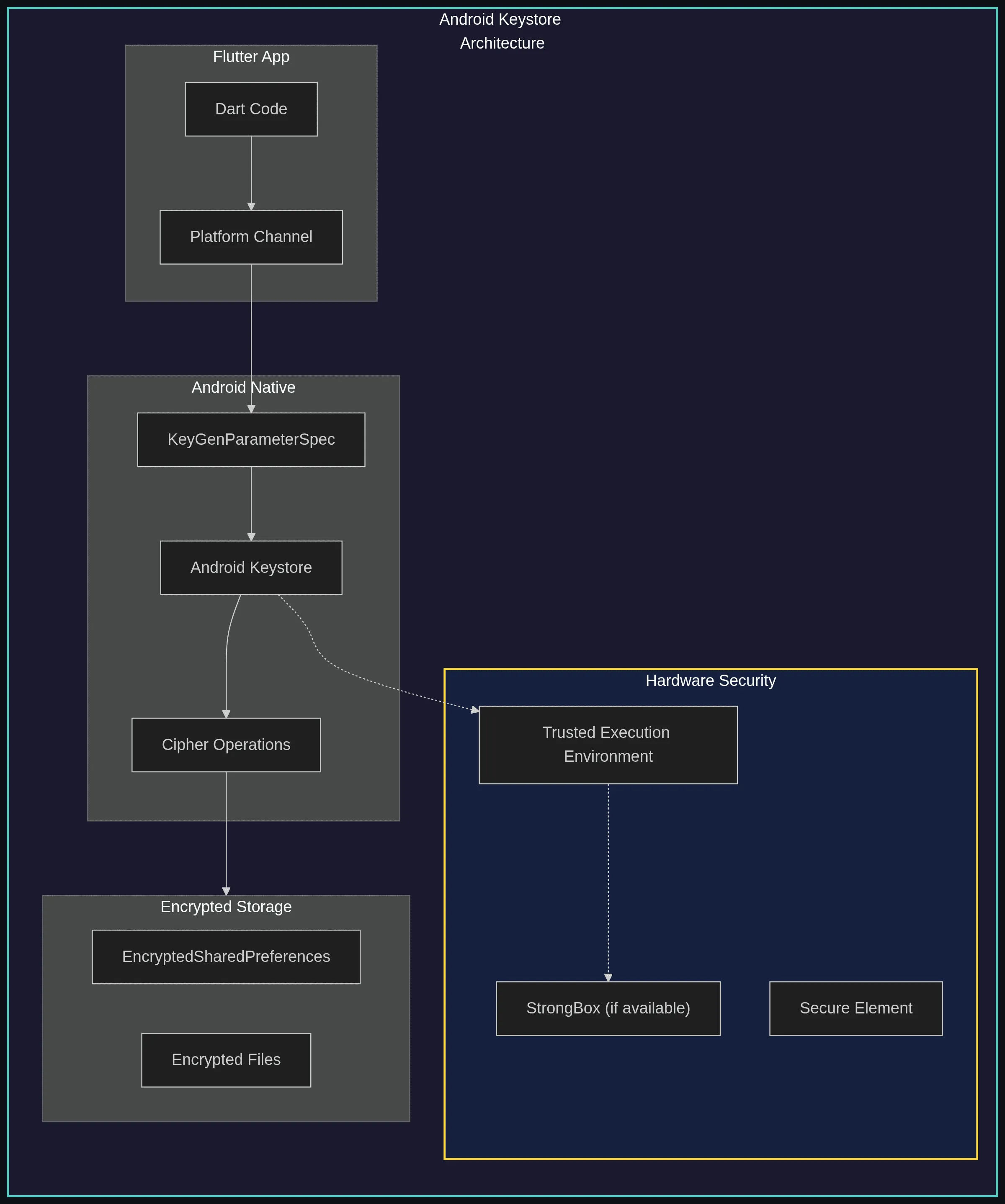
Android’s [Keystore system](https://developer.android.com/training/articles/keystore) is the gold standard for secure storage on the platform.
When available (which is most modern devices), it provides hardware-backed cryptographic key storage. This means the encryption keys literally never leave a secure hardware module. Even the operating system can't extract them.
**What makes Android Keystore special:**
| Feature | Description |
| ----------------------------- | ------------------------------------------------------------------------------------- |
| **Hardware Backing** | Keys stored in TEE (Trusted Execution Environment) or StrongBox (Pixel, Samsung Knox) |
| **Key Extraction Prevention** | Private keys never leave secure hardware |
| **User Authentication** | Can require biometrics/PIN before key use |
| **Key Attestation** | Verify key properties with signed certificate chain |
| **Usage Restrictions** | Limit key to specific algorithms/purposes |
The important thing to understand is that when you use `flutter_secure_storage` on Android, your data is encrypted with keys that are protected by this hardware security.
Even if an attacker extracts your encrypted data, they can't decrypt it without access to the secure hardware. That requires physical possession of the specific device.
#### iOS: Keychain Services
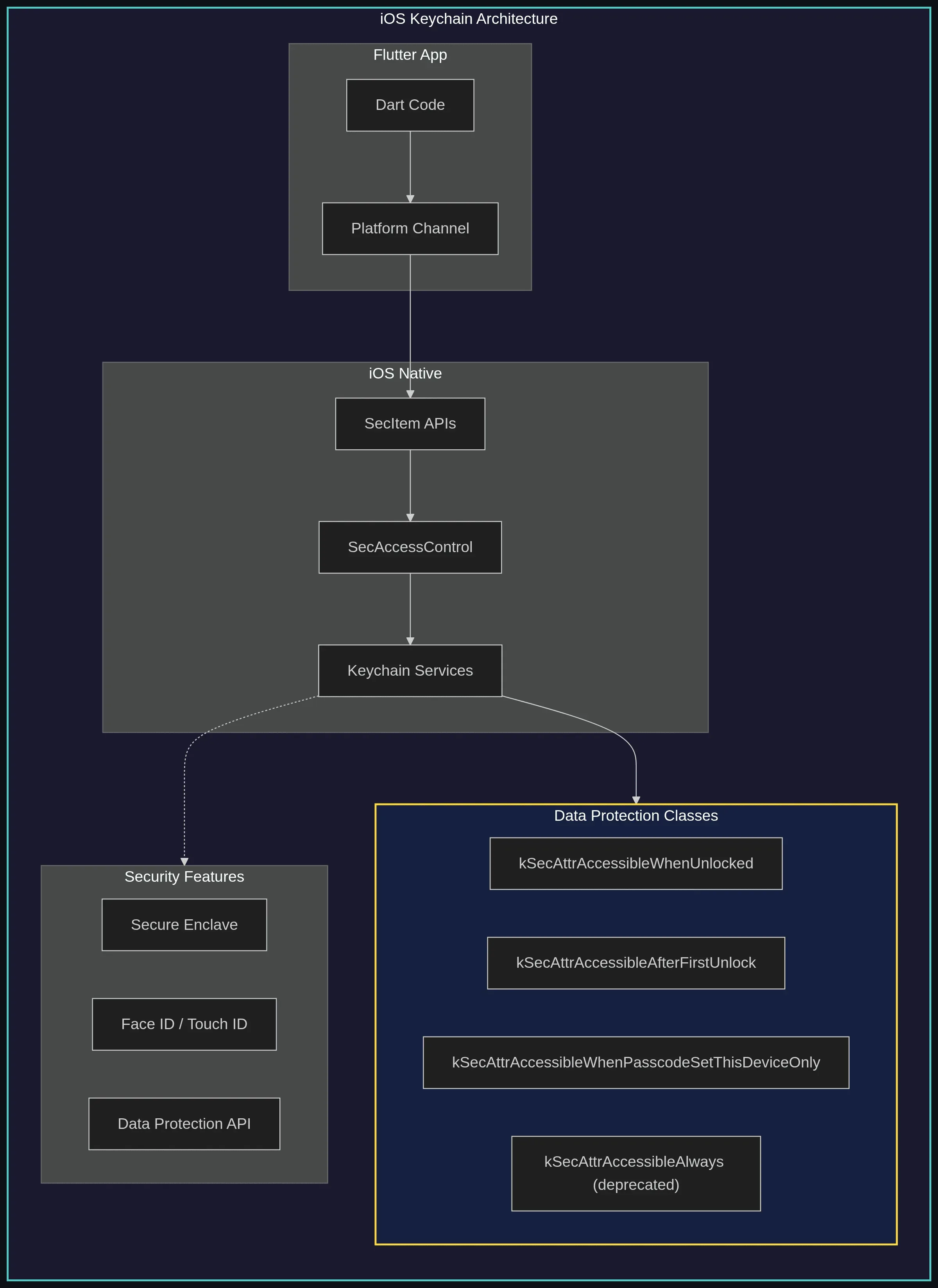
iOS takes a slightly different approach with its [Keychain Services](https://developer.apple.com/documentation/security/keychain_services). Rather than giving you direct access to encryption keys, the Keychain handles both key management and data storage. You put secrets in, and iOS keeps them encrypted with hardware-protected keys. On devices with a Secure Enclave, cryptographic keys created with the [`kSecAttrTokenIDSecureEnclave`](https://developer.apple.com/documentation/security/ksecattrtokenidsecureenclave) flag never leave that hardware—but note that general Keychain items are protected by the device’s Data Protection keys, not stored directly inside the Enclave.
One of the most important decisions you'll make with iOS Keychain is choosing the right [accessibility level](https://developer.apple.com/documentation/security/keychain_services/keychain_items/restricting_keychain_item_accessibility). This determines when your data can be accessed and whether it gets included in backups:
| Level | Description | Use Case |
| -------------------------------- | --------------------------------------------- | ---------------------------------------- |
| `WhenPasscodeSetThisDeviceOnly` | Most restrictive; deleted if passcode removed | Highly sensitive (banking credentials) |
| `WhenUnlockedThisDeviceOnly` | Accessible only when unlocked, not backed up | Session tokens, temporary secrets |
| `WhenUnlocked` | Accessible when unlocked, backed up | User preferences with sensitive elements |
| `AfterFirstUnlockThisDeviceOnly` | Accessible after first unlock, not backed up | Background sync credentials |
| `AfterFirstUnlock` | Accessible after first unlock, backed up | Push notification tokens |
For most sensitive data, I recommend `AfterFirstUnlockThisDeviceOnly`. This provides strong protection while still allowing background operations like push notifications to access the data when needed. The "ThisDeviceOnly" suffix means the data won't be included in iCloud backups, which is important for secrets you don't want floating around in the cloud.
### Implementing Secure Storage in Flutter
With the platform picture in mind, here's how to put it to work from your Flutter code.
#### Using flutter\_secure\_storage
The [`flutter_secure_storage`](https://pub.dev/packages/flutter_secure_storage) package is the standard solution for secure storage in Flutter. It provides a unified API that uses Android Keystore on Android and iOS Keychain on iOS:
```dart
// ✅ SECURE: Using flutter_secure_storage
import 'package:flutter_secure_storage/flutter_secure_storage.dart';
class SecureStorageService {
late final FlutterSecureStorage _storage;
SecureStorageService() {
// Configure with secure options
_storage = const FlutterSecureStorage(
aOptions: AndroidOptions(
// Uses Android's EncryptedSharedPreferences under the hood,
// which applies AES256-SIV for keys and AES256-GCM for values.
encryptedSharedPreferences: true,
),
iOptions: IOSOptions(
// Highest security: requires passcode, device-only
accessibility: KeychainAccessibility.passcode,
// Don't sync to iCloud Keychain
synchronizable: false,
),
);
}
// Store authentication token
Future storeAuthToken(String token) async {
await _storage.write(
key: 'auth_token',
value: token,
);
}
// Retrieve authentication token
Future getAuthToken() async {
return await _storage.read(key: 'auth_token');
}
// Store refresh token with biometric protection
Future storeRefreshToken(String token) async {
final biometricStorage = FlutterSecureStorage(
aOptions: AndroidOptions.biometric(
enforceBiometrics: true,
biometricPromptTitle: 'Authenticate to access credentials',
biometricPromptSubtitle: 'Use your fingerprint or face',
),
iOptions: const IOSOptions(
accessibility: KeychainAccessibility.passcode,
),
);
await biometricStorage.write(
key: 'refresh_token',
value: token,
);
}
// Delete all stored data (for logout)
Future clearAll() async {
await _storage.deleteAll();
}
// Check if key exists
Future hasKey(String key) async {
return await _storage.containsKey(key: key);
}
}
```
**Example output:**
```
[SecureStorage] ✅ Auth token stored (encrypted, hardware-backed).
[SecureStorage] ✅ Auth token retrieved (length: 36).
[SecureStorage] ✅ Refresh token stored (biometric-protected).
[SecureStorage] ✅ All secure storage cleared.
```
#### Secure Database with SQLCipher
For applications that need to store more structured data, plain SQLite isn't enough. The `sqflite_sqlcipher` package provides transparent database encryption using SQLCipher, which is widely trusted in the security community.
The key insight here is that you need to store the database encryption keys securely—which brings us back to `flutter_secure_storage`. Here's the pattern I recommend:
```dart
// ✅ SECURE: Encrypted SQLite database
import 'package:sqflite_sqlcipher/sqflite.dart';
import 'package:path/path.dart';
import 'package:flutter_secure_storage/flutter_secure_storage.dart';
import 'dart:math';
class SecureDatabase {
Database? _database;
final _secureStorage = const FlutterSecureStorage();
static const _dbKeyStorageKey = 'database_encryption_key';
// Generate or retrieve database encryption key
Future _getDatabaseKey() async {
String? key = await _secureStorage.read(key: _dbKeyStorageKey);
if (key == null) {
// Generate a strong random key
key = _generateSecureKey(32);
await _secureStorage.write(key: _dbKeyStorageKey, value: key);
}
return key;
}
String _generateSecureKey(int length) {
const charset = 'abcdefghijklmnopqrstuvwxyzABCDEFGHIJKLMNOPQRSTUVWXYZ0123456789!@#\$%^&*';
final random = Random.secure();
return List.generate(length, (_) => charset[random.nextInt(charset.length)]).join();
}
Future get database async {
if (_database != null) return _database!;
final dbPath = await getDatabasesPath();
final encryptionKey = await _getDatabaseKey();
_database = await openDatabase(
join(dbPath, 'secure_user_data.db'),
version: 1,
password: encryptionKey, // SQLCipher encryption
onCreate: (db, version) async {
await db.execute('''
CREATE TABLE sensitive_data (
id INTEGER PRIMARY KEY AUTOINCREMENT,
data_type TEXT NOT NULL,
encrypted_value TEXT NOT NULL,
created_at INTEGER NOT NULL,
updated_at INTEGER NOT NULL
)
''');
// Create index for faster lookups
await db.execute(
'CREATE INDEX idx_data_type ON sensitive_data(data_type)'
);
},
);
return _database!;
}
Future close() async {
await _database?.close();
_database = null;
}
}
```
With this setup, even if someone extracts the database file, they'll just see encrypted gibberish. The decryption key lives in the hardware-backed secure storage, making the data practically unreadable without access to the specific device.
**Example output:**
```
[SecureDB] ✅ Generated encryption key (length: 32).
[SecureDB] ✅ Key stored in flutter_secure_storage (hardware-backed).
[SecureDB] ✅ Database opened with SQLCipher encryption.
[SecureDB] Path: /secure_user_data.db
[SecureDB] Cipher: AES-256 (via SQLCipher)
[SecureDB] Key storage: database_encryption_key → Keystore/Keychain
[SecureDB]
[SecureDB] Even if extracted, the .db file is unreadable without
[SecureDB] the device-specific hardware-backed key.
```
#### Secure File Storage
Sometimes you need to store larger files, documents, images, or exported data that don't fit well in a database or key-value store. Here's how to handle that securely:
```dart
// ✅ SECURE: Encrypted file storage
import 'dart:convert';
import 'dart:io';
import 'dart:typed_data';
import 'package:encrypt/encrypt.dart' as encrypt;
import 'package:flutter_secure_storage/flutter_secure_storage.dart';
import 'package:path_provider/path_provider.dart';
import 'dart:math';
class SecureFileStorage {
final _secureStorage = const FlutterSecureStorage();
static const _fileKeyStorageKey = 'file_encryption_key';
Future _getEncryptionKey() async {
String? keyBase64 = await _secureStorage.read(key: _fileKeyStorageKey);
if (keyBase64 == null) {
// Generate a new AES-256 key
final key = encrypt.Key.fromSecureRandom(32);
keyBase64 = key.base64;
await _secureStorage.write(key: _fileKeyStorageKey, value: keyBase64);
return key;
}
return encrypt.Key.fromBase64(keyBase64);
}
/// Encrypt and save data to a file
Future saveEncryptedFile(String filename, String data) async {
final key = await _getEncryptionKey();
// Generate a unique IV for each encryption
final iv = encrypt.IV.fromSecureRandom(16);
// Create encrypter with AES-GCM (authenticated encryption)
final encrypter = encrypt.Encrypter(
encrypt.AES(key, mode: encrypt.AESMode.gcm),
);
// Encrypt the data
final encrypted = encrypter.encrypt(data, iv: iv);
// Combine IV and ciphertext for storage
final combined = {
'iv': iv.base64,
'data': encrypted.base64,
};
// Save to file
final directory = await getApplicationDocumentsDirectory();
final file = File('${directory.path}/$filename.enc');
await file.writeAsString(jsonEncode(combined));
}
/// Read and decrypt data from a file
Future readEncryptedFile(String filename) async {
try {
final directory = await getApplicationDocumentsDirectory();
final file = File('${directory.path}/$filename.enc');
if (!await file.exists()) return null;
final content = await file.readAsString();
final combined = jsonDecode(content) as Map;
final key = await _getEncryptionKey();
final iv = encrypt.IV.fromBase64(combined['iv'] as String);
final encrypter = encrypt.Encrypter(
encrypt.AES(key, mode: encrypt.AESMode.gcm),
);
return encrypter.decrypt64(combined['data'] as String, iv: iv);
} catch (e) {
// Decryption failed: tampered data, wrong key, or corrupted file.
// Avoid logging the error — it may contain ciphertext fragments.
return null;
}
}
/// Securely delete a file (overwrite before deletion)
Future secureDelete(String filename) async {
final directory = await getApplicationDocumentsDirectory();
final file = File('${directory.path}/$filename.enc');
if (await file.exists()) {
// Overwrite with random data before deletion
final length = await file.length();
final random = Random.secure();
final randomData = List.generate(length, (_) => random.nextInt(256));
await file.writeAsBytes(Uint8List.fromList(randomData));
// Now delete
await file.delete();
}
}
}
```
**Example output:**
```
[SecureFile] ✅ AES-256-GCM encryption:
[SecureFile] Plaintext length : 48 bytes
[SecureFile] IV (base64) :
[SecureFile] Ciphertext (b64) : …
[SecureFile] Key stored in : flutter_secure_storage
[SecureFile]
[SecureFile] File written: /medical.enc
[SecureFile] Format: { "iv": "", "data": "" }
[SecureFile] 🗑️ Secure delete:
[SecureFile] Step 1: Overwrite 2048 bytes with random data
[SecureFile] Step 2: Delete file from filesystem
[SecureFile] ⚠️ Note: flash wear-leveling means original blocks
[SecureFile] may persist — rely on full-disk encryption too.
```
Three things in this implementation are worth highlighting:
1. **Unique IV per encryption**: A fresh IV is generated for every file.
* Reusing the same IV with the same key in AES-GCM breaks security guarantees.
2. **AES-GCM mode**: Galois/Counter Mode gives you confidentiality *and* authenticity in one pass.
* Tamper with the ciphertext and decryption fails.
3. **Secure deletion**: `secureDelete` overwrites the file with random bytes before deleting.
* Not a perfect guarantee on flash storage, but it raises recovery effort.
**Caveat — flash storage and wear leveling**: Modern mobile devices use NAND flash (a solid-state memory technology) with wear-leveling controllers. Overwriting a file does not guarantee the original physical blocks are erased.
For the strongest guarantees, rely on [full-disk encryption](https://source.android.com/docs/security/features/encryption) (enabled by default on Android 10+ and all iOS devices) so that discarded blocks remain encrypted even if they aren’t zeroed.
### Secure Storage Architecture
Individual APIs are one thing, but in a real app you want a single place where all storage decisions live. The rule I follow: your UI and repository layers should never touch encryption keys or platform storage APIs directly. That concern belongs in a dedicated security layer:

#### Complete Secure Storage Service
Here's what that security layer looks like in practice. It supports three sensitivity tiers—because a user preference and a banking credential shouldn't be stored the same way:
```dart
// ✅ SECURE: Comprehensive secure storage service
import 'dart:convert';
import 'package:flutter/foundation.dart';
import 'package:flutter_secure_storage/flutter_secure_storage.dart';
import 'package:local_auth/local_auth.dart';
enum StorageSensitivity {
/// Standard encryption, no biometrics
standard,
/// Requires biometric authentication
biometric,
/// Highest security: biometrics + device-only storage
critical,
}
class SecureStorageService {
final FlutterSecureStorage _standardStorage;
final FlutterSecureStorage _biometricStorage;
final FlutterSecureStorage _criticalStorage;
final LocalAuthentication _localAuth;
SecureStorageService()
: _standardStorage = const FlutterSecureStorage(
aOptions: AndroidOptions(
encryptedSharedPreferences: true,
),
iOptions: IOSOptions(
accessibility: KeychainAccessibility.first_unlock,
),
),
_biometricStorage = FlutterSecureStorage(
aOptions: AndroidOptions.biometric(
enforceBiometrics: true,
biometricPromptTitle: 'Verify your identity',
),
iOptions: const IOSOptions(
accessibility: KeychainAccessibility.unlocked,
),
),
_criticalStorage = FlutterSecureStorage(
aOptions: AndroidOptions.biometric(
enforceBiometrics: true,
biometricPromptTitle: 'High security verification required',
),
iOptions: const IOSOptions(
accessibility: KeychainAccessibility.passcode,
synchronizable: false, // Don't sync to iCloud
),
),
_localAuth = LocalAuthentication();
FlutterSecureStorage _getStorage(StorageSensitivity sensitivity) {
switch (sensitivity) {
case StorageSensitivity.standard:
return _standardStorage;
case StorageSensitivity.biometric:
return _biometricStorage;
case StorageSensitivity.critical:
return _criticalStorage;
}
}
/// Store a string value securely
Future write({
required String key,
required String value,
StorageSensitivity sensitivity = StorageSensitivity.standard,
}) async {
final storage = _getStorage(sensitivity);
await storage.write(key: key, value: value);
}
/// Read a string value
Future read({
required String key,
StorageSensitivity sensitivity = StorageSensitivity.standard,
}) async {
final storage = _getStorage(sensitivity);
return await storage.read(key: key);
}
/// Store a complex object as JSON
Future writeObject({
required String key,
required T value,
required Map Function(T) toJson,
StorageSensitivity sensitivity = StorageSensitivity.standard,
}) async {
final jsonString = jsonEncode(toJson(value));
await write(key: key, value: jsonString, sensitivity: sensitivity);
}
/// Read a complex object from JSON
Future readObject({
required String key,
required T Function(Map) fromJson,
StorageSensitivity sensitivity = StorageSensitivity.standard,
}) async {
final jsonString = await read(key: key, sensitivity: sensitivity);
if (jsonString == null) return null;
try {
final json = jsonDecode(jsonString) as Map;
return fromJson(json);
} catch (e) {
debugPrint('Failed to parse stored object: $e');
return null;
}
}
/// Delete a specific key
Future delete({
required String key,
StorageSensitivity sensitivity = StorageSensitivity.standard,
}) async {
final storage = _getStorage(sensitivity);
await storage.delete(key: key);
}
/// Check if biometrics are available
Future canUseBiometrics() async {
try {
final isAvailable = await _localAuth.canCheckBiometrics;
final isDeviceSupported = await _localAuth.isDeviceSupported();
return isAvailable && isDeviceSupported;
} catch (e) {
return false;
}
}
/// Clear all secure storage
Future clearAll() async {
await Future.wait([
_standardStorage.deleteAll(),
_biometricStorage.deleteAll(),
_criticalStorage.deleteAll(),
]);
}
}
```
#### Usage Example: Authentication Service
```dart
// ✅ SECURE: Using secure storage for authentication
class AuthenticationRepository {
final SecureStorageService _storage;
static const _accessTokenKey = 'access_token';
static const _refreshTokenKey = 'refresh_token';
static const _userProfileKey = 'user_profile';
static const _bankingCredentialsKey = 'banking_credentials';
AuthenticationRepository(this._storage);
/// Store tokens after successful login
Future storeTokens({
required String accessToken,
required String refreshToken,
}) async {
// Access token: standard security (short-lived)
await _storage.write(
key: _accessTokenKey,
value: accessToken,
sensitivity: StorageSensitivity.standard,
);
// Refresh token: biometric protection (long-lived)
await _storage.write(
key: _refreshTokenKey,
value: refreshToken,
sensitivity: StorageSensitivity.biometric,
);
}
/// Get access token (for API calls)
Future getAccessToken() async {
return await _storage.read(key: _accessTokenKey);
}
/// Get refresh token (requires biometric)
Future getRefreshToken() async {
return await _storage.read(
key: _refreshTokenKey,
sensitivity: StorageSensitivity.biometric,
);
}
/// Store banking credentials (highest security)
Future storeBankingCredentials(BankingCredentials credentials) async {
await _storage.writeObject(
key: _bankingCredentialsKey,
value: credentials,
toJson: (c) => c.toJson(),
sensitivity: StorageSensitivity.critical,
);
}
/// Get banking credentials (requires biometrics)
Future getBankingCredentials() async {
return await _storage.readObject(
key: _bankingCredentialsKey,
fromJson: BankingCredentials.fromJson,
sensitivity: StorageSensitivity.critical,
);
}
/// Clear all on logout
Future logout() async {
await _storage.clearAll();
}
}
class BankingCredentials {
final String accountNumber;
final String routingNumber;
final DateTime lastAccessed;
BankingCredentials({
required this.accountNumber,
required this.routingNumber,
required this.lastAccessed,
});
Map toJson() => {
'accountNumber': accountNumber,
'routingNumber': routingNumber,
'lastAccessed': lastAccessed.toIso8601String(),
};
factory BankingCredentials.fromJson(Map json) {
return BankingCredentials(
accountNumber: json['accountNumber'] as String,
routingNumber: json['routingNumber'] as String,
lastAccessed: DateTime.parse(json['lastAccessed'] as String),
);
}
}
```
### Preventing Data Leakage
Secure storage protects data at rest, but sensitive information leaks through side channels that most developers don't think about until something goes wrong. I've seen each of the following cause real incidents: debug logs submitted in support tickets, screenshots captured by the OS app switcher, clipboard content harvested by other apps.
#### 1. Secure Logging
A `print()` call that felt harmless in development quietly persists into your release build and ends up in support logs, ADB output, and crash reports. Here's a logger that makes it structurally difficult to accidentally expose sensitive values:
```dart
// ✅ SECURE: Safe logging that strips sensitive data
import 'dart:developer' as developer;
import 'package:flutter/foundation.dart';
class SecureLogger {
static final Set _sensitiveKeys = {
'password',
'token',
'secret',
'key',
'authorization',
'credit_card',
'ssn',
'pin',
'cvv',
};
/// Log safely, redacting sensitive information
static void log(String message, {Object? data}) {
// Don't log in release mode
if (kReleaseMode) return;
final sanitizedMessage = _sanitize(message);
final sanitizedData = data != null ? _sanitizeObject(data) : null;
developer.log(
sanitizedMessage,
name: 'APP',
error: sanitizedData,
);
}
static String _sanitize(String input) {
String result = input;
// Redact common sensitive patterns
// JWT tokens
result = result.replaceAll(
RegExp(r'eyJ[A-Za-z0-9_-]*\.eyJ[A-Za-z0-9_-]*\.[A-Za-z0-9_-]*'),
'[REDACTED_JWT]',
);
// Credit card numbers
result = result.replaceAll(
RegExp(r'\b\d{4}[-\s]?\d{4}[-\s]?\d{4}[-\s]?\d{4}\b'),
'[REDACTED_CARD]',
);
// SSN patterns
result = result.replaceAll(
RegExp(r'\b\d{3}[-\s]?\d{2}[-\s]?\d{4}\b'),
'[REDACTED_SSN]',
);
// Email in password context
result = result.replaceAll(
RegExp(r'password["\s:=]+[^\s,}"]+', caseSensitive: false),
'password=[REDACTED]',
);
return result;
}
static Object? _sanitizeObject(Object obj) {
if (obj is Map) {
return obj.map((key, value) {
final keyLower = key.toString().toLowerCase();
if (_sensitiveKeys.any((k) => keyLower.contains(k))) {
return MapEntry(key, '[REDACTED]');
}
return MapEntry(key, _sanitizeObject(value));
});
} else if (obj is List) {
return obj.map(_sanitizeObject).toList();
} else if (obj is String) {
return _sanitize(obj);
}
return obj;
}
}
// Usage example
void example() {
SecureLogger.log('User login', data: {
'email': 'user@example.com',
'password': 'secret123', // Will be redacted
'token': 'eyJhbGc...', // Will be redacted
});
}
```
**Output** (debug console):
```
[SecureLogger] Input with sensitive data:
[SecureLogger] Raw : User login: email=user@example.com, password=secret123, token=eyJhbGciOiJIUzI1NiIsInR5cCI6IkpXVCJ9.eyJzdWIiOiIxMjM0NTY3ODkw.dozjgNryP4J3jVmNHl0w5N_XgL0n3I9PlFUP0THsR8U, card=4111-1111-1111-1111, ssn=123-45-6789
[SecureLogger] Safe: User login: email=user@example.com, password=[REDACTED], token=[REDACTED_JWT], card=[REDACTED_CARD], ssn=[REDACTED_SSN]
[SecureLogger] Map sanitization:
[SecureLogger] Raw : {email: user@example.com, password: secret123, token: eyJhbGciOiJIUzI1NiIsInR5cCI6IkpXVCJ9.eyJzdWIiOiIxMjM0NTY3ODkw.dozjgNryP4J3jVmNHl0w5N_XgL0n3I9PlFUP0THsR8U}
[SecureLogger] Safe: {email: user@example.com, password: [REDACTED], token: [REDACTED]}
```
This logger does several important things: it completely disables logging in release mode, and even in debug mode, it automatically redacts patterns that look like tokens, credit cards, SSNs (Social Security Numbers), and passwords. You can expand the pattern matching for your specific use cases.
#### 2. Clipboard Security
When users copy sensitive data (like account numbers or recovery codes), that data sits in the system clipboard where any app can read it. Here's how to auto-clear the clipboard after a short period:
```dart
// ✅ SECURE: Auto-clear clipboard for sensitive data
import 'dart:async';
import 'package:flutter/services.dart';
class SecureClipboard {
static Timer? _clearTimer;
/// Copy sensitive data with auto-clear
static Future copySecure(
String data, {
Duration clearAfter = const Duration(seconds: 30),
}) async {
await Clipboard.setData(ClipboardData(text: data));
// Cancel any existing timer
_clearTimer?.cancel();
// Set new timer to clear clipboard
_clearTimer = Timer(clearAfter, () async {
await Clipboard.setData(const ClipboardData(text: ''));
});
}
/// Immediately clear clipboard
static Future clear() async {
_clearTimer?.cancel();
await Clipboard.setData(const ClipboardData(text: ''));
}
}
```
Thirty seconds is usually enough time for users to paste what they copied, but short enough to limit exposure. For extremely sensitive data, you might reduce this to 10–15 seconds.
#### 3. Screenshot Protection
For apps handling sensitive information (banking, health, legal), you should prevent screenshots of sensitive screens. Here's how to implement this with platform channels:
```dart
// ✅ SECURE: Prevent screenshots of sensitive screens
import 'package:flutter/services.dart';
class ScreenshotProtection {
static const _channel = MethodChannel('com.example.app/security');
/// Enable screenshot protection
static Future enable() async {
try {
await _channel.invokeMethod('enableScreenshotProtection');
} on PlatformException catch (e) {
debugPrint('Failed to enable screenshot protection: $e');
}
}
/// Disable screenshot protection
static Future disable() async {
try {
await _channel.invokeMethod('disableScreenshotProtection');
} on PlatformException catch (e) {
debugPrint('Failed to disable screenshot protection: $e');
}
}
}
```
**Android Implementation** (`MainActivity.kt`):
On Android, we use the `FLAG_SECURE` window flag which prevents screenshots and also hides the app content in the recent apps list:
```kotlin
import android.view.WindowManager
import io.flutter.embedding.android.FlutterActivity
import io.flutter.embedding.engine.FlutterEngine
import io.flutter.plugin.common.MethodChannel
class MainActivity: FlutterActivity() {
private val CHANNEL = "com.example.app/security"
override fun configureFlutterEngine(flutterEngine: FlutterEngine) {
super.configureFlutterEngine(flutterEngine)
MethodChannel(flutterEngine.dartExecutor.binaryMessenger, CHANNEL).setMethodCallHandler { call, result ->
when (call.method) {
"enableScreenshotProtection" -> {
window.setFlags(
WindowManager.LayoutParams.FLAG_SECURE,
WindowManager.LayoutParams.FLAG_SECURE
)
result.success(null)
}
"disableScreenshotProtection" -> {
window.clearFlags(WindowManager.LayoutParams.FLAG_SECURE)
result.success(null)
}
else -> result.notImplemented()
}
}
}
}
```
**iOS Implementation** (`AppDelegate.swift`):
iOS doesn't have an exact equivalent, but we can show a blur or overlay when the app goes to the background (which is when screenshots are typically captured):
```swift
import UIKit
import Flutter
@UIApplicationMain
@objc class AppDelegate: FlutterAppDelegate {
private var securityView: UIView?
override func application(
_ application: UIApplication,
didFinishLaunchingWithOptions launchOptions: [UIApplication.LaunchOptionsKey: Any]?
) -> Bool {
let controller = window?.rootViewController as! FlutterViewController
let channel = FlutterMethodChannel(
name: "com.example.app/security",
binaryMessenger: controller.binaryMessenger
)
channel.setMethodCallHandler { [weak self] (call, result) in
switch call.method {
case "enableScreenshotProtection":
self?.enableScreenshotProtection()
result(nil)
case "disableScreenshotProtection":
self?.disableScreenshotProtection()
result(nil)
default:
result(FlutterMethodNotImplemented)
}
}
GeneratedPluginRegistrant.register(with: self)
return super.application(application, didFinishLaunchingWithOptions: launchOptions)
}
private func enableScreenshotProtection() {
// Hide content when app switcher or screenshot
NotificationCenter.default.addObserver(
self,
selector: #selector(hideContent),
name: UIApplication.willResignActiveNotification,
object: nil
)
NotificationCenter.default.addObserver(
self,
selector: #selector(showContent),
name: UIApplication.didBecomeActiveNotification,
object: nil
)
}
private func disableScreenshotProtection() {
NotificationCenter.default.removeObserver(
self,
name: UIApplication.willResignActiveNotification,
object: nil
)
NotificationCenter.default.removeObserver(
self,
name: UIApplication.didBecomeActiveNotification,
object: nil
)
showContent()
}
@objc private func hideContent() {
securityView = UIView(frame: window?.bounds ?? .zero)
securityView?.backgroundColor = .white
window?.addSubview(securityView!)
}
@objc private func showContent() {
securityView?.removeFromSuperview()
securityView = nil
}
}
```
#### 4. Secure Memory Handling
This is an advanced topic, but important for truly sensitive data. When you store a password or key in a Dart string, that string sits in memory until the garbage collector cleans it up, which might be a while. On a compromised device, memory can be dumped and searched for sensitive patterns.
Here's a pattern for handling sensitive data that clears memory as soon as it's no longer needed:
```dart
// ✅ SECURE: Clear sensitive data from memory
import 'dart:typed_data';
class SecureMemory {
/// Securely clear a byte array by overwriting with zeros
static Uint8List clearBytes(Uint8List data) {
for (var i = 0; i < data.length; i++) {
data[i] = 0;
}
return data;
}
/// Create a secure string wrapper that clears on dispose
static SecureString createSecureString(String value) {
return SecureString(value);
}
}
class SecureString {
late Uint8List _data;
bool _isCleared = false;
SecureString(String value) {
_data = Uint8List.fromList(value.codeUnits);
}
String get value {
if (_isCleared) {
throw StateError('SecureString has been cleared');
}
return String.fromCharCodes(_data);
}
void clear() {
if (!_isCleared) {
SecureMemory.clearBytes(_data);
_isCleared = true;
}
}
}
// Usage in authentication
class LoginService {
Future login(String email, SecureString password) async {
try {
await _api.login(email, password.value);
} finally {
// Always clear password from memory
password.clear();
}
}
}
```
Note that Dart strings are immutable, so we can't truly "clear" them—we work with byte arrays instead. This is a limitation of the language, but using this pattern still reduces the window of exposure.
**Example output:**
```
[SecureMemory] Created SecureString: [SecureString(13 bytes)]
[SecureMemory] Value accessible: 13 chars
[SecureMemory] (simulating API login call…)
[SecureMemory] After clear(): [CLEARED]
[SecureMemory] ✅ Access denied: Bad state: SecureString has been cleared
```
### Real Attack Scenarios & Prevention
Abstract advice only gets you so far. Here's what these attacks actually look like when they happen—and exactly what stops each one.
#### Scenario 1: Backup Extraction Attack
**The attack**: An attacker gains access to a user's iCloud or Google account (through phishing, password reuse, etc.) and downloads device backups. They extract your app's data from the backup and find authentication tokens stored in plain SharedPreferences.
**What happens next**: The attacker uses those tokens to access the user's account, potentially stealing personal information, making unauthorized purchases, or worse.
```dart
// ❌ VULNERABLE: Data included in backups
class VulnerableStorage {
Future saveTokens(String accessToken, String refreshToken) async {
final prefs = await SharedPreferences.getInstance();
await prefs.setString('access_token', accessToken);
await prefs.setString('refresh_token', refreshToken);
// These will be included in device backups!
}
}
// ✅ SECURE: Exclude from backups
class SecureStorage {
final _storage = const FlutterSecureStorage(
aOptions: AndroidOptions(
encryptedSharedPreferences: true,
),
iOptions: IOSOptions(
accessibility: KeychainAccessibility.passcode,
synchronizable: false, // Exclude from iCloud sync
),
);
Future saveTokens(String accessToken, String refreshToken) async {
await _storage.write(key: 'access_token', value: accessToken);
await _storage.write(key: 'refresh_token', value: refreshToken);
}
}
```
With the secure implementation, even if the attacker gets the backup, the tokens are encrypted with device-specific keys that aren't included in the backup.
#### Scenario 2: Root/Jailbreak Data Extraction
**The attack**: A user's device is compromised by malware (perhaps from a malicious app or sideloaded software). The malware has root access and reads files from your app's private directory.
```dart
// ✅ SECURE: Detect compromised device and respond appropriately
// Uses freeRASP — callback names may differ across versions.
// See https://pub.dev/packages/freerasp for the latest API.
import 'package:freerasp/freerasp.dart';
import 'package:flutter_secure_storage/flutter_secure_storage.dart';
class SecurityService {
bool _isDeviceSecure = true;
Future initialize() async {
final config = TalsecConfig(
androidConfig: AndroidConfig(
packageName: 'com.example.app',
signingCertHashes: ['your_cert_hash'],
supportedStores: ['com.sec.android.app.samsungapps'],
),
iosConfig: IOSConfig(
bundleIds: ['com.example.app'],
teamId: 'YOUR_TEAM_ID',
),
watcherMail: 'security@example.com',
);
// Register callbacks before calling start()
final callback = ThreatCallback(
onPrivilegedAccess: _onRootOrJailbreakDetected,
onAppIntegrity: _onTamperDetected,
// Provide no-op handlers for threats you only want to monitor
onDebug: () {},
onSimulator: () {},
onUnofficialStore: () {},
onHooks: () {},
onDeviceBinding: () {},
onObfuscationIssues: () {},
);
Talsec.instance.attachListener(callback);
await Talsec.instance.start(config);
}
void _onRootOrJailbreakDetected() {
_isDeviceSecure = false;
_clearSensitiveData();
_showSecurityWarning();
}
void _onTamperDetected() {
_isDeviceSecure = false;
_clearSensitiveData();
_blockAccess();
}
Future _clearSensitiveData() async {
final storage = const FlutterSecureStorage();
await storage.deleteAll();
}
void _showSecurityWarning() {
// Alert user about compromised device
}
void _blockAccess() {
// Prevent access to sensitive features
}
bool get canAccessSensitiveData => _isDeviceSecure;
}
```
**Example output (device security checks):**
```
[Security] Running device security checks…
[Security] ✅ Root/jailbreak: not detected
[Security] ✅ App integrity: valid
[Security] ✅ Debug mode: not attached
[Security] ✅ Emulator: not detected
[Security] Device is secure — sensitive features enabled.
[Security] Simulating root/jailbreak detection…
[Security] 🚨 Root/jailbreak DETECTED!
[Security] 🗑️ Sensitive data cleared from secure storage.
[Security] 🔒 Sensitive features BLOCKED.
[Security] canAccessSensitiveData = false
```
#### Scenario 3: Logging Credential Leak
**The attack**: During a support investigation, someone shares device logs with a third party (or posts them online asking for help). Those logs contain authentication tokens that were printed during debugging and never removed.
This one happens more often than you'd think. I've seen production apps that logged full API responses including auth tokens to the console.
```dart
// ❌ VULNERABLE: Logging sensitive data
class VulnerableAuthService {
Future login(String email, String password) async {
print('Attempting login for $email with password $password');
final response = await _api.login(email, password);
print('Got token: ${response.token}');
}
}
// ✅ SECURE: No sensitive data in logs
class SecureAuthService {
final _logger = SecureLogger();
Future login(String email, String password) async {
_logger.info('Attempting login for user');
final response = await _api.login(email, password);
_logger.info('Login successful');
// Never log tokens or credentials
}
}
class SecureLogger {
void info(String message) {
if (!kReleaseMode) {
developer.log('[INFO] $message');
}
}
void error(String message, [Object? error]) {
if (!kReleaseMode) {
developer.log('[ERROR] $message', error: error);
}
// In production, send to secure error tracking (without PII)
}
}
```
### Security Checklist
I run through something like this before every major release. It takes twenty minutes and has caught real issues more than once:
#### Encryption
* [ ] All sensitive data encrypted at rest.
* [ ] Platform secure storage used (Keychain/Keystore).
* [ ] Encryption keys stored securely (never hardcoded).
* [ ] Strong encryption algorithms used (for example, AES-256-GCM).
#### Access control
* [ ] Biometric protection for critical data.
* [ ] Sensitive data cleared on failed authentication attempts.
* [ ] Session data expires.
#### Backup security
* [ ] Sensitive data excluded from cloud backups.
* [ ] Device-only storage for critical secrets.
#### Logging
* [ ] No sensitive data in logs.
* [ ] Production logging minimized.
* [ ] Log files properly secured.
#### Memory
* [ ] Sensitive data cleared after use.
* [ ] No credential caching.
#### Root/Jailbreak
* [ ] Detection implemented.
* [ ] Appropriate response to compromised devices.
#### Data leakage
* [ ] Screenshot protection for sensitive screens.
* [ ] Clipboard auto-clear implemented.
* [ ] Keyboard caching disabled for sensitive fields.
### Conclusion
If there's one thing I hope you take away from this article, it's that data storage security isn't optional—it's a fundamental responsibility we have to our users. When someone trusts your app with their health records, financial information, or personal details, they're trusting you to protect that data. Insecure storage betrays that trust.
The good news is that Flutter gives us access to excellent platform-level security through packages like `flutter_secure_storage`. The hardware-backed encryption provided by Android Keystore and iOS Keychain is genuinely difficult to break when used correctly. You just need to use it.
Remember: the effort you put into secure storage pays dividends in user trust, regulatory compliance, and avoiding the nightmare of a data breach disclosure. It's one of those areas where doing it right from the start is much easier than fixing it after a security incident.
In the next article, we'll explore **M10: Insufficient Cryptography**, where we'll dive into proper cryptographic implementations, key management, and the common crypto mistakes I see in Flutter applications. Because encryption done wrong can be worse than no encryption at all—it gives you a false sense of security.
### Resources
* [OWASP Mobile Top 10 2024 - M9: Insecure Data Storage](https://owasp.org/www-project-mobile-top-10/2023-risks/m9-insecure-data-storage)
* [flutter\_secure\_storage Package](https://pub.dev/packages/flutter_secure_storage)
* [sqflite\_sqlcipher Package](https://pub.dev/packages/sqflite_sqlcipher)
* [encrypt Package](https://pub.dev/packages/encrypt)
* [Android Keystore System](https://developer.android.com/training/articles/keystore)
* [Android EncryptedSharedPreferences (Jetpack Security)](https://developer.android.com/reference/androidx/security/crypto/EncryptedSharedPreferences)
* [iOS Keychain Services](https://developer.apple.com/documentation/security/keychain_services)
* [Apple Data Protection Overview](https://support.apple.com/guide/security/protecting-keys-in-alternate-boot-modes-sec30bbfc4e2/web)
* [freeRASP Flutter](https://pub.dev/packages/freerasp)
*Stay secure, and remember: when it comes to user data, paranoia is a feature, not a bug. 🔐*
---
# Agent Instructions
This documentation is published with GitBook. GitBook is the documentation platform designed so that both humans and AI agents can read, navigate, and reason over technical content effectively. Learn more at gitbook.com.
## Querying This Documentation
If you need additional information that is not directly available in this page, you can query the documentation by asking a question.
Perform an HTTP GET request on the following URL with the `ask` and `goal` query parameters:
```
GET https://docs.talsec.app/appsec-articles/articles/owasp-top-10-for-flutter-m9-insecure-data-storage-in-flutter-and-dart.md?ask=&goal=
```
`ask` is the immediate question: it should be specific, self-contained, and written in natural language.
`goal` is what the user is ultimately trying to achieve, the reason they need the answer. Sharing it helps GitBook give you a better, more relevant answer. A goal is most helpful when it describes the outcome the user wants rather than restating the question. For example, with `ask=how do I create an API token`, a goal like `automate deployments from our CI pipeline` lets GitBook tailor the answer to that use case.
The response will contain a direct answer to the question and relevant excerpts and sources from the documentation.
Use this mechanism when the answer is not explicitly present in the current page, you need clarification or additional context, or you want to retrieve related documentation sections.