How to Detect Root using Kotlin
Need to secure your app against rooted devices? Start here.
As a developer facing the challenge of root detection, you’ve landed exactly where you need to be—we’ll break down your options and help you make the right choice. Written by experts who’ve built and battled this themselves 😎.

What is rooting?
Rooting is the process of gaining privileged (root or superuser) access to an Android device. Rooting bypasses the application sandbox model, allowing users—and attackers—to access and modify system-level files and settings.
Think of rooting as “administrator access” on a Linux-based OS (which Android is). Common rooting tools include Magisk, SuperSU, Shamiko, KingoRoot and much more.
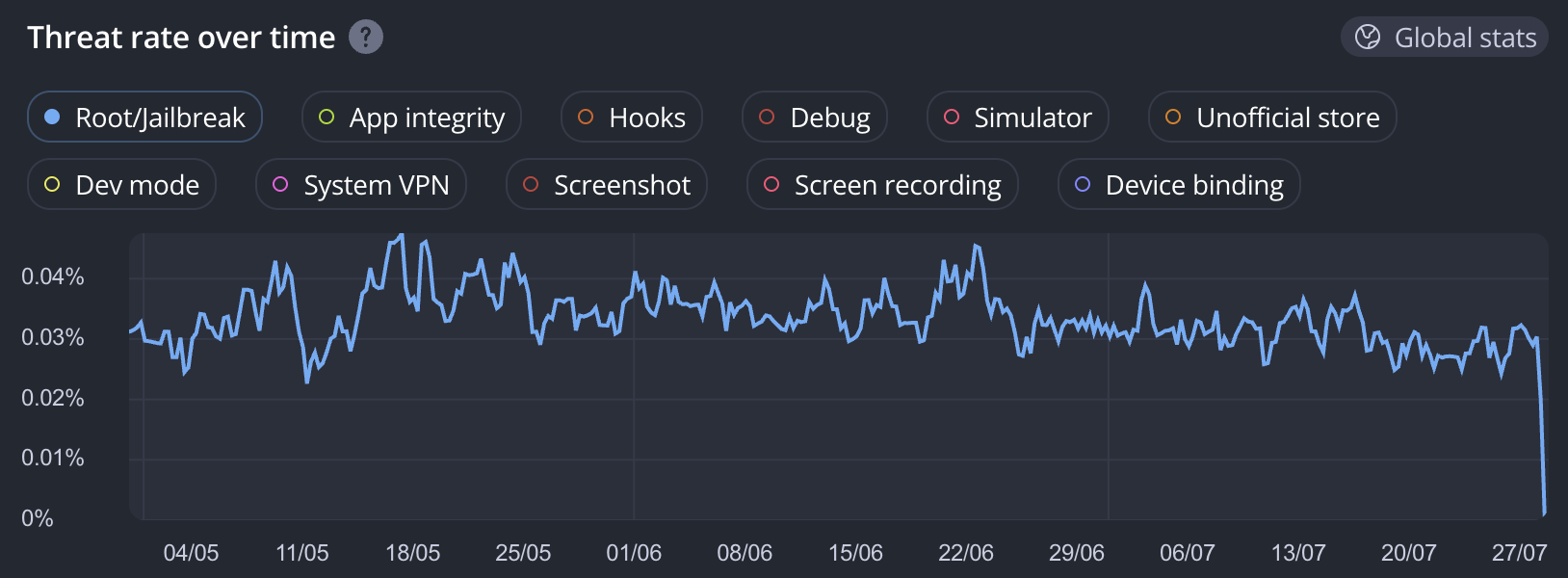
And how common is root access? 0.03% of devices are rooted — a significant number that could pose security risks

Check out our live global stats at my.talsec.app
While rooting can enable customizations (e.g. removing bloatware, customizing ROMs, running system-level scripts), with that power comes a huge attack surface. It introduces security vulnerabilities—like the ability to hook and inject the code using tools like Frida or Xposed.
How to detect rooted device?
Detecting root on Android is complex and constantly evolving, especially with tools like Magisk. While building your own solution offers control, it’s not recommended due to the time, effort, and expertise required to keep up. Instead, using third-party libraries like freeRASP or RootBeer provides a reliable and up-to-date solution maintained by experts.
DIY Coding Guide
You can implement yourself simple root detection like this:
import android.os.Build
import java.io.File
object RootUtil {
val isDeviceRooted: Boolean
get() = checkBuildTags() || checkSuPaths()
private fun checkBuildTags(): Boolean {
val buildTags = Build.TAGS
return buildTags != null && buildTags.contains("test-keys")
}
private fun checkSuPaths(): Boolean {
val paths = arrayOf(
"/system/app/Superuser.apk",
"/sbin/su",
"/system/bin/su",
"/system/xbin/su",
"/data/local/xbin/su",
"/data/local/bin/su",
"/system/sd/xbin/su",
"/system/bin/failsafe/su",
"/data/local/su",
"/su/bin/su"
)
for (path in paths) {
if (File(path).exists()) {
return true
}
}
return false
}
}Popular Libraries: freeRASP, RootBeer, Play Integrity
Let's compare the most popular options. It's immediately clear why freeRASP is so popular—with a staggering 6,000+ apps using it as of July 2025.
👑 freeRASP (free library by Talsec)
Very strong root detector — detects Magisk 29 and Shamiko
Actively maintained (changelog)
Comes with 14 extra detections like app integrity, Frida and hooking, emulators, debugging, screenshots, etc.
Used by 6000+ apps; #1 Mobile RASP SDK by popularity (link)
Integration guide: https://docs.talsec.app/freerasp
// Start detection (asynchronously)
Talsec.start(...)
override fun onRootDetected() {
Log.w("freeRASP", "Device is rooted!")
// Take action if needed
}🍺 RootBeer (open-source library by Scott Alexander-Bown)
Open-source root detection tool.
Fully offline checks (no internet dependency).
Lacks detection of the latest techniques.
Used by 5000+ apps
Integration guide: https://github.com/scottyab/rootbeer
// Perform detections (blocking)
val rootBeer = RootBeer(...)
if (rootBeer.isRooted) {
Log.w("RootBeer", "Device is rooted!")
// Take action if needed
}📡 Play Integrity (library by Google)
Offers strong and officially supported integrity checks.
Requires Google Play Services and backend integration.
Dependent on internet connectivity.
Integration guide: https://developer.android.com/google/play/integrity/setup
Comparison Table
Root Detection Accuracy
High
Medium
❌ Indirect (via signals)
Trusted by
6000+ apps
5000+ apps
N/A
Works Offline
✅
✅
❌ (requires Google Play + Backend)
Detection Response
Listener-based
Manual check
Backend-dependent, server-based validation
Covers Magisk/Hidden Root
✅
❌
❌ (Indirect)
Easy Integration
✅
✅
Moderate (needs server)
Additional Threats Detected
Emulator, Tamper, Debug, Install Source
Root only
Account
Community & Support
Active
Declining
Classic Google — no support whatsoever.
Integration
In-app SDK
In-app SDK
In-app SDK + Backend-dependent, Google-only
Commercial Alternatives
When evaluating mobile app security and Runtime Application Self-Protection (RASP), developers often compare various Talsec alternatives to find the right fit for their architecture. The "right choice" depends on the specific problem you need to tackle and which vendor offers the best bang for your buck.
The market is diverse, offering different philosophical approaches to protection. Talsec prioritizes top-tier root detection and a balanced security SDK portfolio covering the most popular attack vectors. Meanwhile, some vendors specialize primarily in heavy code obfuscation and compiler-based hardening, while others focus on a drag-and-drop (no-code) integration experience for DevOps-oriented teams. There are also solutions dedicated specifically to API security, active cloud hardening, enterprise compliance, or gaming protection. The most prominent providers alongside Talsec include Guardsquare, Appdome, Promon, Build38, Approov, and AppSealing.
You can find detailed description about root and jailbreak detection in our glossary and articles:

Glossary: Root Detection

Glossary: Jailbreak Detection
Handle App Security with a Single Solution! Check Out Talsec's Premium Offer & Plan Comparison!
Plans Comparison
https://www.talsec.app/plans-comparison
Premium Products:
RASP+ - An advanced security SDK that actively shields your app from reverse engineering, tampering, rooting/jailbreaking, and runtime attacks like hooking or debugging.
AppiCrypt (Android & iOS) & AppiCrypt for Web - A backend defense system that verifies the integrity of the calling app and device to block bots, scripts, and unauthorized clients from accessing your API.
Malware Detection - Scans the user's device for known malicious packages, suspicious "clones," and risky permissions to prevent fraud and data theft.
Dynamic TLS Pinning - Prevents Man-in-the-Middle (MitM) attacks by validating server certificates that can be updated remotely without needing to publish a new app version.
Secret Vault - A secure storage solution that encrypts and obfuscates sensitive data (like API keys or tokens) to prevent them from being extracted during reverse engineering.
Last updated
Was this helpful?


