

OWASP Top 10 For Flutter – M9: Insecure Data Storage in Flutter & Dart (cleaned copy)
Welcome back to our deep dive into the OWASP Mobile Top 10 for Flutter developers.
In earlier parts, we tackled:
In this ninth article, we focus on M9: Insecure Data Storage.
Let me start with a story that still makes me cringe.
A few years ago, I was doing a security review of a health-tracking app. I discovered that the developers stored complete medical records in a plain JSON file. No encryption. No access controls. Readable by anyone with a few minutes of physical access to the device.
The developers weren’t malicious. They simply didn’t realize that “saving to a file” on mobile isn’t like saving to a server behind a firewall.
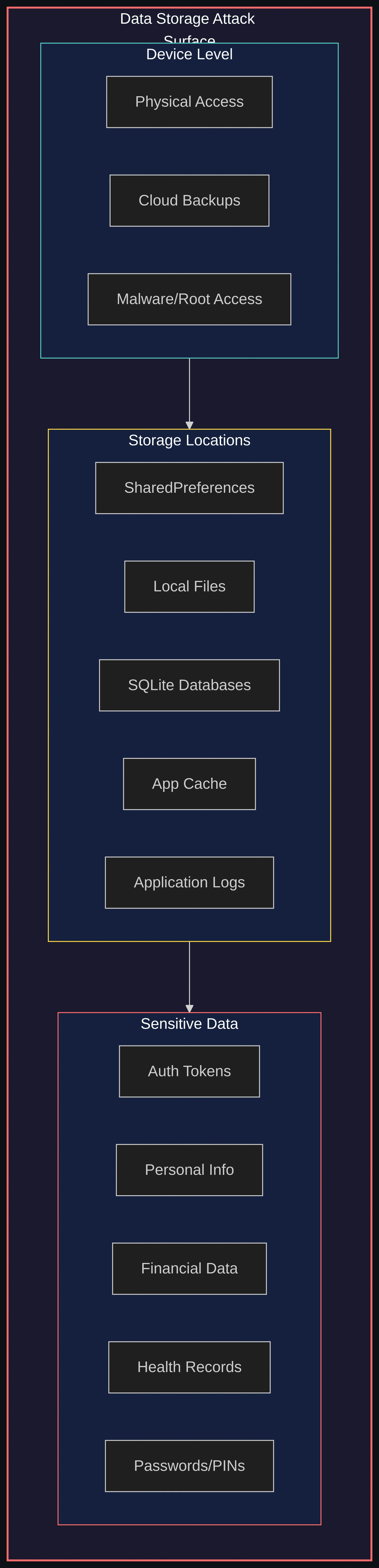
Mobile devices get lost, stolen, backed up to cloud services, and sometimes compromised by malware. Every piece of data you store becomes a potential liability.
OWASP M9: Insecure Data Storage addresses exactly this problem.
It’s the improper protection of sensitive data at rest. It’s also one of the most common vulnerabilities in mobile apps.
Flutter’s cross-platform nature adds an extra layer of complexity.
When you call SharedPreferences.setString(), do you know where that data ends up on Android versus iOS? Do you know who can access it?
Let’s get into it.
Source code. All code examples from this article are available as a runnable Flutter project on GitHub:
Understanding the Threat Landscape
Before we get to the solutions, it helps to understand what you’re defending against.
The threat isn’t abstract. There are real people (and automated tools) that go after insecure storage.
Who’s After Your Data?
You might be surprised how many different types of attackers care about what your app stores:
Hackers
Data extraction, credential theft
Reverse engineering, file system access
Malicious Insiders
Privilege abuse, data exfiltration
Direct database/file access
State-Sponsored Groups
Espionage, mass surveillance
Advanced persistent threats
Cybercriminals
Financial gain, ransomware
Malware, data selling on dark web
Competitors
Corporate espionage
Supply chain attacks, insider recruitment
Data Brokers
Selling personal information
Automated scraping of insecure apps
You might think your app isn’t a big enough target to worry about.
Automated tools don’t discriminate. A script that scans backups for stored credentials doesn’t care whether your app has 1,000 users or 1,000,000.
How Attackers Get Your Data
OWASP rates exploitability for insecure data storage as EASY. That’s the highest exploitability rating.
Physical device access: even a few minutes with an unlocked device can be enough.
Rooted/jailbroken devices: sandboxes don’t help. Privileged malware can read private storage.
Backup extraction: a common blind spot. iCloud or Google backups may include app data in plain text.
Malware: can read insecure storage on rooted devices. It can also abuse backup mechanisms.
Social engineering: trick users into installing apps that harvest stored data.
What Makes Flutter Apps Vulnerable?
The security weaknesses I see most often in Flutter apps fall into predictable patterns:

Flutter Storage Mechanisms: A Security Deep Dive
Before we get to solutions, it helps to understand what Flutter actually does on each platform.
Flutter gives you several ways to store local data. Each one has a different security profile.
The bad news: three of the four most commonly used options are insecure for sensitive data.
1. SharedPreferences / NSUserDefaults
SharedPreferences is the go-to solution for simple key-value pairs in Flutter.
It’s convenient. It’s also completely insecure for sensitive data.
I see it misused constantly. Developers store auth tokens, API keys, and sometimes even passwords here.
Here’s what that misuse looks like:
“But wait,” you might say, “isn’t app data protected by the OS sandbox?”
Technically yes. But you still need to know where the data ends up.
On Android, SharedPreferences are stored in XML files at:
And the contents look like this:
On iOS, NSUserDefaults are stored in plist files at:
Both locations are easily readable on rooted/jailbroken devices, through backup extraction, or with forensic tools.
The sandbox does not protect you against those attack vectors.
The rule is simple: SharedPreferences is for preferences (dark mode, language, onboarding completed). It’s not for secrets.
Example output (what an attacker sees after extraction):
2. Local File Storage
Writing files to the app’s document or cache directory is another common pattern.
Without encryption, you are creating a readable archive of sensitive data.
I’ve seen this in production apps handling financial data, medical records, and legal documents.
The developers assumed that because the file was in “their app’s directory,” it was safe. It wasn’t.
Example output (plain JSON an attacker reads):
3. SQLite Databases
Databases feel more “serious” than JSON or SharedPreferences.
But without encryption, they’re just as vulnerable.
The database file at /data/data/com.example.app/databases/user_data.db can be extracted and opened with any SQLite viewer.
Example output (what an attacker dumps):
4. Application Logs
Debug logging that felt harmless during development can persist in production builds.
It can leak sensitive information.
Example console output (credentials visible to anyone with ADB — Android Debug Bridge):
Platform-Specific Secure Storage
So what should you use instead?
Both Android and iOS provide solid secure storage mechanisms. The key is knowing how to use them properly from Flutter.
Android: The Keystore System
Android’s Keystore system is the gold standard for secure storage.
It provides hardware-backed cryptographic key storage. Encryption keys never leave a secure hardware module.
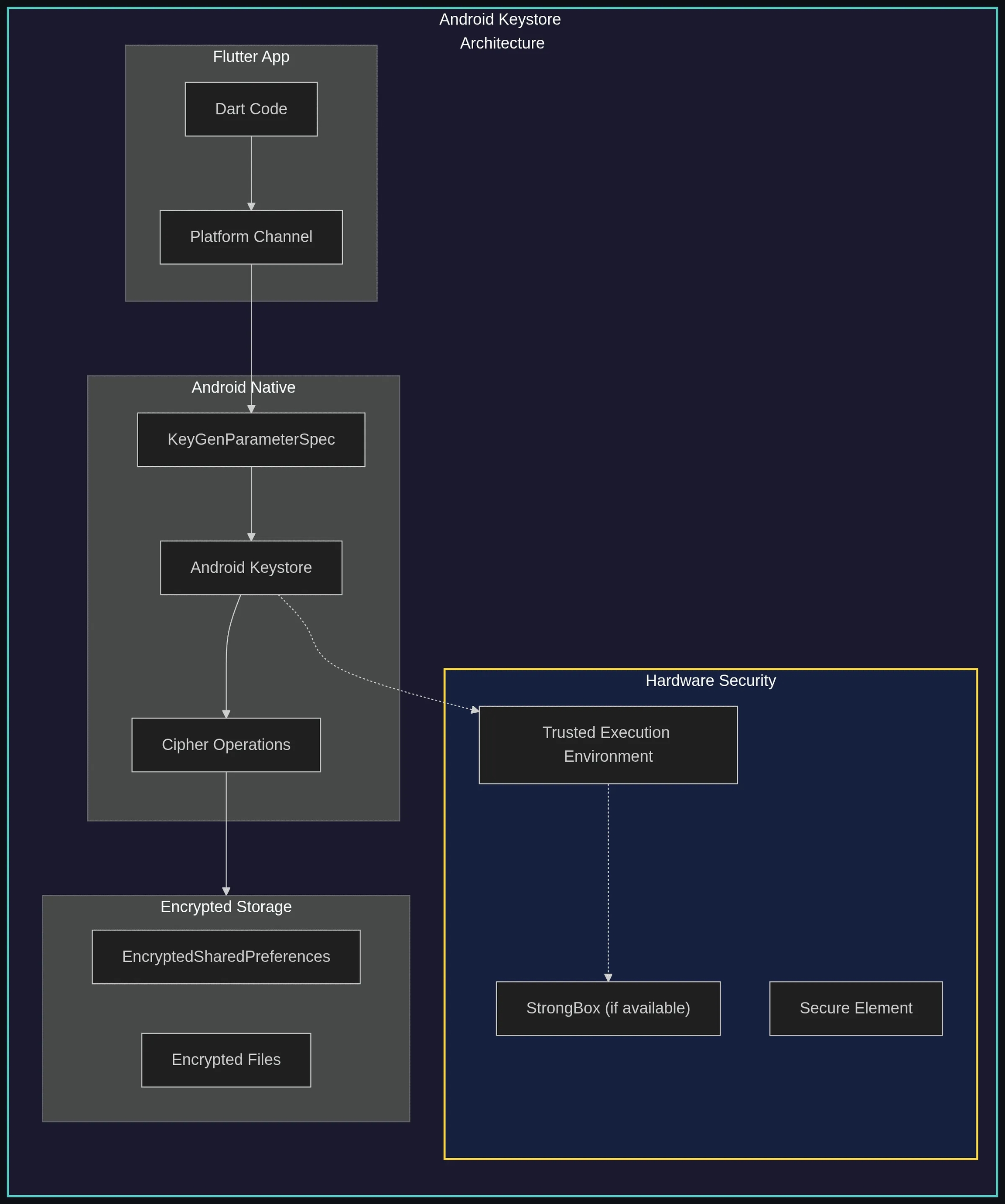
What makes Android Keystore special:
Hardware Backing
Keys stored in TEE (Trusted Execution Environment) or StrongBox (Pixel, Samsung Knox)
Key Extraction Prevention
Private keys never leave secure hardware
User Authentication
Can require biometrics/PIN before key use
Key Attestation
Verify key properties with signed certificate chain
Usage Restrictions
Limit key to specific algorithms/purposes
When you use flutter_secure_storage on Android, your values are encrypted with keys protected by hardware security.
Even if an attacker extracts the encrypted blob, they can’t decrypt it without access to the secure hardware.
iOS: Keychain Services
iOS uses Keychain Services for key management and secret storage.
You put secrets in. iOS keeps them encrypted with hardware-protected keys.
On devices with a Secure Enclave, cryptographic keys created with kSecAttrTokenIDSecureEnclave never leave that hardware.
General Keychain items are protected by the device’s Data Protection keys. They are not stored inside the Enclave.

One of the most important decisions on iOS is choosing the right accessibility level.
It determines when your data can be accessed and whether it’s included in backups:
WhenPasscodeSetThisDeviceOnly
Most restrictive; deleted if passcode removed
Highly sensitive (banking credentials)
WhenUnlockedThisDeviceOnly
Accessible only when unlocked, not backed up
Session tokens, temporary secrets
WhenUnlocked
Accessible when unlocked, backed up
User preferences with sensitive elements
AfterFirstUnlockThisDeviceOnly
Accessible after first unlock, not backed up
Background sync credentials
AfterFirstUnlock
Accessible after first unlock, backed up
Push notification tokens
For most sensitive data, prefer AfterFirstUnlockThisDeviceOnly.
It’s strong protection and still supports background operations.
Implementing Secure Storage in Flutter
Using flutter_secure_storage
flutter_secure_storage is the standard solution for secure storage in Flutter.
It provides a unified API. It uses Android Keystore on Android and iOS Keychain on iOS.
Secure Database with SQLCipher
If you need structured storage, plain SQLite isn’t enough.
sqflite_sqlcipher provides transparent encryption using SQLCipher.
Store the database key in secure storage. Don’t hardcode it.
Secure File Storage
Sometimes you need to store documents, exports, or larger blobs.
Encrypt the file content. Store the encryption key in secure storage.
Three things in this implementation are worth calling out:
Unique IV per encryption. Generate a fresh IV for every file. Never reuse an IV with the same key in AES-GCM.
AES-GCM mode. AES-GCM gives confidentiality and authenticity. Tampering makes decryption fail.
Secure deletion. Overwriting helps, but it is not a perfect guarantee on flash storage.
Caveat — flash storage and wear leveling: modern mobile devices use NAND flash with wear-leveling controllers. Overwriting a file does not guarantee the original physical blocks are erased.
For the strongest guarantees, rely on full-disk encryption (default on Android 10+ and all iOS devices).
Secure Storage Architecture
In a real app, you want one place where storage decisions live.
Your UI and repository layers should not touch encryption keys or platform storage APIs directly.
That concern belongs in a dedicated security layer:

Preventing Data Leakage
Secure storage protects data at rest. Sensitive information still leaks through side channels.
I’ve seen real incidents from debug logs in support tickets, screenshots in the OS app switcher, and clipboard contents harvested by other apps.
1. Secure Logging
A print() call that felt harmless can end up in support logs, ADB output, and crash reports.
Here’s a logger that makes it harder to leak secrets by accident:
2. Clipboard Security
Copied secrets sit in the system clipboard. Any app can read them.
Auto-clear the clipboard after a short period:
3. Screenshot Protection
For banking, health, and legal apps, you should prevent screenshots on sensitive screens.
Android implementation (MainActivity.kt):
iOS implementation (AppDelegate.swift):
Security Checklist
Use this right before release. It takes ~20 minutes.
Encryption
Access control
Backup security
Logging
Root/Jailbreak
Conclusion
Data storage security isn’t optional. It’s a fundamental responsibility.
Flutter gives us access to solid platform-level security through packages like flutter_secure_storage.
If you use Keystore and Keychain correctly, extracting secrets becomes dramatically harder.
Resources
Last updated
Was this helpful?